
dhjghciiiiedfgidmcmablgbjndibhmf
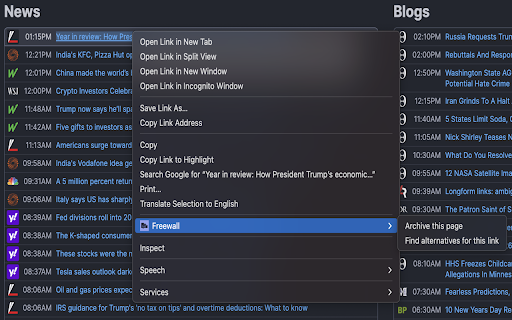
Archive web pages and discover alternative sources for articles A smart web archiving and article discovery tool. - Archive any webpage to Wayback Machine or Archive.ph with one click - Add custom archive services for flexibility - Find alternative coverage of articles across free news sources - Prevent link rot—save important pages before they disappear - Perfect for researchers, students, and avid readers - Multiple search engines: Google News, Bing News, DuckDuckGo - Lightweight and fast—no bloat, just utility Freewall is a web archiving and article discovery extension. Archive webpages to preserve them for future reference, or find alternative sources covering the same topic across free news outlets. Whether you're researching, saving content for later, or looking for different perspectives on a story, Freewall helps you access the information you need. Right-click any link or use the keyboard shortcut (Alt+Shift+A) to save pages to your preferred archive service. Choose from built-in archive services: - Archive.ph - Fast, reliable page snapshots - Wayback Machine - Internet Archive's long-term preservation Need a different service? Add your own custom archive services through the options page. Configure the URL, form selector, and input field to work with any archive site. Can't access an article? Right-click and "Find alternative articles" to search for the same story across free news sources. Simple and Private No account required. No data collection. All preferences stored locally in your browser.

FlickNews
FlickNews - Paywall Detection & Alternative Source Extension Get free alternative-source articles when you are faced with a paywall, as well as links to free articles that report on the same topic. 1. Add FlickNews to your browser in seconds. Works with all major browsers. Soon, you will be able to access premium content directly through partner publications. We are building partnerships with news organizations through revenue sharing.

Paywall-Free Reader
Read premium articles with a clean layout, summarize with AI and save for later. Perfect for research, learning, and productivity. Tired of paywalls blocking your access to news and articles? Seamlessly access content across the web—including Open Access or archived versions when available. Right-click on any link or anywhere on the page to open it with Read Without Limits. Or, click the extension icon for instant access. 🔑 Key Features: ✅ Bypass Paywalls – Unlock articles and news behind paywalls. ✅ Find Open Access Versions – If an article has an official free version, we’ll direct you to it. ✅ Distraction-Free Reading – No pop-ups, ads, or interruptions. ✅ Save articles for later and sync them across devices ✅ Get a personalized feed of premium articles ✅ AI-Powered Summaries – Generate an article based on the page content and related sources. 📝 Pro Tip: For the best results, use the extension on individual articles rather than homepage links. Say goodbye to blocked content and hello to unlimited browsing! Install Paywall-Free Reader today and supercharge your productivity with our suite of tools. 🚀

Read it Anyway
Unlock the world of unlimited knowledge with Read-It-Anyway, a revolutionary Chrome extension designed to enhance your reading experience. In today's digital age, access to information is vital, yet often hindered by barriers. Read-It-Anyway empowers you by providing seamless entry to a wealth of knowledge across various premium news platforms. Broad Coverage: Enjoy unrestricted access to a diverse range of leading news sites, including but not limited to Medium.com, nytimes.com, and many others. Stay informed with unlimited articles from across the globe. User-Friendly Interface: Read-It-Anyway is engineered for simplicity and efficiency. With just a click, bypass paywalls without navigating complicated settings or configurations. Seamless Integration: Designed to blend into your browsing experience, our extension ensures that your access to knowledge remains uninterrupted, providing a smooth and hassle-free reading journey. Privacy-Conscious: We value your privacy. Read-It-Anyway operates without collecting or storing personal user data, ensuring your browsing habits remain confidential. Regular Updates: The digital landscape is always evolving, and so are we. Read-It-Anyway receives regular updates to ensure compatibility with new and updated websites, guaranteeing your access is always current. In our commitment to fostering an informed and educated community, Read-It-Anyway breaks down the barriers to information, making it universally accessible. Whether you're a student, researcher, or simply a curious mind, our extension is your gateway to unrestricted knowledge. Easy Installation: Getting started with Read-It-Anyways is effortless. Add it to your browser from the Chrome Web Store and embark on your unrestricted reading adventure. Your experience is our top priority. For support inquiries or feedback, please contact us through the Chrome Web Store. Join us in our mission to make information freely accessible to everyone, everywhere.

Substack Paywall Warning
Shows a warning banner on the top of the browser when a Substack article has a paywall Tired of getting a few thousand words into a Substack post only to realize that it has a paywall? Well, then you need the Substack Paywall Warning plugin, a plugin commissioned by Paul Crowley to make sure no other human ever has to experience that frustration again. It adds a dismissible banner that slides in from the top of the page when loading a Substack.com post or self-hosted Substack page that has a paywall. There are no settings, just install it and check a post with a paywall and you will see a banner on the top of your browser that can be dismissed on click. *Not in any way affiliated with, endorsed by, or sponsored by Substack Inc. All trademarks, service marks, trade names, referenced herein belong to their respective owners. Their use here is for identification purposes only and does not imply ownership by us or endorsement by them.
