
dhchpgahkaanlehjcdddphegjpopicge
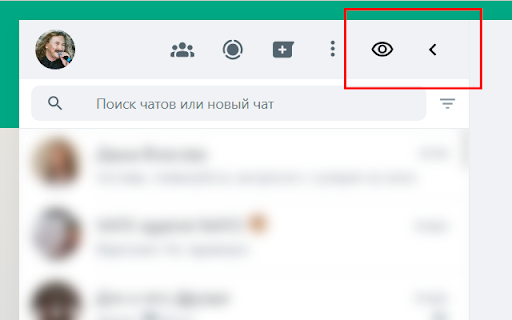
Adds buttons to hide or blur the WhatsApp Web contacts list. Automatically hides the contacts list upon selecting a chat (optional).

Whatsapp hidden archive chats
WhatsAppWeb website can be used a lot in different places, like in an office, at home, etc., and since it's not on your phone, it's really easy that someone might see your screen and sensitive conversations. In order to hide chats, you can archive them. WhatsApp web by default, shows the archived chats on top of all chats, indicating that you have archived chats (not discreet at all), and every time you get a new message from an archived chat, a flashy notification is displayed on top, so It's very obvious that you're actively chatting with someone in archived chats. This extension provides more privacy, hiding the archived chats section on top and moving this functionality to a small icon on the header profile, so nosy people won't notice that you have archived chats.

Privacy Extension for WhatsApp Privacy
Instantly blur WhatsApp messages, media, names, and previews. Protect your chats and lock the app with a password. Instantly blur WhatsApp messages, media, names, and previews. Protect your chats and lock the app with a password. To enhance privacy in shared spaces, a WhatsApp™ Web privacy extension blurs your messages until you hover over them. Your messages and other content will only appear when you hover your cursor over them. How to hide messages? You can toggle different settings on the WhatsApp privacy extension to meet your personal needs. Privacy & screen lock Screen lock: password protection, plus auto lock when WhatsApp Web stays idle for a time you choose. Blur messages inside the current chat. Blur last message previews in the chat list on the left. Blur media previews and media gallery separately from plain text. Blur the message input box so drafts and what you type stay private. Blur profile pictures and group / contact names. Fine-tuned reveal behavior: optional no transition delay for snappier blur/unblur, and “unblur all when hovering the app” when you want everything visible at once instead of item by item. Hover to display specific content as needed. WhatsApp Web enhancements (optional toggles) Reactions-style “like” on messages, pin chats shortcut, custom chat wallpaper (upload and apply from the panel). Contact info helpers: optional contact info icon, keep contact info open, and start a chat with numbers that are not saved in your contacts (with phone + country code). Online contacts notifications when enabled. Business tools (in-panel tabs) Broadcasting: send to contacts, groups, labels, or countries; spacing between sends; schedule or repeat; import targets from a list. Smart replies: keyword-triggered auto replies tied to message templates (text / file / vCard), with rules such as allowed days, delays, optional group replies, mark read / archive after reply, and more. Scheduled messaging: timezone-aware delayed sends managed from a list. Click-to-chat link generator: prefilled message, country code, and easy sharing. Webhooks (outgoing): send structured message events to your endpoint (up to 5 webhooks). Export / import extension-related settings for backup and migration. Data export & statistics Export contacts and chat-derived data to XLSX, CSV, or TXT, with filters such as all contacts, all chats, specific groups, labels, or countries, and selectable fields. Statistics overview for phone contacts, all chats, personal vs group chats, and broadcasts. Interface Built-in multi-language selector in the overlay (e.g. English, Indonesian, Portuguese, Spanish, German, French, Arabic, Chinese, and more as you ship them). LEGAL WhatsApp is a trademark of WhatsApp Inc. registered in the U.S. and other countries. WAPlus is an independent project and has no relationship to WhatsApp.

Michael's Upgrade for TrakED
Upgraded features for TrakED in the THS. (This extension is not an official product of the THS or Intersystems TrakCare software.) Upgraded features for Trak ED in the LGH. Features: - Re-enable spell check in the triage page - Use the enter key when logging in - Handover sheet for ED Main Floor and EMU - ED Main Floor filters and persistent sort - Triage Summary print out - Filter and count results of an enquiry - Count patients currently breaching length of stay targets -- This extension is not an official product of the LGH or InterSystems Trak software.

WhatsApp Sidebar Hider
Hide WhatsApp Web sidebar for a cleaner interface Ever lost an hour on WhatsApp when you just needed to send one message? Screen sharing? Keep your other chats private and only show the conversation you want. That's why I built a disappearing sidebar for WhatsApp Web. With one click, hide the sidebar to focus on a single conversation—no distractions, no wasted time. It's open-source and 100% private.
