
dhajeleodcnkhiilifdjioakndpplpoj
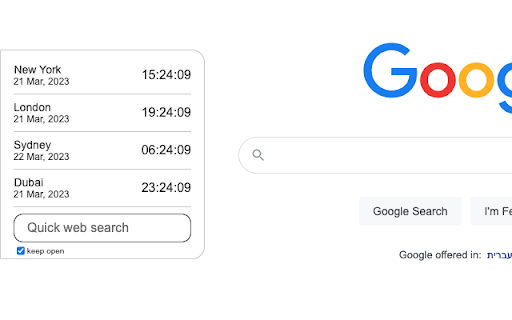
World clock widget that follow you where ever you browse World clock Widget Add a customized world clock widget for your convenience. You can easily choose which regions would you like to be displayed in the widget. By clicking "Add to chrome", I accept and agree to installing Customize Your New Tab extension. This extension changes your search provider on the New Tab to Microsoft Bing.

World Clock
Quickly check the time in major cities around the world.

World Time Zone
A Chrome extension to display world time zones based on selected cities. World Time Zone Keep track of global time zones with ease! World Time Zone is your personal global clock, right in your browser. Whether you're managing international teams, scheduling global meetings, or just curious about the time around the world, our extension has you covered. Key Features: Multiple Cities: Add and track time for cities across different countries and time zones. Customizable Interface: Arrange your cities in any order you prefer with an easy drag-and-drop interface. Color Coding: Assign colors to each city for quick visual reference. Real-Time Updates: Times update automatically, ensuring you always have the current time. Offline Functionality: Works without an internet connection, perfect for travelers. Perfect for: International business professionals Global project managers Remote teams across different time zones Frequent travelers Anyone with friends or family abroad Never miss a deadline or schedule a 3 AM call by mistake again. Install World Time Zone now and bring the world's clocks to your fingertips! Floating draggable panel overlay (no need to switch tabs) Modern UX with rounded corners, blur effect, and close button Automatic fallback to popup window on sites with restrictions Improved readability and cleaner interface.

World Clock
World clock widget that follow you where ever you browse

World Clock
World Clock Extension For Google Chrome - Fast & Easy to Use. My World Clock is a free new tab extension that allows you to see the current time in the top cities of the world (Mumbai, London, Tokyo and New York) at a glance, along with a customizable web search bar to search for things on the internet. The extension has been designed in order to ensure that you are productive and abreast with the times, especially when it comes to scheduling calls with your work teams abroad or just getting a better idea of timezones. Bing.com will be your default search engine to browse online. How to get started: Once the extension is downloaded and added to Chrome (browser) as an extension, open a new tab, click on the My World Clock icon in your browser and voila! For a seamless search experience, all you need to do is type in the text you want to look up and click the arrow on the Bing.com default search box to get instant search results. Features: • Current time in 4 top cities (Mumbai, London, Tokyo and New York) • Reliable web search engine by Bing.com • Clean interface Permissions The extension requires permission to allow new tabs display the extension's features - custom search, My World Clocks and background image. The extension does not store or share any user data. Uninstallation To uninstall the extension in Chrome, go to chrome://extensions/ and locate "My World Clock", click on Remove and you will be prompted with a pop up "Remove My World Clock?", click the Remove button. By clicking "Add to Chrome", I accept and agree to install " My World Clocs" Chrome extension and hereby agree to set Chrome New Tab to that provided by the service and the Privacy Policy and Terms of Use. Please refer to our Privacy Policy (https://mediastinct.com/privacy-policy/) and Terms of Use (https://mediastinct.com/terms-conditions/). For any queries, please contact us at dev@mediastinct.com Disclaimer: "Once the extension is downloaded, Bing.com will be the default search engine;please refer to Microsoft's Privacy and Cookie policy here - https://privacy.microsoft.com/en-us/privacystatement
