
dgomfjbifoldgpkfdodbdggkkdapgdij
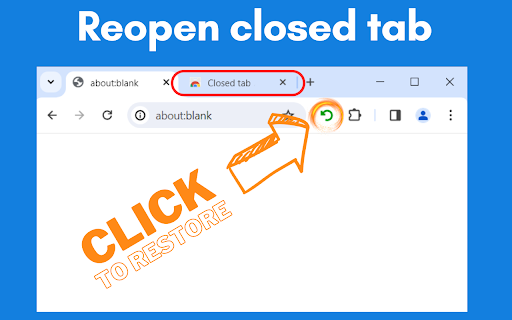
Reopen Closed Tab: Easily restore closed tabs in one click. Enhance your browsing with the convenient "Reopen tab" button 🌐 Have you accidentally closed your browser tab? This Chrome Extension was designed to effortlessly reopen your recently closed tabs. Have you ever accidentally closed a tab and immediately wished you could get it back? With Reopen Closed Tab you can do just that with a single click! This extension is a must-have for anyone who juggles multiple tabs and needs a quick way to recover their lost work or pages. 💻 How to use Reopen Closed Tab extension 🔸 Click the Add to Chrome button in the upper right corner and pin it to the toolbar for easy access. 🔸 Enjoy the simplicity on restoring your closed tabs! 🔍 How to restore recently closed tab? The Reopen Closed Tab extension is incredibly user-friendly. Once installed, the extension adds a small icon to your Chrome toolbar. If you close a tab, simply click on the Reopen Closed Tab button, and your most recently closed tab will reopen instantly. It's that easy! 🔗 Seamless Integration with Chrome Reopen Closed Tab is designed to feel like a native part of your Chrome experience. It integrates seamlessly with the browser, ensuring that it doesn't slow down your computer or interfere with your browsing. The extension works quietly in the background, ready to spring into action when you need it. 🛡️ Safe and Secure Usage Your online safety is our priority. Reopen Closed Tab respects your privacy and security. The extension doesn’t track your browsing history or store any personal data. It simply keeps a temporary record of closed tabs for restoration purposes. Browse with peace of mind, knowing your information is safe. 🔄 Unlimited closed tabs restoration There's no limit to how many times you can use Reopen Closed Tab to restore recently closed tabs. Whether you've closed a tab by accident or purposefully but need it back later, the extension is always at your service. Unlimited restorations mean you never have to worry about losing access to a tab again. 🌟 User-Friendly Interface of extension The interface of Reopen Closed Tab is clean, simple, and intuitive. There's no steep learning curve. The extension is designed for ease of use, ensuring that even the least tech-savvy users can take advantage of its features without any hassle. 📊 Enhance Productivity Extension is more than a convenience tool; it's a productivity booster. By reducing the time and frustration involved in retrieving closed tabs, the extension helps you stay focused and efficient. Keep your workflow uninterrupted and smooth with Reopen Closed Tab. 💡 Constant Updates and Improvements We are committed to making Reopen Closed Tab the best it can be. Regular updates ensure that the extension stays compatible with the latest version of Chrome and incorporates new features and improvements based on user feedback. Enjoy a constantly evolving tool that adapts to your needs. 📝 Feedback and Support Your feedback is invaluable to us. If you have suggestions, questions, or need support with Reopen Closed Tab, our dedicated team is here to help. We strive to provide quick and helpful responses to enhance your experience with the extension. 👨💻 Developed by Experts This extension to restore closed tab is developed by a team of experienced software engineers and UX designers who understand the nuances of web browsing. Their expertise ensures that the extension is not only functional but also optimized for the best user experience. 🌍 Making Browsing Easier Our mission with Reopen Closed Tab is to make your online browsing experience as smooth and hassle-free as possible. We believe that by providing a tool to quickly restore closed tabs, we can significantly enhance your productivity and browsing enjoyment. 📥 Install Reopen Closed Tab Today! Ready to revolutionize the way you browse? Install Reopen Closed Tab extension from the Chrome Web Store today and experience the convenience of easily restoring your closed tabs. It's fast, free, and incredibly useful!

Simple Sexy Undo Close Tab
Manage your browser history and recently closed tabs This is a product similar to SimpleUndoClose and Sexy Undo Close Tab. Since these products have not been updated for several years and do not support the latest Chrome manifest V3 protocol, I created this one. To pay tribute to the pioneers, I chose this name. It should be noted that I am not a programmer. Every line of code in this extension was completed by Github Copilot. I have tried my best to test and ensure that the current functions are usable. However, given the current limitations of AI capabilities, it may be difficult to expand more features in the short term. The biggest difference between this product and previous Undo Close Tab products is that it allows you to view and search your browsing history simultaneously. This is designed to solve the scenario where it is difficult to quickly find the webpage you were on before jumping to another tab and closing it. Since all the code is generated by AI, I can't guarantee that the architecture is clean and efficient. In fact, even though I don't know how to code, I can still see that some parts of the code are clearly not the best way to do things—like the multi-language section. If you like this product and want to help make it better, or if you want to write a better version yourself, feel free to use the code. Version 1.10: ✨ Features - Multi-keyword AND Search: Search now supports multiple keywords separated by spaces (e.g., "nba reddit"). Results must contain ALL keywords (in title or URL), regardless of order or position. 🐛 Bug Fixes - Fixed long-press delete search results: Previously, deleting search results via long-press failed to remove items from "Recently Closed" tabs due to an undefined variable error. - Fixed count refresh on single item deletion: When deleting a single tab while a search filter is active, the tab counter and pagination now correctly refresh based on the filtered count instead of incorrectly jumping to the full storage count. Version 1.9: - I'd like to thank a friend of mine. This update has fixed an infinite loop bug that he discovered, which occurred when the favicon couldn't be retrieved. Version 1.8: - Optimize the UI for dark mode. - Fixed some bugs that occurred when deleting tabs. - Added the feature of holding to delete search results. Version 1.7: - Added a feature to display URLs, which can be turned off in the options. - Added a feature to copy URLs. - Added a shortcut key setting for opening the last closed tab (Note: This has not been rigorously tested and there may be bugs). - Optimized some UI issues. - Fixed several minor bugs that do not affect usability. Version 1.6: - Added a feature to automatically clear the tabs of incognito windows or all tabs when closing. Version 1.5: - Optimize performance - Add the function to clear recent tabs Version 1.3: This is a significant update. Please check the options to see if there are any features you might need. - Fixed the issue where clicking on a record once on Mac might open two tabs. - Added an option to allow displaying search and tabs below the extension. - Added an option for a waterfall-style loading feature (since I think most people probably won't really flip through many pages to find a record but will choose to search instead, I personally recommend everyone switch to this loading method, which should be more convenient).

Easy Undo Closed Tab
Quickly restore closed tabs with one click Easy Undo Closed Tab Quickly restore closed tabs with one click. Never worry about accidentally closing important web pages again! ✨ Multiple Restoration Methods Shortcut Recovery: Press Alt+D to quickly restore the most recently closed tab Right-Click Menu: Right-click anywhere on a page and select "Restore Recently Closed Tab" Visual Management: Click the extension icon to view the entire history of closed tabs ✨ Smart Management Features Batch Operations: Select, open, or delete multiple tabs simultaneously (using the right-click menu) Smart Search: Quickly find specific pages by title or URL, with case-sensitive search options URL Blocking: Customize and block websites you don’t want to be recorded Count Display: Shows the number of saved tabs on the extension icon (can be disabled) ✨ Personalization Settings Interface Customization: Adjust popup width (340-800px), display time, and more Search Options: Choose search scope (title/URL/both) Data Cleanup: Clear all history with one click or delete by time range Pagination Browsing: Supports paginated viewing for large amounts of history 🔒 Privacy Protection Automatically filters out Chrome internal pages and incognito mode tabs Local storage only; data is never uploaded to any server Supports custom blocking of sensitive websites Filters duplicate URLs to avoid redundant records ✨ User Experience Simple & Intuitive: Modern interface design, easy to operate Multi-Language Support: Includes Chinese, English, and more Ad-Free & No Distractions: Clean and seamless browsing Lightweight: Does not affect browser performance Smart Filtering: Automatically filters invalid and duplicate links ✨ Use Cases Accidental Closure Recovery: Quickly restore important pages closed by mistake Workflow Management: Efficiently manage numerous open tabs Research & Learning: Save and review browsing history easily Daily Browsing: Enhance browsing efficiency and convenience ✨ How to Use After installation, closed tabs are automatically saved Quick Restore: Press Alt+D or use the right-click menu to restore Manage History: Click the extension icon to view all closed tabs Batch Operations: Right-click to select multiple items for batch opening or deletion Personalize Settings: Right-click the extension icon to access the settings page 🔧 Technical Features Developed based on Chrome Manifest V3 Uses IndexedDB for local storage Compatible with the latest Chrome versions Low memory usage, optimized for performance Install now and browse with peace of mind!

ControlZ – Easy to undo closed tabs
Easily Reopen Closed Tabs with a Simple Popup - Click the toolbar button to open a popup displaying your recently closed tabs. - Select the tab you want to restore by clicking on it. - To remove a specific entry, simply click the red delete button on the right side of the tab. One more thing, the plugin code is completely open source.

Undo Closed Tabs 2.0
Re-open all the closed tabs 🗂️ with one click. 1. Install and add the extension to Chrome. 2. Whenever you want to open a closed tab, click on the toolbar popup. 3. Choose the commands: open a desired tab, open all closed tabs. 1. Shows last 25 recently closed tabs to choose from. 2. Open one or all tabs 🗂at once or see the history. Undo Closed Tabs Button is an extension to allow users to reopen closed tabs via the toolbar popup.
