
dgjkgkknebmjbaiijjhaihglmiclckep

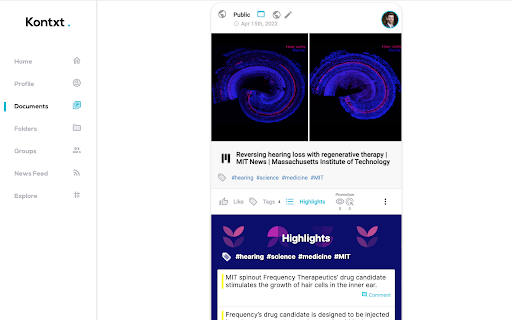

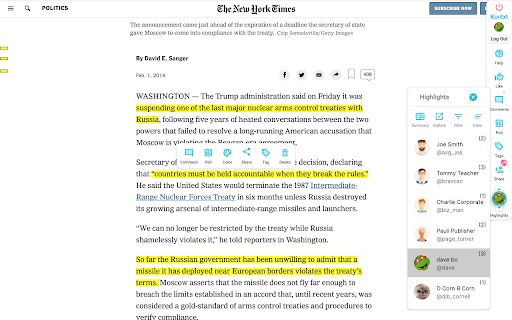
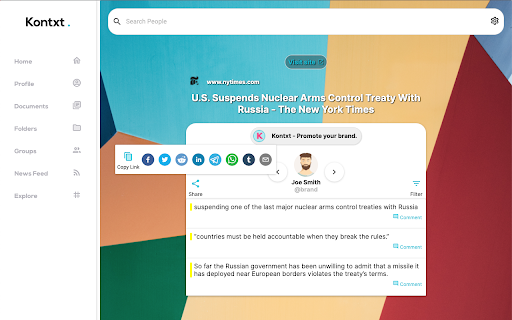
Highlight, tag, and chat with AI on any site. Build shared memory, collaborate, and connect your content to every AI agent. Your Memory, Everywhere. Kontxt turns the entire web into your intelligent, collaborative memory. Highlight, tag, comment, and ask context-aware AI questions—right on any page. Every interaction becomes part of your structured AI memory, accessible across pages, chatbots, teams, and time. Whether you're studying, researching, collaborating, or just browsing—Kontxt helps you capture what matters and reuse it when it matters most. 🔍 Highlight key info. 💬 Chat with AI trained on your past interactions. 👥 Collaborate inline with comments, tags, polls, and mentions. 📁 Organize content into folders with share and privacy controls. 📤 Share insights as memory-rich posts, deep links, or visual cards. 🔗 Plug into agents and tools via the Kontxt MCP Memory Server. 📊 Track engagement and memory evolution. It’s more than a highlighter. It’s your second brain for the web. FEATURES – Chrome Extension Layer 💡 AI Chatbot Inline – Context-aware AI Q&A on any page ✍️ Highlights & Tags – Save what matters, how it matters 💬 Comments & Mentions – Discuss right on the content 🔗 Deep Links – Share direct links to highlights and page parts 📊 Polls & Feedback – Gather insights from readers or teammates 🧠 Context-Aware Overlays – Personalized AI layer for any site 🔒 Privacy Controls – Choose what’s private, team-only, or public FEATURES – Web App Platform 🌐 Shared Memory Layer – Cross-platform, collaborative memory 📁 Folders & Groups – Organize and share knowledge easily 🧭 Smart Summaries & Navigation – Sidebars that guide, not distract 🗂️ Search Everything – Find content, highlights, and discussions 📤 Publish – Generate content snippets, summaries, and cards for sharing 🔌 MCP Memory Server – Use your memory in any AI or chatbot 📈 Analytics – Track what’s clicked, shared, remembered USE CASES ✅ Teams building AI-enhanced workflows ✅ Students and educators collaborating on readings ✅ Researchers saving and organizing key insights ✅ Publishers enhancing engagement and monetization ✅ Social curators sharing insights, not just links Enhance the live web or archive and collaborate inside the web app. Your content. Your context. Your AI memory.

EmojAI
AI-powered emoji picker with smart, context-aware suggestions Turn your emotions into emoji - without stopping writing. ⚠️ The OpenAI API key is required for the AI integration - pass it in the Options page and start writing! ⚠️ ✅ FREE - without ads 🔥 3,000+ latest emojis - Unicode 15.0 compatible 🌐 Simple, but efficient ":" trigger ✨ AI autosuggestions - available wherever you're writing ⚡ Instant picker in every input you’re typing in 🌙 Light and dark mode support 🗒️ Compatible with EVERY platform, including Twitter, LinkedIn, Reddit and many more 🔍 Easy search - misspelling a word would still show what you’re looking for 🚀 Performant - the extension isn't impacting website performance EmojAI is a fully FREE extension! Just install it and it'll be with you whenever you want to write. You have an issue or want to give a feedback / suggestion? Drop me an email 📬 The extension doesn't collect any data.

Hono - Save and summarize everything
Use the latest AI models on any article, video or document: summarize, extract key points, translate, generate quizes, and more Do you want a short and concise version of a long article you're about to read or video you're about to watch? If yes, this is the extension to use! What it does: 💬 Chat: ask anything about the content 🍰 Summarize: shorten long content into a short paragraph or bullet points 🇪🇸 Translate: ask to translate in any language you want, even klingon! 🕵️ Works on: any article, any website, PDF files, images, audio files, YouTube videos 🗃️ Saves all links in the Hono app, so you can find them later 🆓 No account or api keys required 🙈 Private: unlike other extensions, this extension does not request access to all your browsing history Change log: - v1.11: UI updates & message streaming - v1.10: Persist chat messages between extension usage - v1.9: Bug fixes & performance improvements - v1.8: Improvements for Chat interface - v1.7: "Ask" tab, to have a chat with the content of the page

Thymeline
Add events to your timeline the easy way Keep track of everything important about your projects all in one place. Meet Thymeline, the free Chrome extension that will magically transform your project chaos into an organized masterpiece. Created for Project Managers. Here is how Thymeline saves you time. No APIs. No integrations. As simple as copy & paste. Easily copy relevant information from any of your existing tools or apps without any hassle. Once you download the chrome extension... Step 1: Visit any website. Step 2: Highlight any text. Step 3: Click on the Thymeline Chrome extension Step 4: Add to existing Thymelines. That’s it! Thymeline can handle as many projects as you’re juggling. Create as many Thymelines as you need! Multiple projects, multiple Thymelines, we can handle it. Keep track of it all in a simple interface. Share with others Share your Thymelines with others on your team with view or edit privileges, keeping everyone on the same page. Want to keep it private? You can do that too.

Hyper Mark
Pocket users - you can now import all your Pocket saved articles to Hyper Mark! Don't lose your data when Pocket goes dark!… Pocket users - you can now import all your Pocket saved articles to Hyper Mark! Don't lose your data when Pocket goes dark! Elevate your learning journey with Hyper Mark, the ultimate AI-powered bookmark manager designed to simplify knowledge management for curious minds. Effortless Organization - Automatic Summarization: Hyper Mark crawls and summarizes your saved websites, extracting key topics and keywords. - No Manual Sorting: Eliminates the need for folders or manual tagging; everything is organized for you. Powerful Semantic Search - Natural Language Queries: Find exactly what you’re looking for using everyday language. - Comprehensive Results: Searches across summaries, topics, and your personal notes. Chat with Your Bookmarks - Interactive Interface: Ask questions about your saved sites and get instant answers. - Effortless Recall: Retrieve bookmarks by asking natural questions like, “What’s the site that helps you optimize images?” Explore and Discover - Topic Exploration: Browse bookmarks by topics and subtopics within an intuitive, visual interface. - Rediscover Hidden Gems: Uncover forgotten bookmarks and valuable information you’ve saved. Personalization - Custom Tags and Notes: Add your own tags and attach notes to each bookmark. - Enhanced Searchability: Your notes are included in search results, aiding memory and context. Smart Views and Filters - Built-In Views: Access recent bookmarks, most visited, and overlooked bookmarks with ease. - Stay Organized: Quickly manage and revisit your resources through smart filtering options. Lightning-Fast Performance - Instant Access: Enjoy rapid load times and swift search results to keep your learning uninterrupted. - Delightful UI: Experience a sleek, intuitive interface designed for maximum productivity. Seamless Import and Data Ownership - Easy Import: Bring all your existing Chrome bookmarks into Hyper Mark with one click. - Full Control: Export all your bookmarks, including topics, notes, summaries, and tags, anytime. Your data is yours. Created by lifelong learner and developer Shahar Nechmad, Hyper Mark was born out of a personal need for a better way to manage an ever-growing base of knowledge. It’s more than a tool—it’s a companion for those who love to learn and explore.
