
dgjbaljgolmlcmmklmmeafecikidmjpi

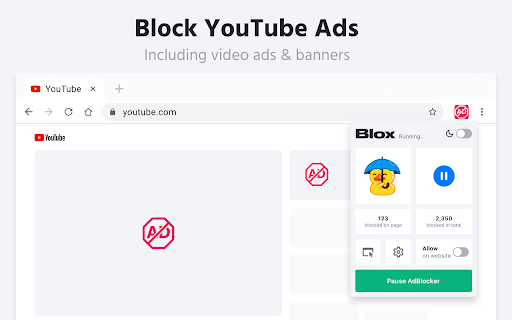


Block ads and browse faster with Adblock, the best ad blocker for Chrome! Enjoy a cleaner, safer, and faster web experience. Adblock - Your trusted ad blocker for Web, YouTube, Facebook, Twitch, and all other sites. Are you tired of advertising, too? Adblock solves this problem by removing all popups, banners, and video ads. It's simple, powerful, and free! --- === 💪 ADBLOCK KEY FEATURES === ✅ Block popups and video ads. 🚀 Enhance your browsing speed. 🔒 Protect your privacy by blocking trackers. === 🤔 REASONS TO CHOOSE ADBLOCK === 🌟 Trusted by over 1,000,000 users worldwide. 🔧 Regular updates for top performance. 🎥 Works on YouTube, Facebook, Twitch and many more. ===💡 BENEFITS OF USING ADBLOCK === 🚫 Blocks all ads. ⚡ Makes webpage load faster. 🌍 Works on every website you visit. === 📖 HOW TO START USING? === 1️⃣ Install Adblocker from the Chrome Web Store. 2️⃣ It automatically starts blocking ads after installation. 3️⃣ Open any website and experience faster and cleaner browsing. 4️⃣ Add sites to the allowlist or set specific blocking rules for elements on the page. --- === ❓ FREQUENTLY ASKED QUESTIONS === 📌 What is Adblock? Adblock is a Chrome extension designed to block ads and improve your browsing experience. 📌 How does it work? It uses advanced filters to block ads and trackers from loading on web pages. 📌 Is Adblock free? Yes, Adblock is 100% free with unlimited usage. 📌 Which websites are supported? Adblock works on YouTube, Facebook, Twitch, and other websites.

Adblocker for Youtube™
Block all Youtube Ads! Augment your YouTube experience with Fullscreen Theater Mode, Video Screenshot, Volume Booster and many more This software helps to removes all ads: pre-roll video ads, text & banner ads. Save time by stopping those useless advertisements. This adblocker automatically blocks all ads on YouTube ™, including pre-roll video ads, text & banner ads. Save your time by stopping those useless advertisements. In gist, by installing this extension all YouTube ads will be hidden. Made a tutorial page. Sometimes, the first video preview ad is not blocked properly and a black screen is shown on the video while the ad audio plays. The temporary solution for this is to refresh the video page by pressing Control + R and the video will play right away. The ad would be skipped once the page is refreshed. If you wish to hide the toolbar at the bottom of Youtube when you are watching videos, please click on this extension icon at the top right corner of the Google Chrome browser. there is an option called "Disable toolbar" which can be ticked on/off. Reverted back to a previous version which helps to press "skip ad" when that button is clickable. Youtube has recently made some changes, so now our extension helps save you time by pressing the skip ad button for you. We'll review the situation and see if there is a better solution in the future. Fixed a bug where the screen would turn black and the ad sound would continue playing for pre-load ads. Fixed a bug where your Youtube Watch History was not saved. Allow Users to turn the toolbar at the bottom of Youtube on/off. Fixed the ad blocking technology so it blocks all types of video ads including pre-roll. Fixed a bug where our extension was interfering with Youtube native dark mode. 1) Fixed the auto blocking of Ads settings. Now if you choose "Block All" under options/settings, the video and image ads for Youtube are blocked automatically. Side note: the toolbar for all the other useful features will fade away if you do NOT mouse over the toolbar in full screen/theatre mode etc. 1) Fixed Bugs - Toolbar kept appearing even when User used full screen mode for their video Fixed Black Screen from appearing when we block a pre-roll ad Added in Tutorial Page so users know how to begin using this extension Allow users to turn on/off the software toolbar at the bottom of the page. 2) Added in toolbar at the bottom of Youtube videos. There are 7 buttons available now. Shield Icon - Press this button whenever you want to skip a pre-roll ad manually Theater Mode - Watch your favorite videos in Theatre mode Screenshot - Take a screenshot of an exact moment. Volume Boost - Increase Volume of the Youtube Video up to 600% Picture Mode - Allow the Youtube video to become floating videos Loop Video - Loop your favorite music videos to play over and over again. You can specify the exact moments you want the Youtube video to loop over and over. Options - Change your ad-block configurations. You can block ads manually/block ads automatically. ★★★ Features ★ No configuration. No messy lists to manage ★ Block all pre-roll YouTube™ video ads on all sites ★ Blocks banner/text ads throughout YouTube™ ★ Ultra fast plus very lightweight, will not slow you down ★ 100% Free & always updated ★★★ YouTube Ad blocking benefits ★ Improve browser speed ★ Improve page load speed ★ Decrease memory / CPU usage ★ Decrease bandwidth After installing, please reload all YouTube tabs for the extension to take effect. ✓ Note Youtube™ & the YouTube logo are trademarks of Google Inc. Use of these trademarks is subject to Google Permissions. This extension is not created nor endorsed by Google inc.

Adblock for YouTube™
Privacy aware, secure Adblock for YouTube™. Blocks any ads on YouTube.com. 🌟 Say Goodbye to Annoying Ads and Preroll Videos on Youtube with Adblock for Youtube❣️ 🌟 Blocks ads from Youtube™ and counts the life-time you saved by not seeing Ads on Youtube™ 🌟 Unlock an uninterrupted and personalized Youtube experience by installing Adblock for Youtube now! 💪 „Adblock for Youtube“ is the perfect solution for an interruption-free and more comfortable Youtube experience. This browser extension blocks all ads and preroll videos on the website Youtube.com, allowing you to watch videos without any interruptions. With this extension, you’ll be able to enjoy your videos without being bothered by unwanted ads and preroll videos, making your time on Youtube more enjoyable. The extension is easy to install and use. Once installed, it runs in the background, automatically blocking all ads and preroll videos on Youtube. You can also customize the extension’s rules to suit your preferences, for example, by blocking preroll videos longer than 15 seconds or ads that contain certain keywords. In addition to blocking ads and preroll videos, the extension can also improve your overall experience on Youtube by speeding up page load times and reducing data usage. Installing the extension is simple. You can get it from the web store for your specific browser (e.g the Chrome Web Store for Google Chrome) by searching for „Adblock for Youtube“ and adding it to your browser. Once installed, the extension will show an icon on your browser’s toolbar, which you can use to turn the extension on or off, as well as to access the settings menu where you can modify the rules and preferences. With „Adblock for Youtube“ you don’t have to worry about unwanted interruptions while watching videos. This extension will make your time on Youtube much more comfortable and enjoyable. Give it a try today and see the difference it makes. Your Key to an Uninterrupted and Improved Online Experience!

Ad Skip Master for Youtube
Ad Skip Master for Youtube allows you to skip ads while watching YouTube. This extension detects ads and clicks the skip button instantly, instead of completely blocking ads preventing YouTube channels from earning any ad revenue. The features are: 🔹Skip ads 🔹Super easy to use 🔹Low CPU/Memory consumption Download now and forget about annoying ads.

Adblock - adblocker for Youtube
Adblock for Chrome extension, an essential tool for your browser that combines power and simplicity to enhance your online experience. By installing this extension, you'll unlock a world where your favorite sites can be enjoyed without intrusive advertisements or unwanted distractions. Witness the magic unfold as you browse the web seamlessly and uninterrupted. Our advanced algorithm ensures a robust surfing experience tailored to your preferences. Not only does our extension block annoying content, but it also provides valuable insights into the security status of websites, empowering you with safe and secure browsing. Adblocker for Chrome is more than just an ad-blocking tool; it is a modern masterpiece designed to elevate your online journey, offering next-level security and an exceptional user experience with just a single click. Using the Adblock extension is effortless. Once installed in Chrome, simply click on the extension icon (Adblock Plus) at the top right corner to activate its features. We go the extra mile by blocking every type of ad, even those that go unnoticed, saving you time and boosting your browser's speed. Note! You might need to disable your other ad blockers (e.g., AdBlock Plus, uBlock, etc.) because they often use the same blocking rules, which can prevent this one from working effectively! It is an Adblock for YouTube application with a huge team of the developer behind it. It is a tool that ensures that you do not see the ads that appear on the screen while watching videos on YouTube. We value your feedback, suggestions, and queries. Please don't hesitate to contact us, as your input helps us continually improve our services for you.
