
dghnaakabgpcdlppgpjbmamhpeoeinpo
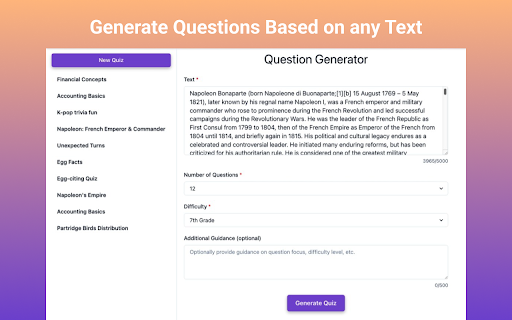
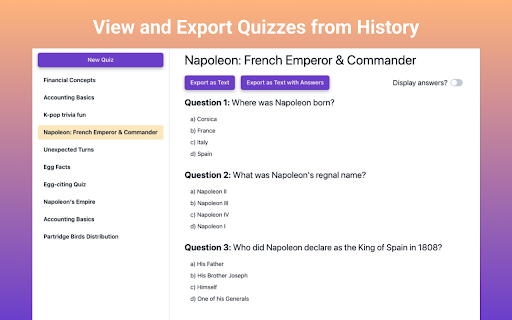
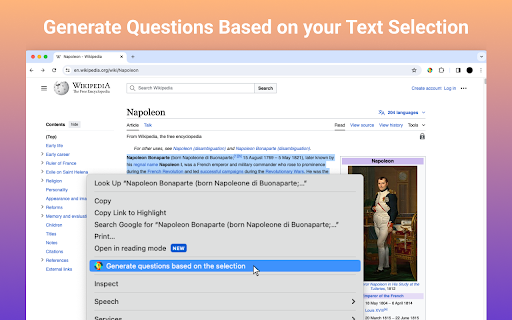
🎉 Welcome to the ultimate Question Generator – the pinnacle of quiz creation tools designed for educators, students, and curious minds alike! Powered by state-of-the-art AI technology, this question answer generator effortlessly turns any block of text into a dynamic quiz. Say goodbye to the monotonous task of drafting quizzes and hello to endless possibilities with our AI app. * How It Works: 1️⃣ Selection: Start by highlighting the text you're curious about or paste an excerpt directly into our tool. 2️⃣ Customization: Choose your preferred difficulty level from a range of options, ensuring the questions match your or your students' knowledge level. 3️⃣ Generation: With a single click, our AI takes over, crafting qs that are both engaging and informative. 🌟 Key Features: - AI-powered Precision: Utilizes advanced algorithms for generating questions that are closely aligned with the input text, ensuring relevance and accuracy. - Difficulty Customization: Offers varying levels of difficulty to cater to all users, from beginners to advanced learners. - Personal Touch: Allows for additional instructions or directions to be added to each quiz, making each test unique. - Quantity Control: Users can specify the exact number of qs they desire, providing control over test length. - History: Easy access to a history of generated quizzes for review and reuse. Q: Who can benefit from using the Question Generator? A: Our tool is perfect for: ▸ Students looking to create quizzes from study materials to test their knowledge and retention. ▸ Teachers seeking to quickly generate engaging quizzes for classroom use without spending hours on preparation. ▸ Lifelong Learners who want to explore new topics and reinforce their learning through testing. 🚀 Why Choose Our Quiz Generator? ➤ Innovative Multiple Choice Generator: Beyond simple question and answer formats, our tool crafts multiple-choice qs that challenge users to think critically. ➤ Flexibility: Whether it's historical texts, scientific articles, or literature excerpts, our question maker from text adapts to any content you're curious about. ➤ Ease of Use: With an intuitive interface designed for efficiency, creating quizzes is a breeze, allowing more time for learning and less for setup. ➤ Export Options: Quizzes can be exported as text files, with or without answers, making it easy to share with others or keep for personal review. 🎓 For Educators: Transform the way you assess student understanding with our test question generator from text. Create engaging quizzes that inspire and challenge, making learning a dynamic experience for every student. Q: What sets the Generator apart from other quiz creation tools? A: Our tool combines the best of both worlds: • Advanced AI technology for generating accurate, relevant tests • Multiple choice quiz maker for crafting thought-provoking quizzes • Seamless integration of questions generator and test generator functions • Customizable options to tailor quizzes to specific needs and learning styles 🧠 Empower your study sessions or enhance your teaching strategies with our tool. Designed for the modern learner and educator, our AI-powered tool is the key to unlocking a more effective and enjoyable learning journey. 📚 Join the revolution in learning with our comprehensive Question Generator. Whether preparing for exams, exploring new subjects, or seeking a reliable teaching aid, our tool is your ultimate ally. 🎨 Tailor every quiz to fit specific needs and learning styles with our customizable app. Utilize our advanced question ai to create qs that resonate, ensuring a meaningful learning experience for everyone. ▸ Want to make a quiz quickly and easily? Our intuitive quiz creator has got you covered! ▸ Looking to create a quiz that truly challenges and engages your students? Let our AI quiz generator do the heavy lifting for you. ▸ Tired of generic test creators that lack personalization? Our test generator allows you to customize every aspect of your quizzes. * Experience the Innovation: Don't just take our word for it – download our extension today and witness the transformative power of our Question Generator. Embrace the new era of quiz creation, where efficiency meets engagement. Say goodbye to the hassle of manual question crafting and welcome a world rich with learning possibilities. With our Quiz Generator, your journey towards effective and enjoyable learning is just a click away. 🚀 Elevate your learning or teaching journey to new heights with our app. Download now and begin crafting quizzes like never before, supported by our cutting-edge ai questions technology. Here's to happy learning!

Ask Gene - AI Assistant
Your Ultimate Web AI Assistant. Answers tough questions. Solves problems. Searches smartly. Use it anywhere. 🆕👉 Try out the new Notes feature! You may save your AI searches now to Gene Notes! Create new notes and save AI responses to a particular note - that way you can always go back to it as a reference! 🚀 Gene is your all-in-one AI assistant powered by GPT-5.5, Claude Opus 4.8, and DeepSeek-V3. Hit Ctrl + Q, and you’re ready to go! Gene helps you search, read, write, translate, and much more—all in one place. Key Features: 💬 AI Chat ✨ Chat with the latest ChatGPT model seamlessly across any webpage. 🧵 Doesn't matter the length of that document—just ask away! 🌐 Real-Time Data Access 📡 Get up-to-date information from the web including news, markets, sports, and trending topics in real time. Chat & Summarize 📚 Webpage Summaries: Type "/webpage" to reference page and get concise summaries of long articles without having to read everything. 🖍️ Highlight & Learn: Select any text on a webpage, and Gene will answer your questions right away. 📄 PDF Search: Freely open any PDF—whether online or from your computer—use "/webpage" or "/pdf" to reference the whole doc, or highlight any text, right-click, and ask Gene! (Note: Make sure "Allow access to file URLs" is turned on before use) 📑 Google Docs Search: Freely open any Google Docs and use highlight or "/webpage" or "/docs" feature! ▶️ Youtube Video Search: Freely open any Youtube video and use "/webpage" or "/video" feature and ask anything on that video! [◉°] Screenshot: Click the screenshot button, highlight anything on a webpage, and ask questions on it. This is useful for a picture or chart! It is also great for data analysis! Smart Search 🧠 Search Agent: Ask a question, and Gene will intelligently search the web, review the results, and deliver an accurate answer using multiple keywords. Write with AI 📝 Write Agent: Share a topic, and Gene will create structured outlines with detailed content and references. ✏️ Content Assistant: Provide a prompt, and we’ll turn it into polished, well-written content for you. Problem Solve ➕ Math & Code Solutions: Get step-by-step explanations for math problems and solve coding challenges instantly. 💻 How to Use: 🔹 Add Gene to Chrome and pin it to your toolbar. 🔹 Press Ctrl+Q to wake up Gene. 🔹 Start leveraging the power of AI instantly! 🗣️ Do I need a ChatGPT/OpenAI account? Nope! You don’t need an OpenAI account to use Gene. Get ready to supercharge your productivity with Gene! ⚡

AI Review Reply Response Generator
Create AI Responses to Reviews right from your browser with ease. Use it directly in your browser on every platform: Google, Booking, Yelp, TripAdvisor, App Store... Generate 4 responses at a time to cherry-pick the best one 🍒 Multiple brand voices and personalized instructions 🗣️ Our toolbar integrates easily into your process 🛠️ Bookmark the best responses for quick shortcuts 📌 Introducing our cutting-edge Chrome Extension, a AI Reply tool by TalkbackAI. This incredible tool is designed to help businesses and individuals manage their online communitcation with ease. With Review Response AI, you can now create responses to reviews right from your browser in just a few clicks. Our AI-powered technology ensures that your responses are tailored to each review, providing a personalized touch to your customer engagement. Our extension is the perfect solution for businesses that want to increase their online visibility and build a positive reputation. With the ability to quickly respond to reviews, you can show your customers that you care about their feedback and are committed to providing the best possible experience. The more you engage with your customers, the more likely they are to return to your website and leave positive reviews. We understand the importance of SEO and have implemented the best practices to ensure that your responses are optimized for the right keywords. Our extension is designed to help you rank higher in search results, making it easier for potential customers to find your business online. By using the right keywords and phrases, you can increase your online visibility and attract more traffic to your website.

QuizSolver AI
Solve online quizzes with AI.Capture multiple-choice questions and get correct answers QuizSolver AI is a Google Chrome extension (Manifest V3) designed to help you solve online quizzes and exams using artificial intelligence. It works by visually capturing any multiple-choice question on your screen and sending it to an AI provider of your choice to get the correct answer in seconds. 📸 SMART QUESTION CAPTURE ────────────────────────── • Activate capture mode with one click and drag to select exactly the area containing the question (crosshair drag). • The cursor changes to a crosshair while selecting. • The selection is automatically sent to the configured AI provider. • The answer appears in a floating popup directly over the page. • Option to directly download the capture as a PNG image. 🧠 MULTI-AI PROVIDER ───────────────────── Supports four artificial intelligence providers, each with selectable models: Each provider has its own API Key field and selectable model. Direct links to each provider's console to obtain the key and add credits. 🎯 CUSTOM PROMPTS ────────────────── • Create your own prompts with a title and content for quick reuse. • Full CRUD system: create, edit, duplicate and delete prompts. • Select any saved prompt to send it along with the capture. • Default prompts per provider: configure a different prompt for Gemini, ChatGPT, Venice and Claude independently. 🕵️ BYPASS SYSTEM (Anti-Detection) ─────────────────────────────────── Scripts that neutralize the most common detection and restriction mechanisms on online exam platforms: 🔓 Anti-Focus (Canvas LMS): Neutralizes tab-change or focus-loss detection. • Blocks focus, blur and visibilitychange events. • Spoofs document.visibilityState = 'visible' and document.hidden = false. • Ideal for Canvas LMS that pauses the exam when you leave the tab. 🖱️ Anti-Context Menu (Right Click): Restores the right-click context menu on sites that block it. • Intercepts events in the capturing phase. • Neutralizes preventDefault() for contextmenu, copy, cut, paste, dragstart. • Allows text selection and copying on sites that disable it. 🔧 Anti-DevTools (Developer Console): Neutralizes all DevTools detection methods. • Function.prototype.toString spoofing to hide proxies. • Fakes outerWidth/outerHeight dimensions to conceal the panel. • Smooths timing of Date.now() and performance.now() during debugger pauses. • Removes debugger statements in eval(), Function(), setTimeout, setInterval. • Neutralizes external detection libraries (devtools-detect, Firebug). 🖱️ Anti-MouseLeave (Cursor Always Present): Makes the site believe the cursor never leaves the window. • Blocks mouseleave, mouseout, pointerleave, pointerout events only when the cursor leaves the viewport (does not break menus or tooltips). • document.hasFocus() always returns true. • Compatible with MutationObserver for dynamically added elements. 📋 PDF GENERATOR (Canvas LMS) ────────────────────────────── On Canvas LMS quiz pages (*/courses/*/quizzes/*) a script is automatically activated that generates a complete PDF of the exam with all questions and options for offline review. 📁 CAPTURE HISTORY ─────────────────── • Stores all captures with date and time. • Thumbnails of each capture with preview. • Button to view the full capture in a new tab (dedicated viewer). • Download any individual capture as PNG. • Delete captures individually or clear the entire history. • Unlimited storage using chrome.storage with IndexedDB. 💾 EXPORT / IMPORT CONFIGURATION ────────────────────────────────── • Export all your settings (API keys, prompts, preferences) to a downloadable JSON file as a backup. • Import settings from a JSON file to restore or share configuration between devices. 🌐 BROWSER CONTEXT MENU ──────────────────────── Options accessible by right-clicking on any page to activate extension functions without opening the popup. 🌍 MULTI-LANGUAGE SUPPORT ────────────────────────── The extension is available in 10 languages: Spanish 🇪🇸 · English 🇬🇧 · Portuguese (Brazil) 🇧🇷 · Portuguese (Portugal) 🇵🇹 German 🇩🇪 · French 🇫🇷 · Italian 🇮🇹 · Japanese 🇯🇵 · Norwegian 🇳🇴 · Swedish 🇸🇪 🏠 Main Panel (main) ───────────────────── The popup home screen. From here you can: • Enable/disable each of the 4 bypasses with switches. • Select the active AI provider (Gemini / ChatGPT / Venice / Claude). • Expand each provider panel to enter the API Key, select the desired model and write the session prompt. • Click "Capture Question" to start area selection. • Access all other panels from the header buttons. ✏️ Prompts Panel (prompts) ─────────────────────────── Full custom prompts manager: • Creation form with title field and content textarea. • Table with all saved prompts. • Edit ✏️, duplicate 📋 and delete 🗑️ buttons per row. • Prompts are saved in chrome.storage.local persistently. ⭐ Default Prompts Panel (defaultPrompts) ────────────────────────────────────────── Allows assigning a different base prompt for each AI provider. The default prompt is sent automatically when no session prompt is selected. 🕐 History Panel (historial) ───────────────────────────── Chronological list of all captures with: • Thumbnail of the captured image. • Exact date and time of capture. • View 👁️, download ⬇️ and delete 🗑️ buttons per capture. • Button to clear the entire history at once. • Access to the full Viewer that opens captures in a new tab. 📤 Export/Import Panel (export) ──────────────────────────────── • "Download" button → generates and downloads the config.json file. • "Import" button → opens the file picker to load a JSON file. 1. Download or build the extension (npm run build). 2. Open Chrome and go to: chrome://extensions/ 3. Enable "Developer mode" (top right corner). 4. Click "Load unpacked" and select the /dist folder. 5. The QuizSolver AI icon will appear in the toolbar. 📌 Recommended: pin it by clicking the pin 📌 in the extensions manager. ════════════════════════════════════ STEP 2 — 🔑 Configure your API Key ════════════════════════════════════ 1. Click the extension icon in the Chrome toolbar. ✅ The Main Panel popup opens. 2. Choose your preferred AI provider using the radio buttons: ○ Gemini ○ ChatGPT ○ Venice ○ Claude 3. Click on the provider name to expand its panel. 4. Paste your API Key in the corresponding field. 💡 Use the "Get API KEY" link to go directly to the provider console if you don't have one yet. 5. Select the model you want to use from the dropdown. 6. (Optional) Write a session prompt or select a saved one. 7. Configuration is saved automatically as you type. 1. Navigate to the exam or quiz on any webpage. 2. Open the extension popup. 3. Click the 📷 "Capture Question" button. → The popup closes and the cursor changes to a crosshair ✛ 4. Click and hold on the top-left corner of the question, drag to include all options and release. → A selection rectangle is drawn as you drag. 5. On release, the capture is processed and sent to the AI provider. 6. The answer appears in a floating popup over the page! 🎉 → You can also view the capture in history to review it. From the Main Panel, activate switches as needed: ┌──────────────────────────────────────────────────────────────────────┐ │ 🔓 Anti Focus (Canvas LMS) │ │ Enable if the exam is on Canvas LMS and pauses when switching │ │ tabs. Prevents the site from detecting you left the page. │ │ │ │ 🖱️ Unlock context menu │ │ Enable if the site blocked right-click or text selection. │ │ You can copy, paste and use the menu normally. │ │ │ │ 🔧 Unlock developer console │ │ Enable if the site detects and blocks the browser DevTools. │ │ Neutralizes all known detection methods. │ │ │ │ 👻 Simulate cursor always on site │ │ Enable if the exam pauses or detects when you move the cursor │ │ outside the browser window. │ └──────────────────────────────────────────────────────────────────────┘ ⚠️ Bypasses activate immediately on the current page. Some may require reloading the exam tab (F5). 1. In the popup, click the ✏️ "Manage Prompts" icon. 2. Write a short title (e.g. "Concise multiple choice"). 3. Write the full prompt in the textarea. E.g.: "You are an expert. Analyze the image and respond ONLY with the letter of the correct option. No explanations." 4. Click "Save". 5. The prompt will appear in the table and be available for selection in the Main Panel when making a capture. 6. You can duplicate 📋 existing prompts to modify them easily. 1. Open the popup and click the 🕐 "Capture History" icon. 2. You'll see a list of all captures with thumbnails and dates. 3. Click 👁️ "View" to open the capture in full screen in a new tab. 4. Click ⬇️ to download the capture as a PNG file. 5. Click 🗑️ to delete an individual capture. 6. Use "Clear all" to wipe the entire history. ════════════════════════════════════ STEP 7 — 💾 Export your Configuration ════════════════════════════════════ 1. Open the popup and click ⬇️ "Export / Import". 2. Click "Download" to save all your configuration to a JSON file (API keys, prompts, selected model, etc.). 3. To restore on another device: click "Import" and select the previously downloaded JSON file. 🔒 Keep your backup file in a safe place as it contains your API Keys. 1. Navigate to a Canvas LMS quiz: (URL like: https://university.instructure.com/courses/.../quizzes/...) 2. The extension automatically detects the URL and activates the generator. 3. A "Generate PDF" button will appear on the quiz page. 4. Click it to download a PDF with all exam questions and options for offline review. • activeTab → Capture screenshot of the active tab. • tabs → Create new tabs (capture viewer). • storage → Save settings, prompts and history. • unlimitedStorage → Store capture history without limits. • scripting → Inject bypass scripts into pages. • contextMenus → Add options to the browser context menu. • downloads → Download PNG captures and generated PDFs. • host_permissions → Work on any URL for captures and bypasses. ━━━━━━━━━━━━━━━━━━━━━━━━━━━━━━━━━━━━━━━━━━━━━━━━━━━━━━━━━━━━━━━━━━━━━━━━━━━━━━ 📝 FINAL NOTES ━━━━━━━━━━━━━━━━━━━━━━━━━━━━━━━━━━━━━━━━━━━━━━━━━━━━━━━━━━━━━━━━━━━━━━━━━━━━━━ • The extension requires a valid API Key with credits from the chosen provider to process captures. • Captures are processed directly from the browser to the provider's API. They are not sent to any external server. • The capture history is saved locally in your browser. • Version: 1.1.2 | Chrome name: QuizSolver AI

Abstract AI | Art Generator
Generate stunning AI-powered abstract art with customizable options. Transform your web projects with Abstract AI. This amazing extension generates millions of random color combinations, creating breathtaking copyright-free abstract backgrounds. Save your masterpieces in PNG, JPG, or SVG format and edit them with your favorite image editing software for incredibly stunning results. With Abstract AI, the ordinary becomes extraordinary.
