
dgdaphghpeoopgaelnebhlbfcionlfji
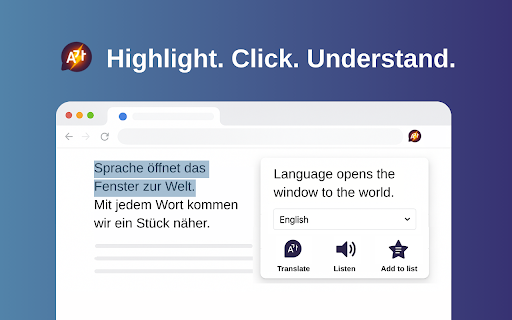

Use Instant Translator for live translation on webpages. Automated translation integration, voice playback and vocabulary builder. 🌍 Instant Translator — your all-in-one AI-powered language translator for web pages. It’s an online translator with automated translation integration, voice playback, and smart word collection for export. Whether you’re reading foreign news or exploring international resources, understanding content in other languages shouldn’t be hard. This lightweight instant translator app is designed for comfort, speed, and ease of use — no complex setup, no confusion. Just smooth browsing. Break the language barrier instantly with an easy-to-use instant language translator that works right on any webpage. Whether you're reading articles, watching videos, or exploring global content, this tool offers AI translator functionality with just one click. It fits right into your flow and makes comprehension feel effortless. 🧠 Get AI-powered instant translation, accurate voice playback, and the ability to save words to a personal list — all in one lightweight translation extension. Export your word list in two clicks: click “Copy to Clipboard” and paste directly into Quizlet, Anki, or any flashcard app. Instantly turn your reading into review material. ⚙️ Core Features 1️⃣ Instant Translate on Highlight • Highlight any text — get an instant translate result without switching tabs • Perfect for multilingual browsing and fast reading 2️⃣ Text-to-Speech Support • Built-in speech support function • Listen to pronunciation directly on the page — helpful in language learning and pronunciation clarity 3️⃣ Word Collection & Flashcard Export • Save selected words to your personal list • Click “Copy to Clipboard” and paste directly into Quizlet, Anki, or Excel — your flashcards are ready in seconds 4️⃣ Works as a web translator • Ideal for multilingual users, researchers, students, and travelers • Use it across content types — articles, e-mails, blogs, or technical documentation 🚀 How to Use ➔ Install the Instant Translator app from the Chrome Web Store ➔ Highlight any sentence or paragraph ➔ Click the button to translate, listen, or add to list ➔ Export your saved list via "Copy to Clipboard" and paste it into Quizlet, Anki, or your flashcard app You don’t need to sign up, configure settings, or open a separate app — the features are always ready when you need them. 🌐 Why It’s Powerful ✨ Built for real-time speed, accuracy, and simplicity ✨ No fluff, just tools that do their job right ✨ Use it to translate English to Korean, translate Japanese to English, or for any language translation you need ✨ Especially useful for research, academic reading, and quick communication 📚 Whether you’re a student needing an AI instant translate words on a page for vocabulary practice, a global worker using it for cross-language communication, or a traveler exploring new cultures, this is your go-to translation extension. It’s built for people who want clarity fast, without endless menus or setup. Use it once, and you’ll want it in every browsing session. 💼 Who Uses Instant Translator? 🧑🎓 Students & Language Learners Master vocabulary with voice and text. Turn unfamiliar sentences into clear meaning in seconds. 🌍 Professionals & Travelers Read websites in any language. Great for planning, communication, and international teams. 🧠 Researchers & Content Creators Translate long documents instantly. Understand technical content without losing meaning or tone. 📦 Extra Highlights • Lightweight instant translation app for daily use • Recognizes context for better machine translation • Auto detects language and translates to the language you choose • Works as a live translation overlay without slowing down your browser • Helps with emails, learning, and everyday reading ❓ FAQ 🔸 Can I use it for multiple languages? ✅ Yes! From English to Spanish, English to Korean, English to German translation, it handles them all. 🔸 Is it also an AI-powered instant translator? ✅ Absolutely. It's AI-powered and precise. 🔸 Can I use it as a word translator and interpreter? ✅ It covers both basic and advanced needs. 🔸 Does it support vocabulary saving and export? ✅ Yes — save words and export to Quizlet, Anki, or Excel with one click. 🎯 Whether you're studying, traveling, or just browsing, try this sleek, powerful translation app now and elevate how you interact with the world. 🕘 Understand faster. Speak clearer. Focus better. 📥 Install Instant Translator today and experience next-level instant translation with voice playback and word list export built in.

Dual Subtitles & AI Translation - InterSub
Use dual subtitle AI translation dualsub for language learning, immersive translate meaning of words: Spanish to English to Japanese 🚀 Unlock the Full Power of Language Learning with InterSub! Turn every video session into a personal language classroom with InterSub, the premier dual subtitle translator for immersive and effortless learning. Whether you’re streaming movies on Netflix, enjoying YouTube videos, or diving into courses on Udemy, our video translator subtitle for long videos brings seamless subtitle translation directly to your screen. 💡 What’s New * Forced AI-translation for second subtitles based on original. * Support for new platforms: Bilibili.tv. * Subtitle appearance customization: subtitle background opacity, text color, text outline color. * AI Language Buddy chat – ask AI-powered questions about slang, grammar, usage, or get extra examples without leaving the screen. Now you can type your questions and save definition of a given explanation to your vocabulary. 🎥 How Does InterSub Subtitle Translator Elevate Your Viewing? 1️⃣ Instantly translate subs into multiple languages, including Spanish to English, English to Japanese, English to German, Russian to English, English to Russian, and English to Turkish. 2️⃣ Hover over subtitles for an instant word meaning, lemma details, and accurate AI language translation - no pausing or manual searches required. 3️⃣ Automatically generate missing captions through our translator, enhancing your viewing even when track in your native language isn't available. 4️⃣ Easily save new words and phrases to your vocabulary, sync with popular apps like AnkiDroid, or export your word lists to Excel for convenient review. 🌍 Your Ultimate Online Subtitle Translator: Forget traditional subtitle translation services or cumbersome manual methods like Google translation. InterSub simplifies video-based learning by embedding dualsub directly in your videos. Instantly translate subtitle tracks, words and phrases with our powerful AI video subtitles technology, optimized for accuracy and natural language fluency. 🔑 Why Choose InterSub over Others? - Supports dual subtitles (dual subs) to simultaneously display original and translated texts. - Features ChatGPT AI subtitle capabilities, allowing you to understand complex idioms, slang, and cultural nuances right in your browser. - Offers real-time AI instant translate words on a page, including collocations, frequency, and pronunciation, making vocabulary acquisition intuitive and enjoyable. 🎯 Compatible Platforms: InterSub seamlessly integrates across multiple platforms: ➤ Netflix ➤ YouTube ➤ Prime Video ➤ Crunchyroll ➤ Coursera and more! The full list is here: intersub.cc/#platforms No matter where you prefer to watch, InterSub is the ultimate AI translator companion. 📖 Build Your Vocabulary Faster: InterSub Subtitle Translator transforms passive watching into active learning: • Instantly translate Spanish to English words, phrases, and sentences, enhancing bilingual proficiency. • Translate subtitles effortlessly from Russian to English, making challenging content accessible. • Use built-in language translator features to clarify word meanings and language nuances instantly. 📝 Premium Features for Accelerated Learning: Take your experience further with our premium subtitle translation services: * Unlimited word lookups and translations * Advanced AI language translation and collocation detection * AI-generated dual subs for unmatched clarity * Full access to personal vocabulary * ChatGPT translation features for real-time linguistic insights 💲 Flexible & Affordable Pricing: InterSub offers versatile plans designed for every learner: ▸ Free Plan: Get up to 15 lookups/month or unlimited lookups with ads - perfect for casual learners. And unlimited dual subs are included! ▸ Premium Plans: Enjoy AI translation starting at just $1.5/month with our unique pay-as-you-go options for ultimate flexibility or use subscription plan for unlimited translations. 📱 Learn Anytime, Anywhere: Your vocabulary syncs seamlessly with mobile apps and chatbots: 1. Capture new words directly from videos. 2. Review them on-the-go via apps like AnkiDroid or Telegram bots. 3. Export your vocabulary data effortlessly to Excel for offline or on-the-go studies. 💬 Real-Time ChatGPT AI Subtitle Insights: No more switching tabs to translate subtitles or search meanings - integrated AI Language Buddy offers immediate insights into grammar, slang, and cultural contexts. With InterSub’s advanced AI meaning explanations, you stay focused and engaged throughout your viewing. 🎓 Ideal for Everyone: InterSub Subtitle Translator suits diverse users: • Students mastering foreign languages • Busy professionals needing rapid language comprehension • Cultural enthusiasts exploring new linguistic horizons • Educators looking for effective video-based teaching aids 🌐 Extensive Language Support: InterSub currently supports 30+ languages, delivering exceptional AI dual subtitles translation in languages like English, Spanish, Portuguese, Ukrainian, and more. Visit our platform page for a complete list! 🔧 Easy Setup in Minutes: Getting started with InterSub is simple and straightforward: ▸ Install our translate extension (completely free!) ▸ Choose your preferred subtitle translation language settings ▸ Start watching videos - translate subtitle instantly with intuitive hover interactions 🛠️ Advanced RTL Language Support: Optimized specifically for right-to-left languages such as Arabic, Hebrew, and Urdu. InterSub ensures clear, readable subs for all linguistic contexts. 🔝 Why Users Love InterSub: - Sophisticated dual subtitles with "show only on pause” feature - Real-time AI subtitle translator for effortless comprehension - Instant AI video translate functionality with no delay - Seamless mobile app integration for learning on-the-go - Transparent and flexible subscription options Forget outdated Russian word translator tools or clumsy browser tabs; InterSub dualsub is your definitive solution for effortless AI instant translate words on a page. 🌟 Ready to Revolutionize Your Video Viewing Experience? InterSub is more than an online subtitle translator - it’s a powerful AI subtitle tool designed to make language learning natural, enjoyable, and seamlessly integrated into your daily life. Start using InterSub today and transform your favorite video platforms into dynamic language classrooms! Experience the future of subtitle translation with InterSub Dual Subtitles Translator - where entertainment truly meets education!

ViiTor Translate - AI Translation & Real-Time Bilingual Subtitles & Free
The ViiTor translation provides translation for live audio & video, realizing bilingual subtitle functions. ViiTor Translate provides real-time AI translation and bilingual subtitles for online audio content. Whether you are watching videos, following live streams, or attending online meetings, ViiTor helps you understand spoken content instantly with fast subtitle generation. ⭐ Core Features: - Real-time speech transcription and translation directly from browser audio - Bilingual subtitles for videos, live streams, and meetings - One-click activation whenever translation is needed - Supports 19 languages including English, Japanese, Korean, Chinese, Spanish, Arabic, and more - Encrypted transcription and translation for privacy protection 💡 Best For: - Online meetings and multilingual communication - Live streams and webinars - Video platforms like YouTube, Twitch and WerVerse - Language learning and international content browsing ViiTor uses advanced AI technology to deliver fast and reliable subtitles, helping users reduce language barriers in real time.

Web Translate - Online translator
Right-click to translate words or phrases with Google Translate: accurate translations, page translator 🖱️ Simply click on any word or phrase to access Google Translate for instant online translation of words, phrases, or entire pages. 🔗 Extension Features: Effortlessly translate words and phrases on the current web page with a single click. Use this powerful online translator for quick and accurate results. ⚙️ Easy Configuration: Customize your preferred language in the extension settings with automatic language detection based on your location. 🌐 Multilingual Capabilities: Translate seamlessly between a wide array of languages, making it perfect for translating text, websites, or full pages. 🔒 Privacy Policy: Use the "Web Translator" extension at your own discretion; no warranty is provided. The author bears no responsibility for any data loss or damage resulting from its use. By utilizing "Web Translator," you agree to these terms. 🔄 Two Convenient Translation Options: Translate words and phrases by clicking on them or copy and paste larger texts into the extension’s popup for precise translations. Ideal for those who need a full text translation capabilities. 🎨 Beautiful Design: Navigate effortlessly through the extension’s features with its visually appealing design. Choose the color theme that best suits your preferences for efficient use of this translator tool. 📖 Efficient Reading: Quickly read foreign text and understand every word by translating the entire page or selected text at once. Use the translation button in the context menu or the extension’s popup. 🕰️ History and Favorites: "Click to Translate" remembers your language preferences and history, saving you time. Add frequently used languages or phrases to your favorites for quick access. 🚫 Disclaimer: The "Web Translator" Chrome extension is independent of the popular site https://translate.google.com. All copyrights belong to their respective owners. This extension is not supported, sponsored, or owned by Google Inc. 📚 Copyright Acknowledgment: All copyrights are duly acknowledged and belong to their respective owners. Google does not endorse or sponsor this Chrome extension

Instant Translate
Instant Translate · Quick Translate · One Click Translate. Select any text on a webpage for an instant popup translation. The fastest way to translate any text while browsing. Simply select text on any webpage and get an instant popup translation. No extra clicks, no tab switching, no hassle. 🚀 Coming Soon 🔔 v3.2 — Daily Word Reminder → Get notified to review your saved words and make them stick. • 🖱️ Select & Translate - Just highlight any text for instant translation • 🌐 100+ Languages - Translate to and from virtually any language • 📋 One-Click Copy - Copy translated text to clipboard instantly • ⚡ Lightning Fast - Powered by Google Translate for accurate, speedy results • 🔒 Privacy First - No account required, no data collection, no tracking • 🎨 Clean Popup - Beautiful, minimal design that doesn't interrupt your browsing ✨ What's New? ⭐ Favorites — Click the ★ star button in the translate bubble to save any translation. Your saved words and phrases are always one tap away. 📂 Favorites Tab — All your saved translations in one place. Search, listen (TTS), copy or delete — full control over your vocabulary list. ⌨️ Alt+S Shortcut — Press Alt+S from any page to open your Favorites instantly. 🐛 Bug Fixes — History and favorites now save reliably. Translation bubble performance improved. ✨ What's New in This Version? 🎨 10 Themes — Light, Dark, Midnight, Warm, Forest, Sunset, Mocha, Rose, Nord and System. Make your browser yours. 🔊 Text-to-Speech (TTS) — Listen to any translation in the target language. One click, done. 📋 Translation History — Your last 500 translations saved automatically. Search and revisit anytime in Settings → History. ↔️ Resizable Bubble — Drag the corner of the translation bubble to resize it however you like. 🆕 v2.9 — Bubble & Shortcut Toggles ⚙️ New toggles in Settings → Interface 🫧 Turn the translate bubble on/off independently ⌨️ Enable/disable Alt+T keyboard shortcut independently 🆕 v2.8 — Keyboard Shortcut ⚡ Translate selected text instantly with Alt+T 🖱️ No mouse click required 🔀 Works alongside the bubble — both active at once You can now disable Instant Translate on specific websites — no more accidental bubbles on sites where you don't need translation. How to disable a site: • Right-click on any page → "🚫 Disable on this site" • Or go to Settings → Disabled Sites → type the hostname manually To re-enable, right-click again → "✅ Enable on this site", or remove it from the list in Settings. 🎯 New: Translate Bubble Select any text and a small "Translate" button appears right next to your selection — no more accidental popups. 📌 New: Pin & Drag Pin the translation popup to keep it on screen while you scroll. Drag it anywhere on the page. 🖱️ New: Right-Click Menu Right-click on any selected text and choose "Translate with Instant Translate" — works even on sites where the bubble doesn't appear. 🐛 Bug Fixes Improved popup positioning and selection detection across all websites. 1. Install the extension 2. Select any text on any webpage 3. See the translation appear instantly in a popup 4. Click copy to save the translation 🎯 PERFECT FOR • Reading foreign websites and articles • Language learning and vocabulary building • International business communication • Understanding social media posts in any language • Quick translator while researching English, Spanish, French, German, Chinese, Japanese, Korean, Arabic, Portuguese, Russian, Italian, Dutch, Turkish, Polish, Vietnamese, Thai, Hindi, Hebrew, and 80+ more languages! 🔐 YOUR PRIVACY MATTERS We don't collect any personal data. We don't track your browsing. We don't store your translations. Your activity remains completely private.
