
dgcfmccdeggjhkpndikcanaobhkggffd
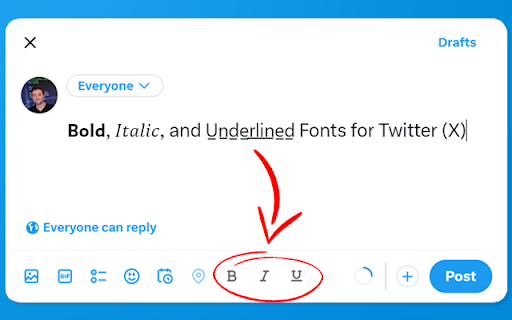
Enables bold, italic, and underlined text in Twitter posts! 𝗕𝗼𝗹𝗱, 𝐼𝑡𝑎𝑙𝑖𝑐, and U̲n̲d̲e̲r̲l̲i̲n̲e̲d̲ Fonts for Twitter (X). The Font Editor is free and open source: https://github.com/maxrohowsky/twitter-font-editor X Font Editor is developed and maintained by Max: https://www.maxrohowsky.com/

WhatsApp™ Web Translator
Translate WhatsApp, Telegram, and Discord messages with our extension. Just select text for instant translations in any language! WhatsApp Translator | Auto WhatsApp Translator | Translator for WhatsApp | Translator for WhatsApp Web | Translate WhatsApp Messages | Lang Translator for WhatsApp | Chrome Extension for WhatsApp Translation | Translate WhatsApp Web Messages | Language Translation for WhatsApp | Instant Translation for WhatsApp Definition: WhatsApp Translator is a powerful and free Chrome extension designed to instantly translate WhatsApp Web messages with ease and accuracy. Whether you're chatting with global clients, friends, or collaborators, this auto WhatsApp translator empowers you to translate WhatsApp messages in real time. As a reliable language translation tool for WhatsApp, it enables seamless communication across 100+ languages, making it the ultimate translator for WhatsApp Web and beyond. Perfect for both personal and professional use, it brings instant translation for WhatsApp directly into your browser. How to Use: Download and install the WhatsApp Translator extension from the Chrome Web Store. Open WhatsApp Web and start a chat - the translation feature activates instantly. Configure your source and target languages in the extension settings. Type or receive messages - the translator for WhatsApp will auto-translate in real-time. Features: ✅ Auto WhatsApp Translator: Automatically detects and translates messages on WhatsApp Web. ✅ Translator for WhatsApp: Supports over 100 languages with fast, accurate results. ✅ Lang Translator for WhatsApp: Customise source/target languages for multilingual chats. ✅ Translate WhatsApp Messages Instantly: Translate both sent and received texts in real time. ✅ Chrome Extension for WhatsApp Translation: Lightweight, secure, and easy to use. ✅ Translate WhatsApp Web Messages: Integrates directly with WhatsApp Web for seamless operation. ✅ Language Translation for WhatsApp Web: Ideal for global communication in business or travel. ✅ Manual & Auto Mode: Switch between manual and automatic translation as needed. ✅ Secure & Private: No data stored or shared - all translation occurs locally in your browser. Translate 50 Messages for Free - That’s Not It… Sign Up & Get 50 More! Here's how to unlock your 100 free translations: Install & Pin the WhatsApp Translator extension from the Chrome Web Store. Click the extension icon - you'll see a Sign-Up button. Enter your email address, complete verification via code, and set your password. That’s it - your account is ready with 50 bonus translations added instantly! ✅ Use your first 50 messages instantly - no login needed ✅ Create an account and unlock 50 additional translations for free ✅ Enjoy seamless, real-time translations across 100+ languages Why wait? Break the language barrier - 100 messages at your fingertips now! Start Translating in Seconds - No Cost, No Catch! Why Choose Us? ✔ Built for remote teams, global users, e-commerce sellers, educators, and international clients. ✔ Eliminate language barriers in real-time with fast, reliable message translation. ✔ Enhance customer experience and boost engagement by responding in your audience's native language. ✔ Works great for multilingual customer support, international coaching, cross-border trade, and education. ✔ 100% browser-based- no WhatsApp API, no login required, and no server-side processing. ✔ Privacy-first design: We never access, store, or share your chat data. Support: Need help? Our support team responds within 24 hours, even on weekends. Contact us via email or through the extension’s support tab for quick resolution. Disclaimer: WhatsApp™ is a trademark of WhatsApp Inc., registered in the U.S. and other countries. This Chrome extension is not affiliated, endorsed, or certified by WhatsApp™, Meta™, or Facebook Inc. WhatsApp Translator is an independent tool built to enhance messaging functionality, in full compliance with WhatsApp’s terms and Chrome Web Store policies.

Tweet Copier - Copy Twitter / X Threads
Copy tweets and full X (Twitter) threads in one click. Instantly save clean text for research, notes, writing, and archiving. Tweet Copier is a Chrome extension that lets you copy tweets and entire Twitter/X threads instantly with one click. Save clean, structured tweet text directly to your clipboard for research, writing, archiving, or reuse. 🚀 Key Features ✅ Copy Single Tweet Instantly copy the full text of any tweet, including quoted tweets and emojis. Copy tweet text instantly without screenshots or manual selection. ✅ Copy Twitter / X Threads Automatically detects and copies the entire thread by the same author. ✅ Auto-Scroll for Long Threads Loads hidden tweets so you can copy long Twitter threads in one click. ✅ Clean, Structured Formatting Preserves emojis, line breaks, and auto-numbers tweets (e.g., 1/12, 2/12). ✅ Native X Integration Adds Copy and Thread buttons directly to the X action bar (left of Grok). 👨💻 Who This Is For Content Creators – Save tweets and threads for blogs, newsletters, or social media. Researchers & Students – Archive Twitter discussions and primary sources. Journalists – Preserve tweets and threads before edits or deletion. How to Use - Install Tweet Copier. - Refresh X (Twitter). - Click Copy or Thread on any tweet. - The tweet text is copied instantly to your clipboard. 🔒 Privacy-First Twitter Extension No data collection No tracking or analytics No external servers Runs entirely locally Tweet Copier does not automate engagement, modify content, or interact with your account. It only reads tweet text you explicitly choose to copy.

Post Formatter: LinkedIn Bold Text & More Styles
Easily add LinkedIn bold text, italics, 20+ styles & lists. Instant formatting for LinkedIn, X, Facebook, Threads & Pinterest. Add LinkedIn Bold Text, Format Posts & Proofread with AI — All in One! Need LinkedIn bold text to make your profile and posts stand out? Post Formatter is the simple yet powerful LinkedIn text formatter you've been looking for! Stop using plain text and start creating engaging, visually appealing content — not just on LinkedIn, but across all your favorite social platforms. 🚀 Elevate Your Social Media Presence 🚀 This extension is your go-to tool for adding emphasis and style. Effortlessly apply bold on LinkedIn, italics, underline, strikethrough, lists, and 20+ unique text styles. Whether you're highlighting skills, sharing insights, or crafting compelling calls to action, using bold on LinkedIn helps grab attention immediately. As a versatile LinkedIn text formatter, it also works seamlessly on X (Twitter), Threads, Facebook, Pinterest, YouTube, and Bluesky. ✨ Your Go-To LinkedIn Text Formatter Features ✨ ✅ Instant Formatting for LinkedIn Bold: Simply select text directly within LinkedIn, and our intuitive floating toolbar appears. Click the bold button (or choose other styles) — getting bold on LinkedIn takes just a second! ✅ NEW — AI Proofread & Rewrite: Catch grammar, spelling, and style mistakes right inside the editor. Let AI rewrite and improve your post while keeping your LinkedIn bold and other Unicode styling intact. Bring your own API key and pick your favorite model. ✅ NEW — LinkedIn Post Preview: See exactly how your post will look before you publish. A live LinkedIn feed preview updates as you type — with your real name, avatar, photos, videos, document carousels, and link previews. ✅ NEW — Post Preview for Every Platform: Realistic post mockups for LinkedIn, X (Twitter), Threads, Facebook, and Bluesky, including dark mode — so you always know how your formatted post will appear. ✅ NEW — Drafts Manager: Save, organize, and reuse your posts. Group drafts into folders, add tags, mark them "Ready to Post," and search everything instantly. Insert any draft with a right-click. ✅ NEW — Character Counter & Limit Checker: Stay within the character limit for LinkedIn, X, Threads, Facebook, and Bluesky with a live counter and one-click "Trim." ✅ NEW — Smart Paste: Paste from Google Docs, Word, or Notion and your bold, italic, and lists are automatically converted to Unicode — no reformatting needed. ✅ Symbols & Emoji: Insert from a huge searchable library of symbols and 30+ emoji, plus emoji bullet lists. Recently used symbols are saved for quick access. ✅ Keyboard Shortcuts: Use Ctrl/Cmd+B for bold, +I for italic, +U for underline, and more — with full undo/redo support. ✅ Convenient Popup & Side Panel Editor: Prefer drafting offline? Open the extension from your browser toolbar or side panel. Type, paste, apply LinkedIn bold, lists, and styles, then copy the perfectly formatted text. ✅ Multi-Platform Support: While ideal for creating bold on LinkedIn, this formatter ensures your text looks great everywhere — X (Twitter), Threads, Facebook, Pinterest, YouTube, and Bluesky. ✅ Rich Styling Beyond Bold: Explore italics, underline, strikethrough, UPPERCASE, lowercase, monospace, script, bubble, and 20+ creative styles, plus easy bullet, numbered, and lettered lists. Increase Engagement: Well-formatted posts, especially those using bold on LinkedIn, encourage reading and interaction. Boost Professionalism: Present polished, structured, error-free content on LinkedIn using a reliable LinkedIn text formatter with built-in AI proofreading. Save Time: Stop searching for workarounds or external tools to get bold on LinkedIn. Format, preview, and proofread directly where you type. Improve Readability: Organize your thoughts clearly with lists, emphasis, and a real preview before you post. Your content remains yours. This LinkedIn text formatter operates entirely locally on your device. We do not collect, store, or transmit any of your text or user data. AI features run only through your own API key. Get LinkedIn bold text with complete confidence. Download Post Formatter today — the easiest way to get LinkedIn bold, add styles, proofread with AI, preview your posts, and become a LinkedIn formatting pro!

X (Twitter) Cleaner
X Feed Cleaner – Distraction Free & Focus Mode for X.com X Feed Cleaner – Distraction-Free Browsing on X.com Remove distractions on X (formerly Twitter) and regain focus: Hide your timeline feed, trends, premium promos, live content and more – with one click. Stay productive without endless scrolling. Why Choose X Feed Cleaner? - 100% open-source & privacy-first – no trackers, no data collection - Super lightweight – minimal impact on browser speed - Dynamic hiding – works even with infinite scroll and real-time updates - Simple toggle controls in a clean popup interface Key Features 🗑️ Hide Timeline Feed – Eliminate the main feed for zero doom-scrolling 🔍 Hide Trends & Premium Sections – Clean sidebar, no ads or suggestions 💡 Hide Live Content – Remove live streams and noisy sections 🎛️ Custom Toggles – Enable/disable each element individually 🚀 Always-On Hiding – Settings persist across sessions and page refreshes Who It's For Perfect for professionals, creators, or anyone tired of distractions on X.com. Whether you want a fully minimal interface or just selective cleaning – take back control of your feed. How It Works Install → Open X.com → Use the popup toggles to hide what bothers you. Changes apply instantly and stay active. Privacy & Open Source Fully transparent: No personal data collected. View and contribute on GitHub: [https://github.com/BaskLash/X-Feed-Cleaner]. Created by Olivier Lüthy © 2024–2026. Get Started Now Install X Feed Cleaner today and experience a cleaner, more focused X. Official site: https://x-feed-cleaner.carrd.co/
