
dgbnmiokjnaomdpnfbcbpfbmegejllen

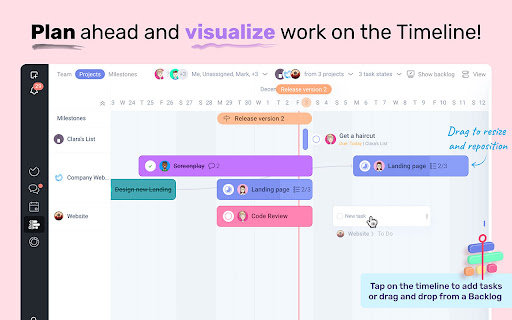
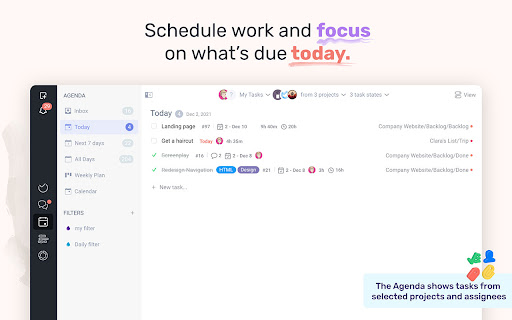

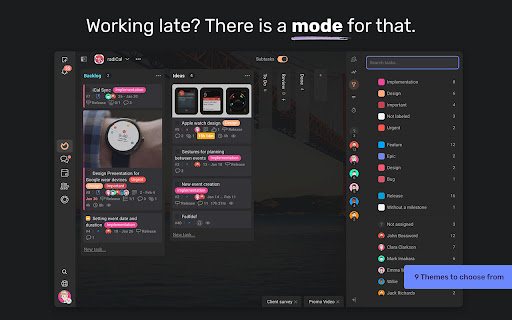
Quickly add and search tasks in Ora.pm from any web page. Ora.pm reinvents how you manage work, tasks and your team. With the official chrome extension you can boost your productivity even more. QUICKLY ADD TASKS Add tasks in Ora and optionally add a link to the current page. Assign the newly created tasks to yourself or a team member. Choose any project and any list straight from the extension. QUICK FIND TASKS Select a project and search for a task by id or task title. Open this task in a new window or add current page as link the the task you found. QUICK LINK Search and add a link or create a new task from the current webpage you visit.

tabOS - Tab management, ChatGPT 4o, Docs/Images, RSS/YouTube/Reddit feeds
Enhance your New tab/Sidebar - Manage tabs, ChatGPT prompted chats, RSS/YouTube/Reddit feeds, write documents and save images. Meet tabOS - An operating system (sort of! 😇) for your browser. Add it with one click to gain a powerful new tab where you can manage your tabs and tab groups. Try it for free. Stop jumping from tab to tab, from tool to tool, losing your focus and time in the process. Declutter your browser by saving tabs not used at the moment, effortlessly create relevant tab groups, take notes anywhere, save images, and get answers from your library of AI helpers. Lay out everything on the same page to save time and discover new insights from your data. Stay on top of the news by creating and subscribing to RSS feeds, all inside your new tab. 🧑🏭 Assemble your custom-prompted AI helpers in a new tab, and then use them side-by-side with your web apps via the side panel view. Add powerful documents and note-taking capabilities anywhere. Integrate next-level, intuitive, and familiar tab and tab group management. Combined, these elements forge the comprehensive ecosystem of tabOS. 👌 Drag and drop to save and close your tabs and tab groups. Create and rearrange groups and organize them all in easy-to-use and familiar grid, column, list, and tree views. Additional features include discarding tabs, searching your library, and picking up where you left off, all within the new tab. ⭢ Tab Management: Easily handle your tabs with options to open, close, and manage them effortlessly. ⭢ Tab Groups: Organize your tabs into visually distinct groups for improved focus and organization. ⭢ Tab Folders: Further categorize your tab groups into folders for streamlined navigation. ⭢ Discard Tabs: Free up resources by discarding tabs without losing track of them. ⭢ Pin Tabs: Keep important tabs always accessible by pinning them to the browser window. ⭢ Move Tabs: Reorder and move tabs between windows and groups with a simple drag-and-drop. ⭢ Windows Management: Manage multiple cloud desktops to enhance multitasking and reduce context-switching. Bookmarks Integration: Seamless integration with your bookmarks for quick access and management. ⭢ Documents: Create and edit documents directly in your browser. ⭢ Notes: Take quick notes, save ideas, and manage to-do lists dynamically. ⭢ Markdown Support: Write and format using Markdown for clear, structured documents. ⭢ To-Do Lists: Organize tasks effectively with customizable to-do lists. ⭢ Bullet Point Lists: Make concise lists for easy readability and organization. ⭢ Code Snippets: Store and manage code blocks with syntax highlighting. ⭢ Highlight Colors: Visually prioritize information with color-coded highlights. ⭢ Images: Insert and manage images within your documents and notes. ⭢ Cloud Drive: Integrate seamlessly with your cloud storage for anywhere access to files. ⭢ AI Chats: Engage with AI-driven chat for help and queries. Custom Prompted Assistants: Tailor AI prompts to your specific workflow needs. ⭢ Vision AI: Utilize AI for image recognition and contextual actions. ⭢ ChatGPT 3.5 & 4.0 & Turbo: Choose from a range of AI versions, including the most advanced, for a personalized experience. ⭢ Global search: Powerful search across your entire workspace, including tabs, bookmarks, and cloud files. ⭢ Search open tabs: Quickly find and jump to the content within your currently open tabs. ⭢ Fuzzy search: Smart search technology that finds what you need, even with partial or misspelled queries. ⭢ Share data: Share tabs, documents, and notes easily with others. ⭢ Shared folders: Collaborate with team members using shared cloud folders. ⭢ Shared documents: Work on documents simultaneously for real-time collaboration. ⭢ Live collaboration: Interact and collaborate in live sessions with colleagues and friends. ⭢ New Tab view: A fresh perspective every time you open a new tab, with the option to pick up where you left off. ⭢ Sidepanel view: Multi-task with ease by using tabOS next to your web apps. ⭢ Web app: Access all your data from anywhere via our fully featured web app ⇨ Free Plan: Get started with the core functionalities without any cost.. Try out with an anonymous account. ⇨ Pro Plan & AI Plus Plan: Scale up as needed with extra cloud storage and AI sorting capabilities. ⇨ Automatic Daily Backups: Ensure all your data is secure and up-to-date with daily automatic backups.

Blixem Tab Manager
Organize, save & share your tabs for easy collaboration with Blixem. Blixem helps you manage your tabs and windows efficiently, reducing distractions and improving performance. Homepage: Your new tab screen shows tabs vertically, gives quick access to favorite sites, and lets you launch Workspaces with one click. Customize with widgets, colors, and backgrounds. Workspaces: Save tabs into Workspaces for easy access, sharing, and collaboration. Customize Workspaces and share them with a few clicks. Collaborate: Share Workspaces by granting view or edit permissions. Teams can add content, comment, and invite others with a link or email. Collaborators don't need the extension installed. Windows: See all open tabs across all Chrome windows from one page. Rearrange, close, or add tabs to Workspaces. Pause tabs and windows to speed up your computer. Widgets: Add widgets like recently closed tabs, frequently visited sites, and top Workspaces to your homepage. Work-Personal Separation: Separate work and personal tabs using Categories. Hide work tabs when off duty and personal tabs during work hours. Blixem Tab Manager helps you control and organize your online life.

SwipeNote
SwipeNote is designed to help anyone who uses the Internet. Swipe, Save, Organize, Share & Collaborate any content from the web with your friends and team members. SwipeNote Chrome Extension Features: 1. Swipe and Save social posts from Facebook, Instagram, YouTube and more with a single click. 2. Grab Full-Page or Regional Screenshots from any website. 3. Bookmark URLs. 4. Save Highlighted Content. 5. Add Tags and Notes to individual Saved items/Cards. 6. Import Favorite Kindle Highlights. 7. Shortcut Keys for Easy Access. All the content you grab from the internet gets saved as multi-purpose Cards. a. These Cards can be saved in your personal cloud Folders or Sub-Folders created by you directly from the chrome Extension. b. These Cards can also be saved to a Workspace/Subspace created by you. After you Save and Organize the Cards, you can do so much more: 1. Copy or Move Cards to Workspace/Subspace and Folders/Subfolders. 2. Share Cards with teammates, individual account holders or directly to social sites. 3. Add Tags and Notes to individual Cards. 4. Create Short Links for easy share. 5. Assign Cards with team members and Set Reminders for the same. Set and View Due Date of completion of assigned tasks. 6. Real Time Chat with individual team members or in groups. Share files/documents, use Emoji’s and @mentions. 7. Create Labels (to-do, work-in-progress, done) to let know the status of Cards. 8. Track your work through a single dedicated menu. Easy Date Filters to understand the priority and due dates. 9. Job Board (simple Dashboard) to view all your Cards/task inside your Workspace or Sub-space. At a glance know about what's going on, by viewing Due Dates, Chats and much more. === VERSION 1.0.23 ==== Latest fixes for all the social media websites and Youtube/Yshorts

Notejoy Web Clipper
Save and share anything you see on the web directly to Notejoy. CLIP ANYTHING - Clip any web page you find across the web - Save as a simplified article for easy reading within Notejoy - Or save a bookmark to get back to the original at any time - Clip images, PDFs, and videos in addition to articles - Great for saving any content you come across as part of your project's research EASILY SHARE - Simply save your clip in a team library to give your colleagues access - Add a comment and @mention colleagues to bring the clip to their attention and start a conversation - Easily maintain a central hub for your team to come back to so important research doesn't get lost in email or Slack
