
dflgmloelafhpaghlhnkcaplmlmoabnh

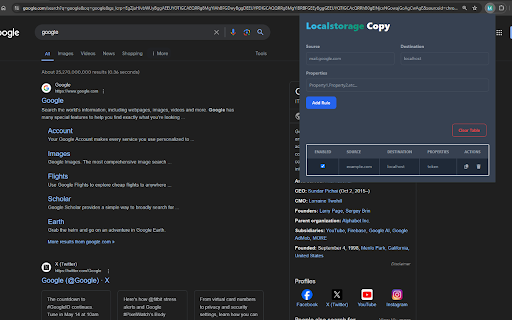
Copies localstorage items from one website to another, could be use for developers to login to applications on their dev machines… Copies localstorage items from one website to another, could be use for developers to login to applications on their dev machines mirroring the token they got from the staging environment.

Local Storage Manager
Manage your local storage variables in one single click. The best extension for devs. Copy, paste and edit your local storage variables in one single click

GetSet Local Storage & Session Storage
Get all the Local/Session Storage values of one domain and set all those values in other domain's local/session storage. This extension will let the developers get the local/session storage values of any domain (dev/staging/prod) and set those values into any other domain's local/session storage. For example, getting the local/session storage values from dev/staging urls and setting those values into the localhost's local/session storage. Please follow the steps: 1. Visit the domain URL from where you want to get all the local/session storage values. 2. Open the extension and click "Get" below Local Storage/Session Storage respectively. You'll see the feedback text "All the local/session storage values are retrieved." 3. Now visit the domain URL (for example, localhost:3000) where you want to set all the above retrieved local/session storage values in the local storage. 4. Open the extension and click "Set" below Local Storage/Session Storage respectively. You'll see the feedback text "All the retrieved local/session storage values are set." Now you can find all the values stored in the local/session storage. 5. Similarly, you can also clear the local/session storage values for any domain.

LocalStorage Watcher
Monitor localStorage changes and show notifications. LocalStorage Watcher is a powerful Chrome extension designed to monitor and track changes in localStorage across all websites you visit. This tool is perfect for developers, QA testers, and anyone interested in understanding how websites interact with local storage.

Storage Copier
Copy local and session storage between domains Storage Copier - Effortlessly Transfer Your Browser Data Storage Copier is a powerful Chrome extension designed to simplify the process of transferring your browser's local and session storage data. With this tool, developers and power users can easily copy storage data from one domain to another, streamlining testing and development processes. Key Features: • One-Click Copy: Instantly copy all storage data from the current domain • Selective Pasting: Choose to paste either local storage, session storage, or both • Cross-Domain Transfer: Easily move data between different domains • Developer-Friendly: Perfect for testing web applications across different environments • User-Friendly Interface: Simple popup interface for quick actions Whether you're a web developer testing your application, a QA engineer verifying functionality across domains, or a power user managing multiple accounts, Storage Copier streamlines your workflow and helps you manage browser storage data with ease. Install Storage Copier today and simplify your browser data management!
