
dfchjmkfiamiijddcjfaicahfdoainjj
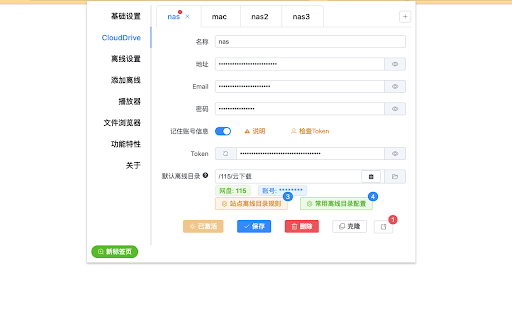


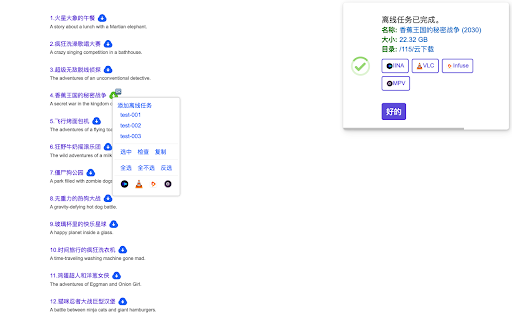
CloudDrive助手,是一个CloudDrive的周边工具,使用CloudDrive的API实现一些提高效率的功能。 本扩展主要使用了CloudDrive2开放的API(CloudAPI)来实现一些便捷的小功能,比如添加离线任务、快速播放网盘视频等。 CloudDrive官网:https://www.clouddrive2.com 【功能特性】 👉🏻 CloudDrive ☑️ 支持添加多个配置,随意切换。 ☑️ 支持简单的文件浏览;支持调用播放器进行播放。 👉🏻 离线 ☑️ 支持magnet和ed2k链接。 ☑️ 支持解析种子为magnet链接。 ☑️ 支持多选链接后批量添加离线任务。 ☑️ 支持自动从文本中提取支持的链接。 ☑️ 支持在网页选中任意文本后批量添加离线任务。 ☑️ 支持通过表单批量添加离线任务。 ☑️ 支持设置站点离线目录规则,根据网页链接自动选择目标离线目录。 ☑️ 支持设置常用的目标离线目录。 ☑️ 支持查看和管理离线任务。 ☑️ 支持添加离线任务后检查任务状态。 ☑️ 支持添加离线任务后调用外部播放器进行播放。 ☑️ 支持在任务列表调用外部播放器进行播放。 ☑️ 支持在离线任务完成时发送多种类型的通知。[实验功能] ☑️ 支持自定义站点页面预处理规则,使页面支持离线操作。 👉🏻 播放 ☑️ 内置常用的本地播放器设置。 ☑️ 支持自定义播放器。 ☑️ 支持在文件浏览器中调用播放。 ☑️ 支持在离线任务列表中调用播放。 ☑️ 支持在添加离线任务后调用播放。 【使用】 1. 设置界面: 浏览器窗口右上角的图标栏找到CloudDrive2图标,如果直接单击,则会打开一个小窗口,这是比较方便的操控方式,另外也可以右击这个图标,点击菜单「选项」打开一个单独的页面。 2. CloudDrive2配置: 在设置界面,左边栏切换到「CloudDrive」,填写连接信息。如果需要离线功能,至少需要设置「默认离线目录」,具体请查看设置界面里的帮助信息。 3. 添加离线任务: 3.1 在任意页面,扩展会在支持的资源链接右方(或下方)添加一个离线按钮(图标大概是一朵云 ☁️),点击该图标即可添加离线任务,添加后扩展会自动检查任务状态。当然,这只是默认的操作行为,扩展支持强大且灵活的行为自定义,可以在设置界面中的「离线设置」里设置为适合自己习惯的操作行为。 3.2 设置界面切换到「添加离线」,在这里可以粘贴资源链接、选择种子解析为磁力链接,可以指定目标目录。 4. 离线任务: 4.1 在页面点击离线按钮添加离线任务后,会自动进行任务状态的检查,对于单个任务,会显示详细的信息,而多个任务目前只会显示各个状态的数量(未找到、成功、失败等)。

Quicker Connector
Native message connector with Quicker application. !!! Do not download if you are not using Quicker application from https://getquicker.net. This extension was designed to work with Quicker (A windows tool that can automate operations and softwares).

cat-catch
Open Source: https://github.com/xifangczy/cat-catch For bug submissions, please visit GitHub or find other submission methods in the documentation. Documentation: https://o2bmm.gitbook.io/cat-catch/ The extension is not responsible for the content downloaded by users, so please check the copyright and permissions before downloading.

Aria2 Explorer
Speed up your downloads with Aria2, manage your download tasks easily. Aria2-Explorer captures browser's download task and exports it to Aria2 via JSON-RPC interfaces to complete download task. Aria2 is a lightweight multi-protocol & open-source command-line download utility. It supports HTTP/HTTPS, FTP, SFTP, BitTorrent and Metalink. 1. For Windows, please install Aria2 Manager: https://apps.microsoft.com/detail/9p5wq68q20wv?cid=cws Other platform, please download Aria2 utility: https://github.com/aria2/aria2/releases/latest. 2. For Windows, please run Aria2 Manager . Other platform, please run Aria2 in the Terminal with typing aria2c --enable-rpc. 3. Install this Chrome extension. 4. Enable auto-capture on the extension options page and configure others as you need. (For Motrix user, please use http://localhost:16800/jsonrpc as the RPC URL) After these steps, you could enjoy the multi-threads and BT download experience inside the Chrome. Warning: Please turn off auto-capture function, when you are using other extension to download network resources. Otherwise, there will be conflict and exception arisen. Features: [ ZERO collection of user data and privacy ] 1. Auto capture browser download tasks - Capture notification - Support magnet links - Toggle auto-capture by shortcut (Default: Alt + A) - Set all Aria2 options manually before download - Filter task by the domain, file extensions or file sizes Filter priority: domain > file-ext > file-size, white-list > black-list 2. Auto-select Aria2 RPC server by matching the preset download URL pattern 4. Synchronize and store all settings on the cloud 5. Support for zh-CN/zh-TW/en/fr/it/ja/ko/ru/uk languages 9. Support shortcuts in the options page (Save: Alt + S Reset: Alt + R Download: Alt + J Upload: Alt + U)

115网盘离线下载
针对115网盘会员用户,提供快速离线磁力和aria2导出功能;夸克网盘aria2导出功能。本插件需读取115网盘相关Cookie以实现自动登录和离线功能,并在获得用户授权后收集必要的账号标识信息用于会员服务验证,所收集数据不会出售给第三方。 插件说明: 0. 插件付费使用 1. 【一键离线】插件识别页面磁力链接, 支持点击一键离线 2. 【文本离线】支持未带magnet头部协议的文本和 sha1文本, 使用鼠标右键【发送到115离线】 3. 【aria2下载】aria2 下载 (支持115网盘/夸克网盘) 4. 【右键下载】(暂停)增加右键下载图片,适配weibo,twitter,instgram 高清图 5. 【鉴别磁力】(暂停)鉴别被屏蔽磁力链接 本插件需读取115网盘相关Cookie以实现自动登录和离线功能,并在获得用户授权后收集必要的账号标识信息用于会员服务验证,所收集数据决不会出售给第三方。 场景简介: 场景一:【一键离线】 识别页面的所有磁力链,并在磁力链左边加一个小图标,点击即可离线 场景二:【文本离线】不带 magent 头部的文本,使用鼠标右键发送文本到 115,即可离线 场景三:【aria2下载】使用aria2下载到挂载硬盘,nas等远程设备 场景四:老司机们自己挖掘咯 历史更新: [v1.10.28] 修复:chrome148版本登录问题 [v1.10.27] 增加:应商店要求完善隐私条款 [v1.10.26] 增加:支持新版ui [v1.10.24] 优化:遮挡问题 [v1.10.20] 修复:新版chrome 无法显示导出问题 [v1.10.14] 修复:离线文本问题 [v1.10.12] 修复:修复本地播放问题 [v1.10.10] 优化:浏览器升级后 aria2 无速度 [v1.10.7] 优化:aria2 导出沉睡下载 [v1.9.5] 修复:偶尔未出现115导出按钮 [v1.9.3] 修复:115小文件下载 网络测试 [v1.9.1] 修复:夸克 aria2 下载 & 115 sha1秒传 [v1.8.9] 修复:115 aria2 下载 [v1.8.3] bug:夸克文件夹下载不全问题 [v1.8.1] bug:登陆问题 [v1.7.4] 优化:夸克导出文件名重复 [v1.7.2] 优化:支持夸克网盘 aria2 导出,升级 manifest v3 [v1.6.8] 优化:大文件数量过多的下载 [v1.6.7] 修复:修复了大文件夹下载问题,自测大文件数量为 300,正常通过下载; 优化:增加了下载数量提示 [v1.6.4] 增加支持一键离线 115:// 格式的文本转存链接(sha1),具体操作,鼠标选中文字,右键发送文本到 115 [v1.6.3] 优化“本地播放”显示速度, 无感知 [v1.6.2] 文件鼠标浮动层增加 “本地播放”,列表加载1秒后鼠标移动生效 [v1.5.54] 修复导出按钮, 增加本地播放 [v1.5.46] 修复导出按钮,在左侧点击文件按钮消失的问题 [v1.5.43] 增加右键开关,通知消息开关和停留时长,aria2 导出面向会员,非会员请用 42 版本 [v1.5.42] 增加"搜索"后 aria2 导出,设置保存云端同步,调整 aria2 导出按钮位置 [v1.5.41] 增加右键下载图片,适配weibo,twitter,instgram 高清图 [v1.5.40] 调整 aria2 导出按钮位置 [v1.5.35] fixed : aria2 导出 文件大小限制 2020-08-01 1. 修复秒传 2020-02-11 1. 增加 aria2 导出 2020-01-31 1. 验证码问题 2020-01-18 1. 修复 qq 浏览器问题 2019-12-12 1. chrome 权限变更,增加授权页面 2019年11月13日 1. 不与另外的插件冲突 2019年08月05日 1. 增加秒传 2. 增加BUS 2019年05月17日 1. 修复 ed2k 链接无法下载的错误 2. 增加点击磁链后复制磁链的功能 3. fixed某站弹窗问题 4. fixed check blocked magnet
