
dfablgdffinpaeiilgjpebchbacimpoa
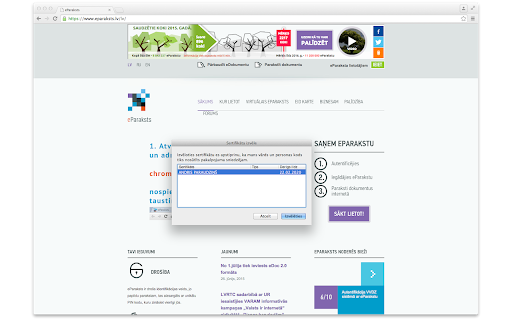
eParaksts signing extension Signatures with Latvian eID on the web. Installs automatically along with the eParaksts application installation.

Revolut Shopper
Faster, safer, smarter. Revolut Shopper transforms the way you buy online. Faster, safer, smarter. Revolut Shopper transforms the way you buy online. Meet Revolut Shopper, the new browser extension from Revolut, the financial super app trusted by more than 25 million people worldwide. Check out in a click faster than ever Make it easy to shop deals from different websites: just autofill your card number and skip adding your details every checkout. With Shopper, you can finish without any pit stops! Single-use cards for extra protection Stay secure with a unique card number for every spend. With your real card details hidden, safe from hackers and fraudsters, you’re free to treat yourself without any worry You’re in the driver’s seat With Shopper, you call the shots. Set your own spending limits, and freeze or unfreeze a card anytime. You can also customise each card’s color and name, to tell them apart easily! Ready to get started? Grab your laptop and add Shopper to your browser to enjoy fast, stress-free online payments. Any questions, check out our FAQs or reach out via the in-app chat. Happy shopping! ✓ Once you’ve logged in, go shopping as usual. At checkout, choose which card you want to pay with. ✓ Single-use virtual cards are perfect for adding security on unfamiliar merchant websites or when you make a big purchase. ✓ Multi-use virtual cards are ideal for managing all your different subscriptions so you’re always in control. ✓ Your card details are autofilled at checkout so there’s no need to hunt around for your wallet!

ePadLink SigCaptureWeb SDK Extension
The SigCaptureWebSDK Chrome Extension enables users to capture signatures on ePad Link signature pads. The ePadLink SigCaptureWeb SDK Extension allows developers and integrators to easily capture handwritten signatures securely in web applications running in the Chrome browser, and to bind those signatures to the document being signed.

Alitools Shopping Assistant
AUTOMATIC DISCOUNTS ALREADY IN YOUR CART - Autochecker of promo codes and coupons helps you save money. We find all the latest discounts daily and automatically apply the best ones to your cart. BUY AT A REAL, NOT EXCEEDED PRICE - Price history checker for the product over the last 3 or 6 months helps to avoid artificial discounts, especially during big sales: 1111 Sale, Black Friday and Cyber Monday. EUR, USD, RUB and 17 more currencies are supported for price tracking. BUY ONLY FROM RELIABLE SELLERS - Seller verification helps you avoid bad sellers. A reliable seller will deliver you what you bought right on time, and a bad one — a cat in a bag. Seller check works completely automatically. FIND EXACTLY THE PRODUCTS YOU ARE LOOKING FOR - Aliexpress search by image helps you to find the item in the picture in one click. No more wasting precious time and looking for a thing you like for a long time. - Search similar products help you find very similar products. This is useful when you want to find similar product, but slightly different. CHECK YOUR PRODUCTS BEFORE PURCHASING - Real product photos from customer feedbacks and product reviews allow you to check product before purchasing. Alitools can synchronize data between computers. For example, at work and at home. To do this, simply create an account. Alitools extension is fully compatible with other shopping extensions, cashback services and dropshipping tools. We are always open to communication and will be happy to answer your questions. Contact form: https://alitools.io/en/feedback. By installing the Alitools Chrome extension, you accept the terms of the «User Agreement» and allow redirecting you to the links of the affiliate program AliExpress. User agreement — https://alitools.io/en/info/agreement. For extension's functions to work and to be able to improve the product, we collect anonymous data about how you use AliExpress and other popular online stores. More details in privacy — https://alitools.io/en/info/policy. Our extension uses the Google Analytics service to collect statistics on the use of the extension. If you do not want to transfer data, you can find the official Google blocker application or any equivalent. The official Google Analytics blocker from Google — https://tools.google.com/dlpage/gaoptout. We support the Chrome Web Store’s minimum rational use of extensions policy: 1. «http(s)://*/*» - Collection of information on prices and products on Ali Express and on popular online stores. - Search for products on AliExpress by pictures on other sites. - Search for lower priced alternatives on AliExpress for products that you are viewing on other online stores. 2. «Cookies» - Alitools account authorization. - Automatic detection of language, currency and country. 3. «Notifications» - Price drop alert is sent, when price drops down by 5% or more. 4. «Tabs» and «Web Navigation» - Browsing history widget. - Correct functioning of the Ali Tools widget when opening multiple product pages. - We do not run reverse image search scripts on domains that are prohibited in the settings and save the resources of your computer. 5. «ContextMenus» - Search product by image from the context menu. 6. «Storage» - Storing the extension settings. - Storing the history of recently viewed products.

xLaw
xLaw - knowledge management platform for Lawyers. xLaw Estonia: explanatory memorandums, translations, court cases, journal articles, private comments etc. xLaw Latvia: english translations, redaction comparisons, court case search engine. xLaw EU: private comments, court cases with 1-click etc. xLaw Quicksearch: navigation to different sources (legislation, cases, business registry etc).
