
ddlpcandmdagknjmlmokglimgepcgpjo
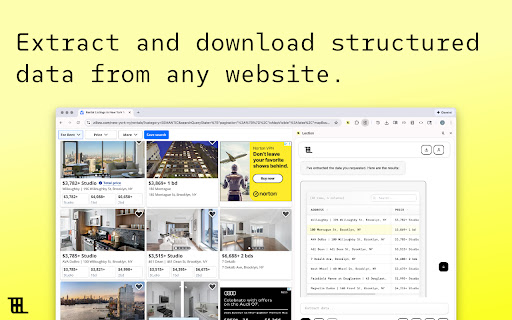

Create web scraping tasks directly in your browser that you can automate on the cloud. Lection is an AI-powered web scraper that turns plain English into automated data extraction. Just describe what you want, and our AI finds it for you. Describe your data in plain English (e.g., "Get product names and prices") AI builds the scraper automatically—analyzing the page structure for you Preview instantly, then export to CSV, JSON, Excel, or sync to your tools No CSS selectors. No XPath. No technical setup. Just describe what you need. Lection's AI handles the complexity—identifying tables, lists, and data fields automatically. Point-and-Click Precision Set up daily, weekly, or custom schedules. Your scrapes run in the cloud automatically—even when your browser is closed. Multi-Page Scraping Navigate pagination, follow links, and scrape entire sites in a single run. Lection handles the crawling logic for you. All scrapes run on our cloud infrastructure. View results anytime from your dashboard—no local processing required. Download as CSV, JSON, or Excel. Or send data directly to Zapier, Airtable, Make, Google Sheets, Supabase, webhooks, and more. Pre-configured scrapers for Instagram (followers, posts, comments), Reddit (subreddits), and common data patterns like tables and product listings. Monitor competitor pricing across e-commerce sites Track job postings from career pages Extract contact information from directories Aggregate reviews and ratings Build datasets for research or analysis Automate lead generation from business directories Why Lection? ✓ AI figures out the scraping logic ✓ Cloud-based—runs without your browser open ✓ Direct integrations with your tools

InsComment-Export-Download Instagram Comments
Maximize Your Instagram Management with Our Robust and Efficient Tool Are you searching for the best solution to manage and export Instagram data? Look no further! The Instagram Comment Export Tool is the quickest and most secure method to export Instagram comments, tailored for influencers, marketers, and data analysts seeking comprehensive insights. How to Use This Instagram Comment Export Chrome Extension Enter an Instagram username. Select the export type (comments). Click the Export button. Done! Features ✅ Export Instagram comments with one click using our extension. ✅ CSV and Excel formats support. Security ● The extension does not ask for your Instagram password or any of your data, including user information, story views, visit history, posts, and social relationships. ● Instagram enforces a rate limit, i.e., a limit on the number of requests. This rate limit is not public information and varies depending on your IP address. How it Works in the Instagram Comment Export Tool ● If you export a large number of Instagram comments, you might experience a rate limit error. ● The extension will then go into “Cooldown” mode. The timer will display the remaining time. ● If the limit error persists, the cooldown period will double. ● Once the cooldown period ends and the subsequent request is successful, the extension switches back to Normal mode. Statement INSTAGRAM is a trademark of Instagram, LLC. Instagram Comment Export is not affiliated with, endorsed, sponsored, or otherwise related to Instagram, Inc., or any of its affiliates or subsidiaries. ➡️ After installing, please reload all tabs for the Chrome extension to take effect. If you're looking for an Instagram export tool, you really need to try this Instagram Comment Export Tool! Rate it with 5 stars, share it with your friends, and build a new community of Instagram enthusiasts.

Instagram Comment Exporter - Free Downloader by exporter24
Download Instagram comments and replies with author insights and engagement metrics. Free and unlimited. Instagram Comment Exporter is a powerful Chrome extension that lets you export Instagram post comments and replies to CSV files with ease. It supports detailed data scraping and helps you save time when managing large volumes of comment information. How to Use: 1. Open the Instagram post page. 2. Click the extension button located next to the comment section to open the Instagram Comment Exporter extension page. 3. Click the "Start" button to begin scraping. 4. Once the scraping process is complete, download your data in CSV format. Features: - Export comments quickly with a single click. - Automatically handles Instagram rate limit errors. - No Instagram password or sensitive data required for operation. Security: Instagram Comment Exporter does not ask for your Instagram password or access any sensitive personal data, such as private messages, story views, or followers list. Instagram's rate limits are automatically handled to ensure safe and efficient scraping. Instagram Comment Exporter is your ultimate tool for exporting Instagram comment data securely and efficiently. Also can be used for exporting followings/followers on Instagram, TikTok, etc. Please check out https://www.exporter24.net

Instagram Comments Scraper - IG Comment Export Tool
Export IG comments to Excel/CSV in one click! IG comment export tool, a reliable instagram comments scraper for fast, accurate data. ▬▬▬▬▬▬▬ Description Step by Step ▬▬▬▬▬▬▬ 1. Click Extension icon, which is on browser toolbar, then open a popup page. 2. Click "Export Instagram Data" button, an IGTools option page will be opened. 3. Input a valid IG post URL. 4. Click "Start parsing" button, and our Tools will run automatically. After this processing is finished, you can download IG comments to CSV or Excel. ▬▬▬▬▬▬▬ Features ▬▬▬▬▬▬▬ ● One-Click Export: Extract data using the best ig comment exporter. ● Format Freedom: Fully supports CSV and Excel downloads. ● Smart Recovery: Automatically bypasses IG rate limit errors. ● High Speed: Fast processing via our optimized ig comment export tool. ● No Login Required: We never ask for your password. ▬▬▬▬▬▬▬ Supported columns ▬▬▬▬▬▬▬ ● id ● text ● username ● profile url ● profile pic url ● date ▬▬▬▬▬▬▬▬ Security ▬▬▬▬▬▬ ● No Password Required: This ig comment exporter never requests your Instagram password or accesses any personal data — including user info, stories, visit history, posts, or social relationships. ● Smart Rate Management: Instagram comments scraper intelligently manages IG rate limits, which vary by IP address and are not publicly disclosed. ● Local Processing: All data handled by this ig comment export tool is processed entirely within your browser. No personal account details are ever stored or transmitted. ● Account Safety: A built-in "Human-Like" delay system keeps your activity within safe boundaries, helping you avoid account flags or restrictions. ● Transparent Operation: We only access the public comment data you explicitly choose to export — nothing more. ▬▬▬▬▬▬▬▬ How it works ▬▬▬▬▬▬ ● If you export a huge list of data, you can experience a rate limit error. ● The extension goes into “Cooldown” mode. The timer shows the time remaining. ● If the limit error persist, the cooldown period increases 2x. ● Once the cooldown period ends and the subsequent request is successful, the IGTools switches to the Normal mode. ▬▬▬▬▬▬▬▬ Statement ▬▬▬▬▬▬ INSTAGRAM is a trademark of Instagram, LLC. This instagram comments scraper is not affiliated with, endorsed, sponsored, or otherwise related to Instagram, LLC. or any of its affiliates or subsidiaries.

IG Comments Export - Post Comments Exporter and Scraper for Instagram
IG Comments Export: Export Instagram Comments to CSV for Giveaways, Analysis, and Backups Easily export Instagram comments to CSV for streamlined giveaway management! 🏆 The ultimate tool for anyone looking to export Instagram comments into CSV format. This smart tool lets you quickly transfer Instagram comments into a CSV file with a single click. Start making the most of Instagram comment exporting for your giveaways today! 🚗 How It Works - Simple Steps: 1. Paste the Instagram post URL. 2. Hit the export button. 🔒 USAGE POLICY: • No password needed. • All data you export is processed locally, ensuring your information remains private.
