
ddkbmflfhmcidnnmmbmcnkidiigbnljb

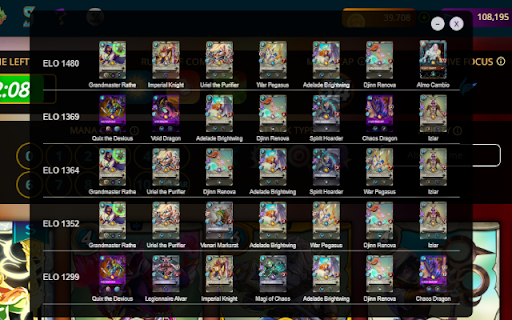


XBOT Battle Helper for Splinterlands. It helps you choose the best team for the battle and includes many QoL features. XBOT Battle Helper extension has 5 features: • Battle Helper Access (Team Recommendations via XBOT) • Simulate battle results directly on the battle page • Change background image on battle page • Change Game Speed up to 12x • Auto-start battle

Hive Keychain
Secure Hive Wallet Extension. Hive Keychain is an extension for accessing Hive-enabled distributed applications, or "dApps" in your Chromium or Firefox browser! The extension injects the Hive Keychain API into every website's javascript context, so that dApps can read from the blockchain. Hive Keychain also lets the user create and manage their own identities, so when a dApp wants to perform a transaction and write to the blockchain, the user gets a secure interface to review the transaction, before approving or rejecting it. Because it adds functionality to the normal browser context, Hive Keychain requires the permission to read and write to any webpage. You can always "view the source" of Hive Keychain the way you do any Chrome extension, or view the source code on Github: https://github.com/hive-keychain/hive-keychain-extension

brocrobes
Browser plugin for https://transcrob.es Brocrobes is the Chrome-compatible web extension for interacting with the open source foreign language content enrichment system of Transcrobes (https://transcrob.es). It allows you to take any webpage and enrich it with personalised, hypertext-based comprehension aids. It requires an existing account on a Transcrobes server. Free accounts are available at https://am.transcrob.es NEW! Now with personalised language learning support for watching many of your favourite movies on Netflix or Youku (in Mainland China)!

Tab Search Pro
Search active tabs, highlight results, save search history, switch between the last two active tabs, navigate tabs chronologically. Introducing Tab Search Pro, the ultimate browser extension designed to revolutionize your web searching experience. Tired of juggling multiple tabs just to find the information you need? Tab Search Pro is here to make your browsing efficient, organized, and productive. *Now, with the new feature to duplicate the current tab, you can effortlessly create a copy of any tab you're working on, enhancing your browsing efficiency even further.* Now you can easily switch between the last two active tabs, and navigate tabs chronologically for efficient browsing. At its core, Tab Search Pro is all about simplifying the way you search for content within your open tabs. Say goodbye to the hassle of switching between tabs, wasting precious time in endless clicks. With Tab Search Pro, you can effortlessly search for text across all your active tabs without losing focus on your current page. Using Tab Search Pro is a breeze. Just highlight any text that you want to look up, and a world of possibilities opens up. Activate the search through convenient context menu options or by utilizing customizable keyboard shortcuts. Tab Search Pro will quickly scan your open tabs, seeking out the first tab where your desired content is found. Not only that, it will highlight all occurrences of the text throughout your open tabs, making it easy to locate the information you need at a glance. Available Shortcuts: Duplicate Current Tab and Activate It Alt+Shift+D (Mac) Alt+Shift+D (Windows/Linux) Switch between the last two active tabs Command+Q (Mac) Ctrl+Q (Windows/Linux) Switch to the previous tab in the order they were activated, maintaining the chronological sequence of tab activations Ctrl+Shift+Space (Mac) Command+Space (Windows/Linux) But what sets Tab Search Pro apart is its versatility. If Tab Search Pro doesn't find a match within your tabs, it has your back. Instead of leaving you empty-handed, the extension prompts you to conduct a Google search directly, ensuring that you never miss out on any relevant information. With this dynamic feature, you're never left without answers. We value your privacy and security, which is why Tab Search Pro is designed with minimal permissions, including activeTab, contextMenus, scripting, and tabs. Rest assured, your data stays within your browser, and you remain in complete control. Tab Search Pro is not just a simple search tool; it's a productivity powerhouse. Imagine the time and effort you'll save as you seamlessly navigate through your tabs, instantly finding the information you need. No more distractions, no more wasted clicks – just pure efficiency. Whether you're a researcher, student, or a professional seeking the latest news, Tab Search Pro empowers you to be in charge of your browsing. No more losing focus, no more disruptions – only smooth and targeted searches. With Tab Search Pro as your trusted companion, you can create an organized browsing environment, keeping track of your searches and creating a history for later usage. No more digging through browser history or bookmarks; your sought-after content is always just a click away. Don't settle for inefficient browsing. Upgrade to Tab Search Pro and unlock the full potential of your web searching capabilities. Embrace a new level of productivity, save time, and access information faster than ever before. Tab Search Pro is your ticket to a more streamlined, effortless, and enjoyable browsing experience. Install Tab Search Pro today and take the first step towards a smarter, more efficient web journey.

Congree Web Interface
Write according to your company's Style Guide This extension helps you to integrate your company's Congree Authoring Server into specific websites. Research Meets Practice Content optimization solutions based on scientific insight and long-standing industry experience Higher text quality with less effort Apart from the reuse of sentences and consistent use of terminology, Congree offers a comprehensive Language Check that covers 98 percent of the English and German languages. The Congree Authoring Server is scalable and thus supports the editorial work in small, medium-sized, and large enterprises. Rule-Based Language Check Apart from the spelling, grammar, and terminology, the rule-based Language Check also checks the style. Predefined rule sets cover most application cases; additional company-specific rules can be added as needed. Authoring Memory The Authoring Memory serves as a sentence repository, which shows all text segments that are similar to your text and that were written and approved in the past. You can apply these text segments with a click. New sentences are included in the Authoring Memory after they are checked and approved. Congree Data Grooming can help to maintain and improve the quality of your Authoring Memory. Terminology Component The connection of third-party terminology software enables access to a wide range of information on terminology hits. The terminology component in Congree delivers definitions and usage information on specialized terms – including preferred terms, admitted terms, and deprecated terms.
