
ddkacjpcbjcnbnhijggkdgfemmogpiil

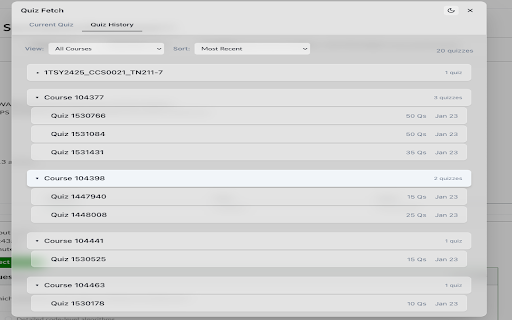
Automatically capture and organize Canvas LMS quiz questions for easy review and study. 📝 Auto-capture quiz questions while taking Canvas quizzes ✅ Answer tracking with correct/incorrect indicators 📊 Score visualization with progress tracking 📋 One-click export to clipboard or HTML file 🎯 Smart detection of multiple choice, fill-in-blank, and text questions 🔘 Quick access buttons on Canvas quiz pages 🔍 Search functionality to quickly find specific questions

Canvas Hack
Cheat on quizzes easily, and maintain a low-profile on all Canvas tests. Introducing the Canvas Hack, an extension which allows any student to side-step canvas cheating detection. It prevents your teacher or professor from detecting tab switching, window switching, or any similar actions during Canvas quizzes and tests. You can also save your correct answers in quizzes with multiple attempts, allowing you to retake tests with ease. This extension has been rigorously tested to make sure that you are 100% cloaked on Canvas while this extension is activated. Join 2,000+ students acing their tests effortlessly with the CanvasHack! All CanvasHack features/hacks: - Tab Detection Bypass: Prevents Canvas from detecting when you leave the testing tab. - Undetectable Activity: Makes all actions on Canvas appear normal, even when cheating. - Split Screen Bypass: Allows for split-screen usage without detection. - Automatic Activation: The CanvasHack is able to be used right after activation, no waiting around! - Save Feature: Saves correct answers from previous quiz attempts for reuse on later retakes. - Kiosk Mode: Mimics the Canvas kiosk app within the browser, for students who need to spoof the app and cheat undetected. - Extensive Testing: Successfully tested by over 80 college and high school students, plus 7,000 beta testers and not a SINGLE report of the CanvasHack not working. - Cross-Domain Support: Works on ALL Canvas website domains/urls, all college urls, including non- .instructure.com ones. Everything above is activated directly upon installing the extension and purchasing the cheap subscription or one time payment✌️(for more details visit the CanvasHack website listed below ↘️) Learn more about the extension at: https://canvashack.com/ In order to book a call to test the CanvasHack before purchasing, join the discord server linked below, you'll able to see the tool working 1-on-1! If you have any questions/issues feel free to contact the development team through discord -> (https://discord.gg/eEWFw9th8D) Full YouTube Video Demo with Teacher & Student POV. Displays results cheating with & without the CanvasHack activated: https://www.youtube.com/watch?v=IX1TamSlnj8 Disclaimer: Canvas Hack is an unofficial tool and is not endorsed by or affiliated with any educational institution, including Canvas™. All trademarks belong to their respective owners. Canvas™ is a trademark of Instucture® Inc.

Canvas Course Downloader & Exporter
Download, export, and back up Canvas LMS course files, pages, assignments, grades, and more into organized folders. Canvas courses disappear after the semester ends. This extension lets you download, export, and back up everything from your courses before that happens: files, pages, assignments, discussions, announcements, modules, quizzes, your syllabus, and even your grades as a CSV. It works on any Canvas LMS instance, whether hosted on instructure.com or your school's own domain. Just navigate to a course page and click the download button. The extension uses your existing Canvas session, so there's no API token to set up. Export your course materials to use with AI tools like ChatGPT, Claude, or NotebookLM. The organized folder structure and clean HTML (or Markdown) exports make it easy to upload everything and turn your courses into a personal tutor, generate study guides, or search across all your materials at once. What you can download: - All course files with the original folder structure preserved - Pages, assignments, discussions, and announcements saved as HTML with scripts stripped out - Quizzes, including your own score and your answers when your instructor allows it - Module structure with any files referenced inside them - Your syllabus as a standalone HTML file - Grades exported as a CSV with assignment names, due dates, scores, and letter grades - Files and images embedded in page content that don't show up in the course file browser Teaching a course? When you're a teacher or TA, the extension automatically archives the full picture (students still only ever get their own view): - Every student's submissions, files, text, grades, instructor comments, and rubric scores - A full class gradebook and student roster, with sections - Complete discussion threads, including every student reply - Quizzes with the question bank, answer key, and per-student scores Other things worth knowing: - Batch mode lets you select multiple courses at once, including past/completed courses, and download them all - ZIP bundling (on by default) packs each course into a single .zip instead of hundreds of individual file downloads - Incremental mode skips files you've already downloaded, so re-running only grabs what's new - File filters let you exclude videos or skip files above a size limit - A progress panel shows what's downloading, what failed, and lets you retry failures - Each download includes a manifest.json with course metadata and file counts - Configurable throttle delay between downloads to avoid hitting rate limits - Keyboard shortcut (Ctrl+Shift+D / Cmd+Shift+D) to start a download without opening the popup - Presets for common scenarios: full archive, files only, text content only The extension only communicates with your Canvas instance. No data is sent anywhere else. The entire project is open source at https://github.com/jasp-nerd/canvas-course-downloader if you want to check for yourself.

Canvas Quiz Loader
Are you tired of opening two windows just so that you can see what you've answered in the previous quiz attempt? Well, I understand. It gets even worse when you have multiple submissions that need to be combined into one. Canvas Quiz Loader has been built to solve this common problem. It scans your previous submissions, picks out correct answers, and automatically applies them to the current attempt. ============================================== We support ALL question types * * If formula or variables within the formula change, the answer might have to be changed as well. * Fill in multiple blank question type does not auto-populate, but you will still see your previous and best submission results ============================================== For questions, suggestions, and bug reports, engage with us on Discord https://discord.gg/npNySzNZ

Canvas Hack Pro
Canvas Hack Pro for every Canvas LMS quiz. Answer faster with this powerful Canvas hack tool designed to optimize your workflow. Canvas Hack Pro is a lightweight browser extension designed to improve productivity while working inside a Canvas LMS Quiz page. Instead of switching tabs or manually tracking previous attempts, Canvas Hack Pro adds small workflow tools that operate directly within the LMS Quiz interface. This extension focuses on organization and efficiency. With Canvas Hack Pro, users can review information from earlier attempts (when permitted by quiz settings), stay consistent across submissions, and keep their quiz workflow organized without leaving the page. The purpose of Canvas Hack Pro is simple: provide practical in-page utilities that make navigating and managing a quiz easier. ⚙️ Features 📝 Answer Review Tools for LMS Quizzes When a quiz allows multiple attempts, Canvas Hack Pro provides tools that help users review their own previous submissions. This feature helps organize information across attempts and keeps the quiz workflow consistent. 🧰 In-Page Toolbar The extension adds a small optional toolbar to supported LMS Quiz pages. The toolbar provides quick access to tools so users can stay focused during an LMS Quiz without navigating away from the page. The toolbar can be hidden at any time to keep the interface clean. Unlike complex external tools, the extension works directly inside the browser. This lightweight design keeps the LMS Quiz environment simple and responsive. Users can configure where Canvas Hack Pro runs and where it remains inactive. This allows the tools to appear only when a supported quiz page is detected. Install Canvas Hack Pro in your browser Open your institution’s LMS website Navigate to a Quiz page Open the extension and activate the tools Use the tools during your LMS Quiz workflow to review previous attempts and stay organized With the extension, managing an LMS Quiz becomes simpler and more structured ❓ FAQ Is Canvas Hack Pro only for LMS Quiz pages? The extension is optimized for the LMS Quiz interface. The tools activate automatically when compatible quiz pages are detected. No. The extension does not submit answers, change quiz content, or interact with grading systems. Its utilities only help users organize information during an LMS Quiz session. After the trial period ends, continued access to premium tools requires a purchase. This extension is an independent browser extension and is not affiliated with, endorsed by, or officially connected to Canvas LMS or any educational institution. The extension does not bypass platform restrictions, automate answers, or access protected data. All tools are designed only to assist users in organizing their own workflow within an LMS Quiz environment.
