
dddhhdjpmcideofdgcohkajmmjdkbjoo
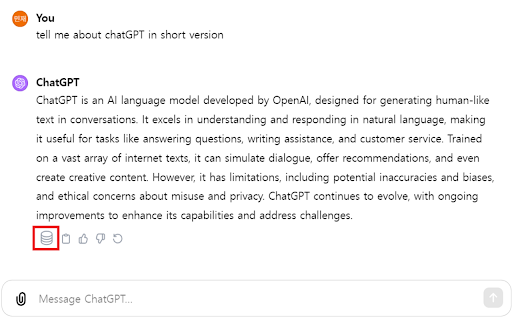
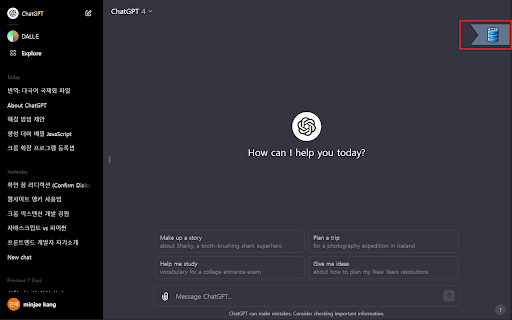
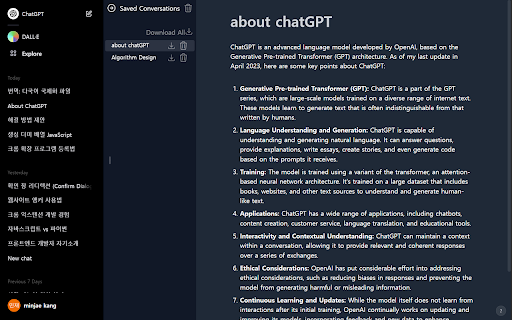
Save, edit, search, and download ChatGPT conversations locally in Markdown. storageGPT helps you keep useful ChatGPT conversations organized without sending your saved data to any external server. Save conversations: Save ChatGPT responses directly from the conversation screen and keep them in your local browser storage. Editable notes: Open a saved conversation in the drawer and edit both the title and the body. The body editor is powered by Milkdown, so Markdown content stays easy to read and update. Fast drawer access: Use `Control + Shift + X` to open the storage drawer quickly. Search and trash management: Search saved titles, restore deleted notes, or permanently clean up the trash. Theme-aware UI: The extension follows ChatGPT light and dark modes for a more natural experience. Local-first privacy: Saved conversations stay on your device. storageGPT does not transmit your saved data to a server. Added editable saved note bodies with Milkdown. Improved drawer layout, fixed click handling, and reduced CSS conflicts through Shadow DOM encapsulation. Improved light mode support and visual styling. storageGPT makes it easier to save, edit, search, and export the ChatGPT conversations you want to keep.

AI Conversation Saver
Save and manage your AI conversations with a modern, fast, and easy-to-use interface. AI Conversation Hub is a fast, modern Chrome extension designed to save, organize, and export conversations from leading AI platforms with a clean and intuitive experience. Easily export full conversations, selected messages, or multiple chats at once with a streamlined workflow built for productivity, sharing, and archiving. • Select and export specific messages only Choose exactly which messages you want to save or share. • Bulk export multiple conversations Export multiple chats simultaneously and download them together in a convenient ZIP package. • Clean and professional exports Generate beautifully formatted conversation files that are easy to read, share, print, or archive. • Modern interface Enjoy a polished tabbed interface with dedicated Export and Settings panels. • Dark, Light, and Auto themes Switch seamlessly between themes with preferences saved across sessions. • Smart file naming Automatically names exported files using your conversation context for better organization. • Optional metadata controls Include or exclude timestamps and export details as needed. • Performance optimized Handles long conversations smoothly and efficiently. • One-click feedback access Quickly share suggestions and reviews directly from the extension. • Built on Manifest V3 Designed with the latest Chrome extension standards for performance and long-term compatibility. Perfect for professionals, developers, writers, researchers, students, content creators, and anyone who wants a better way to manage AI conversations.

ChatGPT Chat Downloader
A browser extension that allows you to download chat conversations. U can easily download your Chat GPT Chats using this small extension, I will constantly update it if there come chatgpt html updates. The Chats are downloaded as HTML-Files so u can easily open and view them. Stylesheet used by this extension is a rip-off of the ChatGPT stylesheet so all rights are onto them.

TurboGPT For ChatGPT
Introducing TurboGPT - the ultimate productivity Chat GPT Chrome extension designed to supercharge your writing experience. With TurboGPT, you can quickly generate text snippets, article summaries, and even entire articles using cutting-edge AI technology. Powered by OpenAI's Chat GPT-3 language model, TurboGPT offers lightning-fast writing suggestions and automated content creation for all your writing needs. Whether you're a blogger, content marketer, or just looking to write more efficiently, TurboGPT is the perfect tool to help you boost your writing speed and quality. TurboGPT is incredibly easy to use. Simply install the extension, and you'll have access to a powerful AI writing assistant right in your browser. With intuitive prompts and real-time suggestions, TurboGPT can help you write better and faster than ever before. So why waste time struggling with writer's block or staring at a blank page? Install TurboGPT today and start writing with the speed and confidence of a professional writer.

AI Prompt Lab
Chrome Extension for AI Tool Prompts: Enhanced Interaction with AI Creating, editing, storing, and organizing prompts has never… Chrome Extension for AI Tool Prompts: Enhanced Interaction with AI Creating, editing, storing, and organizing prompts has never been easier. Introduction The AI Prompt Lab Chrome Extension is a groundbreaking tool for creating, editing, storing, and organizing prompts for Large Language Models (LLM), such as ChatGPT. In the near future, the range will be expanded to include Leonardo, Midjourney, and other tools. Designed for convenience and efficiency, this extension is an invaluable aid for anyone who regularly uses AI tools. Creating Prompts With AI Prompt Lab, users can easily save prompts created directly from the text window of their chosen AI tool. The intuitive user interface and editing features of our extension make this process fast and hassle-free. The extension also allows the use of ready-made prompts, which can be tailored to individual needs. Editing and Organization Advanced editing options allow for personalization of each prompt. Users can assign titles, tag, and move prompts between folders for better order and access. The drag-and-drop feature ensures easy and quick organization. Managing Folders The AI Prompt Lab extension enables the creation and naming of folders, facilitating the organization of prompts. Users can also create "prompt bars" to link content and folders, e.g., by topics, clients, or specific work cycles. This allows quick access to frequently used or specialized prompts. Ready-Made Prompts For users looking for inspiration or a quick solution, AI Prompt Lab offers a set of ready-made prompts from various fields, which can be immediately used or customized to one's own needs. Saving and Storing All created and modified prompts can be easily saved and stored in the extension. This ensures that favorite or important prompts are always at hand. User Interface AI Prompt Lab has a clear and user-friendly drop-down menu, enabling easy access to all tool functions without leaving the AI tool's web page. AI Integration Our extension works with all AI platforms through the side panel - ChatGPT, Claude, Gemini and more. Access any AI tool you need directly from our interface, giving you complete flexibility and seamless integration with your preferred AI services. Why Use Our Extension? AI Prompt Lab is not just about convenience and time-saving. It's also a way to enhance the efficiency of working with AI, through better organization and availability of prompts. Whether you are a professional using AI for work, or an enthusiast eager to explore the possibilities of LLM, our extension provides the necessary tools to fully utilize the potential of AI. Experience for yourself how our Chrome extension can change the way you work with prompts in AI. visit https://ai-promptlab.com for more.
