
dddapfimfefnombikhnbckhjmfkggifl
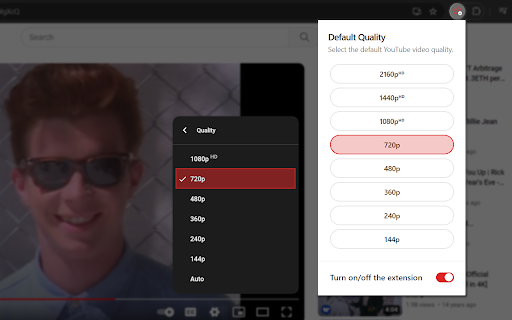

Easily set your preferred default video quality for YouTube™ Meet 'Default Quality Adjuster for YouTube™' – your personalized solution for seamless video streaming on the world's favorite platform. Tired of continually tweaking video quality settings every time you switch videos? Bid farewell to this inconvenience with our user-friendly extension. With 'Default Quality Adjuster for YouTube™', selecting your preferred video quality is a breeze. Simply open the popup, choose your desired quality, and let our extension take care of the rest. Your selection is saved automatically, ensuring that every video you watch thereafter is streamed in your chosen quality without any manual intervention. Whether you're an HD enthusiast or prefer conserving bandwidth with a lower resolution, our extension ensures a tailored viewing experience every time you hit play. Say goodbye to interruptions and hello to uninterrupted enjoyment of your favorite YouTube™ content. Experience hassle-free streaming today – add 'Default Quality Adjuster for YouTube™' to Chrome and redefine your video-watching experience. v1.0.1 - Added 8k option. - Default video quality upon installation now set to 720p. - Added a feature to auto-select next highest quality if default option isn't available. - Added support for Indonesian language. - Various minor bug fixes and improvements.

Enhancer for YouTube™
Take control of YouTube and boost your user experience! Enhancer for YouTube™ is the ultimate tool to supercharge your YouTube experience with a host of highly customizable features, making it smoother and more enjoyable. Whether you’re looking to fine-tune playback settings or customize the look and feel, this YouTube enhancer gives you complete control to tailor YouTube to your needs. Video Playback: • Quickly adjust playback speed, quality, volume, and more with the mouse wheel or keyboard shortcuts. • Playback Speed: Set a default playback speed and adjust it anywhere from 0.07x to 16x while watching. • Playback Quality: Set a default playback quality for videos, playlists, and embedded videos. • Volume Booster: Boost volume and bass for louder, clearer sound (up to 10x audio boost). • Enhanced Loop Mode: Repeat specific parts or the entire video effortlessly. • Autoplay Control: Fine-tune or disable YouTube’s autoplay features for better control. • Video Formats: Disable high frame rate formats (60fps). Appearance and Themes: • Video Filters: Adjust brightness, contrast, color, and more without changing your monitor's settings. • Enhanced Dark Mode: Enjoy a sleek, eye-friendly interface with the built-in Dark Theme and its 50+ variants. • Custom Themes: Personalize YouTube's appearance with custom themes to suit your style. • Cinema Mode: Dim everything around the player to keep your focus on the video. Video Player: • Wide Player: Expand the player beyond the default Theater Mode, or fill the entire screen without going full screen. • Mini Player: Keep watching while reading comments so you never miss a moment. • Pop-up Player: Watch videos in a resizable window while multitasking or browsing other content. Distractions and Shorts: • Block Distractions: Hide end screens, info cards, recommendations, related videos, chat, or comments. • YouTube Shorts: Hide Shorts or watch Shorts like regular videos. Other Features: • Screenshot: Capture high-quality screenshots of your favorite video moments. • Keyboard Shortcuts: Set up customizable keyboard shortcuts to control YouTube like a pro. • Reverse Playlists: Watch playlists in reverse order for a fresh viewing experience. And more! Get the most popular YouTube enhancer now and transform the way you watch YouTube forever! Enhancer for YouTube™ is a third-party extension and is not affiliated with YouTube. YouTube is a trademark of Google LLC. Use of this trademark is subject to Google Permissions.

YouTube Quality Adjuster
Automatically adjusts the quality of YouTube Videos Adjust the quality of YouTube Videos automatically. Only available in the original YouTube page, not the embedded videos. Updated Feb/2025 - added extra functionality for HD qualities - added fallback functionality, make sure to set it to your preference - added Donation button, your support is highly appreciated

Video playback rate control for YouTube™
Take full control of YouTube video playback speed. Adjust the rate more extensively. Take full control of your YouTube viewing experience with powerful keyboard shortcuts! 🔹 This is a third-party extension and is not officially affiliated with YouTube™. 🔸Extended Speed Control: Adjust playback speed with greater precision and a wider range (up to 16x). It uses the same standard YouTube shortcuts (). 🔸Custom Time Seeking: Rewind or fast-forward by a custom amount of time (1-4 seconds) using SHIFT + ← and SHIFT + →. On-Screen Display: Instantly see the current playback speed right on the player's control bar. 🔸When playing at speeds above 2x (or 4x for Premium users), YouTube's native closed captions (CC) may occasionally lag and then appear in a batch. 🔸⚠️ The custom seek shortcut has been changed to SHIFT + Arrow to avoid conflicting with YouTube's default shortcut for chapter navigation (CTRL + Arrow on Windows, ⌘ + Arrow on Mac). - Wider Compatibility: The extension now fully works on videos embedded with "privacy-enhanced mode" (youtube-nocookie.com). - Instant Option Updates: Changes made in the options page now apply instantly, no page reload required. - Optimized for YouTube Premium: Full support for YouTube Premium's new high-speed playback features, providing a stable viewing experience at higher rates.

ResLock for YouTube
Automatically sets YouTube video quality to your preferred resolution. Have you had enough of manually changing YouTube quality every time you start a new video? Tired of switching back to 1080p or higher on every single click? Set your preferred playback quality once, and ResLock applies it automatically whenever a video starts. No more digging through the settings menu. No more interruptions. Just consistent playback the way you want it. If your selected quality isn’t available, ResLock intelligently falls back to the closest available resolution to keep playback smooth and stable. Why ResLock is worth it: - Saves time on every video - Keeps your viewing experience consistent - Reduces frustration from unwanted auto-quality changes - Simple setup — works quietly in the background - No ads, no clutter Whether you prefer stable 720p on slower networks or sharp 1080p+ on a fast connection, ResLock ensures YouTube behaves the way you expect. Core Features: - Automatic preferred quality apply on YouTube - Optional Always Best mode (automatically selects the highest available resolution) - Optional on-video quality badge - Clean popup settings with one-click save - Account and subscription handling via ExtPay An optional Pro plan is available via ExtPay for $1 USD/month. Pro unlocks: - Higher-resolution options - Pro-only quality controls - Advanced playback preference handling Independent & Ad-Free: ResLock is part of the MemoTweaks extension lineup and is independently built and maintained. The extension does not show ads or inject advertising into your experience. Optional Pro support helps fund ongoing maintenance, improvements, and future tools. Highlights: - Auto-applies your preferred YouTube quality - Optional Always Best mode (Pro) - Optional on-video quality badge - Clean popup controls with one-click save - Secure subscription handling via ExtPay - Lightweight, focused, and distraction-free Learn more or support the project at: https://MemoTweaks.com
