
dcijbgljdombbkbmmkabanaopnnapcfd

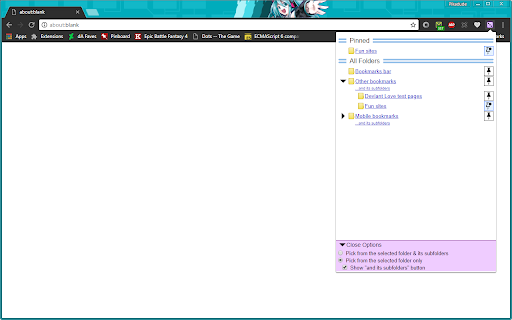
Pick a folder, roll the die! This extension lets you open randomly-selected bookmarks from a folder of your choice. Features: - Pin your favorite folders to the top for easier access - Decide for yourself whether subfolders are included - Made with care to provide a friendly, functional interface

Random Bookmark Machine
Explore forgotten bookmarks with this highly customizable time machine! Click the blue and yellow button on your Toolbar and a random website from your bookmarks list will open. This is the lightest, fastest and most customizable extension of this kind. You can choose to: - Open each bookmark in a new tab or always in the same tab - Show a short notification for every bookmark opened. In the notification you will see the date of when you created the bookmark and the name of the folder where the bookmark is stored - Set your own keyboard shortcut All options are easily manageable in our cool vintage styled Options page. Right-click on the Toolbar button and select “Options” to open the Options page.

Random Bookmark URL
A bookmark randomizer is used to scroll through your saved bookmarks. I save a lot of bookmarks. Sometimes, I want to click a button and mindlessly scroll through my bookmarks. This extension allows me to do that. I thought I'd share it with you.

Random Tab
Opens a random tab when the icon is pressed and displays a tab counter. Now with the added option to chose between opening a random tab from all windows or just the current window.

Random Tab Picker
Indecisive about what to watch/buy/do? Open them in different tabs and let this extension pick a random one (or more) for you. How to use the extension The extension shows a list of tabs that are currently open on your browser window. You can unselect tabs from the list by clicking on them*. Unselected tabs will not be a part of the random selection. If you want the extension to pick only one tab, press the "Pick One" button and the extension will select a random tab and automatically switch to the tab it has selected**. If you would like the extension to pick multiple tabs, press the "Pick Multiple" button and there will be a pop up on your screen asking how many tabs you would like the extension to pick. Enter the desired number of tabs to be picked and press the "OK" button. The extension will pick random tabs, create a tab group named "SELECTED" which contains the randomly picked tabs, and automatically switch to one of the tabs it picked. You can see the rest of the picked tabs within the tab group. Notes: * Tabs you unselect from the extension list will remain open on your browser ** If the active tab remains the same after you press the button, it means the tab you were on was picked. Icon created by juicy_fish on flaticon.com Source code: https://github.com/han-lue/random-tab-picker-chrome-extension
