
dcfnpdofbnolkdljlifgjfcebfnkiiog
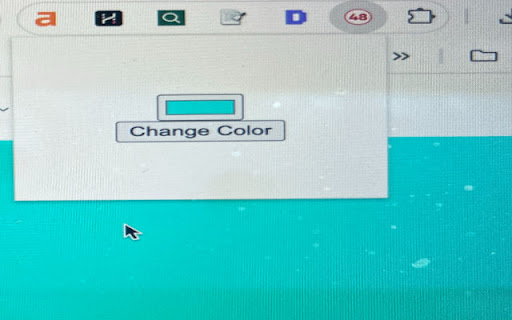
Changes the background color of the current webpage. Color-changer extensions changes the background color of any webpage to a color of your choice when you click on the extension's icon.

Pastel Pink YouTube
Changes the background color of YouTube pages to a pastel pink color. Change the default white background of YouTube to a cute pastel pink. Customize YouTube with your favorite color! CHANGELOG: Version 3.0 Fixed the extension, since it stopped working with changes in the YouTube design. Version 2.0 Added a On/Off slider. This needs new permissions to correctly apply the setting of the user to all YouTube tabs.

Colorfy
Change colors of elements on a web page easily. Colorfy is a powerful web customization tool that lets you easily change the colors of any website to match your preferences. Create multiple color themes, switch between them instantly, and make the web more comfortable for your eyes. 🎨 KEY FEATURES: • Multi-Style Support - Create up to 5 different color themes per website (e.g., "Dark Mode", "High Contrast", "Work Theme") • Instant Theme Switching - Switch between your custom themes and the original design with one click • Smart Element Selection - Click any element on the page to customize its background and text colors • Professional Color Picker - Choose from curated palettes or use the advanced color picker for precise control • Advanced Manual Editing - Target specific elements using CSS selectors (class/ID) for power users • Auto-Save & Sync - All changes are automatically saved to your device for each website 🔧 HOW TO USE: 1. Click the Colorfy extension icon 2. Select a color style from the dropdown (or create a new one) 3. Click on any page element you want to customize 4. Choose background and text colors from the palette 5. Your changes are automatically saved and applied! 🗂️ STYLE MANAGEMENT: • Create themed color schemes like "Dark Reading", "Eye Comfort", or "High Contrast" • Compare your custom themes with the original website design • Rename, duplicate, or delete styles as needed • Each style maintains independent color changes • Right-click anywhere → "Colorfy: Switch to Original" for quick toggling 🧹 EASY CLEANUP: • Switch to "Original" style to temporarily see the unmodified page • Go to extension options to clear all changes from all websites • Non-destructive workflow - your custom styles are never accidentally lost 🌍 MULTI-LANGUAGE SUPPORT: • English, Croatian, and Serbian languages supported • Automatically detects your browser language Perfect for users with visual preferences, web designers testing color schemes, or anyone who wants to make websites more comfortable to browse. Compatible with all websites and maintains your customizations across browser sessions. PRIVACY: All data is stored locally on your device. No information is collected or transmitted. PERMISSIONS EXPLAINED: • Active Tab: Required to modify colors on the current webpage • Storage: Saves your color preferences locally • Context Menus: Adds right-click option to switch to original design • Scripting: Injects color modification scripts into webpages

Stackroom Page Saver
Saves the current web page to your Stackroom board. Page Saver for Stackroom This extension saves the current web page to your personal Stackroom board.

Color Palette
Lists and displays color codes of the current page Color Palette is a powerful tool that allows you to explore and extract color codes from any webpage you visit. With a simple click, this handy extension lists and displays color codes used on the current page. Upon activating this extension, it scans the entire page and extracts color codes from various elements such as backgrounds and text colors. The extension then presents the extracted color codes in a convenient list within a user-friendly pop-up. Each color code in the list is accompanied by a visual representation of the color, making it easier to identify and differentiate between different shades. When you click on a color code, it is instantly copied to your clipboard, enabling you to quickly and effortlessly use the color code in your projects. This extension is a valuable resource for web designers, developers, and anyone working with colors. Whether you need to extract color information for inspiration, match specific colors, or analyze color usage on a webpage, this extension simplifies the process by providing an organized and accessible collection of color codes. Discover the colors that make up the webpages you browse with this extension and unlock new possibilities for your creative projects. - Extract Color codes: The extension scans the current webpage and extracts the color codes used in various elements, including backgrounds and text colors. - Convenient pop-up: The extracted color codes are displayed in a user-friendly pop-up, providing easy access and readability. - Visual Representation: Each color code in the list is accompanied by a visual representation of the color, helping you identify and differentiate between different shades at a glance. - Copy to Clipboard: With a simple click, you can copy any color code to your clipboard, allowing you to easily paste it into your design or development projects. - Streamlined Workflow: This extension streamlines your color exploration process, eliminating the need to manually inspect elements or search through CSS style sheets. - Inspiration and Analysis: Use the extension to gain insights into the color palette of any webpage, find inspiration for your own designs, or analyze color usage patterns across different sections of a site. - Suitable for Designers and Developers: Whether you’re a web designer, developer, or anyone working with colors, this extension provides a valuable toolset for working with and understanding color codes. - Easy Installation: The extension is quick and easy to install from the Chrome Web Store, allowing you to start exploring color codes right away. - This extension enhances your color workflow, empowering you with essential information about the colors used on any webpage you encounter. Explore, copy, and analyze color codes effortlessly with this powerful tool. == Why does this extension need permission to “access data on all websites”? == This extension requests the permission to “access data on all websites” in order to extract color information from the webpages you visit. This permission is necessary for the extension to analyze the colors used across different elements on a webpage, including backgrounds and text. It’s important to note that while this extension has the ability to access data on all websites, it does not collect or transmit any personal or sensitive data. The extension solely focuses on extracting color codes and does not gather any other form of user information. As with any Chrome extension, it’s essential to ensure that you install extensions from trusted sources and review the permissions requested by each extension. This extension has been designed to provide a useful and secure color exploration tool, with the “access data on all websites” permission being specifically required for its intended functionality. If you have any concerns about privacy or data security, rest assured that this extension adheres to strict privacy practices and does not compromise your personal information. Should you have further questions or require additional clarification, please feel free to reach out. == Feedback and bug reports == We value your input in making this tool even better. If you encounter any bugs, issues, or have suggestions for improvement, please contact me via this link: http://jimwitsenboer.com/contact. We appreciate your support in refining and enhancing the extension. Thank you for using this extension! == Share Your Experience! Leave a Review == Enjoying the this extension? We would greatly appreciate it if you could take a moment to share your positive experience by writing a review. Your feedback helps us improve and inspires others to try the extension. Thank you for your support, and we look forward to hearing your thoughts! If you’re not fully satisfied, please contact me via this link: http://jimwitsenboer.com/contact and I will make sure to help :)
