
dcaiaejmmijbpojelegojkihaegchnak


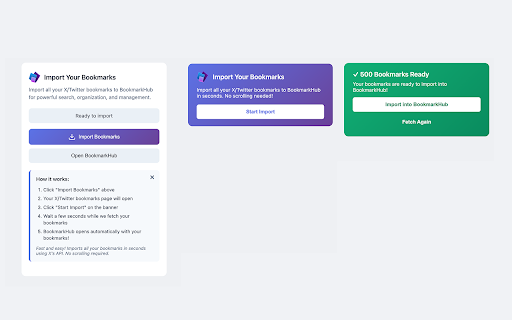
Import and manage your Twitter/X bookmarks with BookmarkHub's powerful interface 🚀 Take Control of Your Twitter/X Bookmarks! BookmarkHub is the ultimate privacy-first bookmark manager for Twitter/X users. Import all your saved tweets directly to your browser's local storage - no cloud servers, no tracking, just pure functionality. 📥 One-Click Import • Extract all your Twitter/X bookmarks instantly • Preserves tweet content, media, and metadata • Works with both twitter.com and x.com 🔒 Privacy First • All data stored locally in your browser • No external servers or cloud storage • You own and control your data completely • Export anytime in standard JSON format 🎯 Powerful Organization • Create custom collections and categories • Add tags for easy filtering • Advanced search across all bookmarks • Filter by date, author, content type • Find threads and media content instantly ⚡ Offline Access • Access your bookmarks without internet • Lightning-fast local search • No API rate limits or restrictions • Works even if tweets are deleted 📊 Smart Features • Duplicate detection • Bulk operations for efficiency • Dark/Light theme support • Responsive design for all devices • Keyboard shortcuts for power users 🔄 Easy Migration • Import from Twitter/X with one click • Export all data in JSON format • Backup and restore functionality • Share collections with others HOW IT WORKS: 1. Click the extension icon while on Twitter/X 2. Select "Import Bookmarks" 3. Watch as your bookmarks are extracted 4. Access them anytime at bookmarkhub.app No signup required. No subscription fees. Just install and start organizing! Perfect for: • Researchers and journalists • Content creators and marketers • Anyone who saves tweets for later • Privacy-conscious users • Professional Twitter/X users Questions? Visit bookmarkhub.app for more information.

X-Track: Twitter Footprint & Bookmarks
Sync bookmarks, track reading history, and analyze interests with AI. Bring your X (Twitter) history to your personal knowledge base. Passively record content to your local vault so you always have access to it, fully searchable and safe from deletion. X-Track is secure, private, and designed around durable formats that allow you to preserve your digital memory for the long term. X-Track is the best way to track, organize, and interpret your social media footprint: Track: Automatically record tweets you view, like, or bookmark as you browse. No manual saving required—if you see it, you keep it. Organize: Turn chaos into order with powerful full-text search, tags, and filters. Find a specific tweet from months ago in milliseconds, even if the original author deleted it. Interpret: Use AI to chat with your history. Summarize threads, extract insights, or analyze your reading habits compatible with models like Gemini, OpenAI, and DeepSeek. Advanced features: Passive Recording: Captures data silently in the background without interrupting your flow or risking your account safely. Media Vault: Batch download images and videos from your saved history. Visual Sharing: Create beautiful, customizable image cards from any tweet for easy sharing on other platforms. Flexible Export: Export your data (CSV/JSON) to integrate with tools like Notion, Obsidian, or Excel. Time Machine: Revisit your timeline exactly as you saw it on any specific date. As with everything we build, X-Track is designed to protect your privacy and give you control over your data. No lock-in: Your data is saved in standard JSON/CSV formats. You own it, forever. Offline access: Your database is stored locally in your browser (IndexedDB) and available anytime, even without an internet connection. 100% private: X-Track doesn't transmit your browsing history to any external servers. X-Track helps you capture the fleeting flow of information so you can build a lasting library of thoughts and inspirations.

Bookmark-X: Twitter/X Bookmark Manager
Organize your Twitter/X bookmarks into categories and chat with them. Never lose track of your favorite tweets again.

XBookmark - Twitter Bookmark Manager
Save and export your X/Twitter bookmarks locally. Tags, Markdown & JSON export. 100% private and open source. Stop losing your best X finds. XBookmark saves your Twitter/X bookmarks locally on your Mac. No account linking, no cloud, nothing leaves your machine. Open x.com/i/bookmarks and XBookmark picks up every bookmarked tweet automatically. Want more control? Click to grab individual tweets as you scroll. TAGS Label tweets however you want: "dev", "design", "read later", whatever works for you. Filter by tag when you need something specific. EXPORT - Markdown with YAML frontmatter, ready for Obsidian, Notion, or any markdown tool - JSON for developers or custom workflows - Export all at once or by tag PRIVATE BY DEFAULT Zero data collection. No analytics, no tracking, no server calls. Your bookmarks stay on your Mac. The code is open source if you want to verify. THE DASHBOARD A dark-themed interface where your saved tweets look just like they do on X, with full text, author info, and timestamps. THE PROBLEM XBOOKMARK SOLVES - X has no folders, no tags, no export for bookmarks - Bookmarks vanish when tweets get deleted or accounts suspended - XBookmark keeps a local copy with the tools X never built 100% FREE No subscriptions. No in-app purchases. No premium tier. Everything works for everyone. Built for anyone who bookmarks tweets and actually wants to find them later.

XSaved — Bookmark Manager for X (Twitter)
Organize, search, and export your X (Twitter) bookmarks. The bookmark manager X never built. Free, local-first, private. Your X (Twitter) bookmarks deserve better. XSaved turns your messy, unsearchable X bookmarks into an organized, fast, and beautiful library. No more scrolling for hours trying to find that one tweet you saved last month — just type, filter, and find. X gives you a bookmark button. That's it. No search. No tags. No folders. No export. No way to recover a tweet after it's deleted. Once you have a few hundred bookmarks, the built-in tool stops being useful. 🔍 Instant search across all your X bookmarks Search by keyword, author, topic, or tag. Results appear as you type. No more endless scrolling. 🧠 Auto-organization Your bookmarks automatically cluster into topics, group by author, and sort by date. No folders to manage. No manual tagging required. 📤 Export to JSON or CSV Back up your entire library in one click. Move your data anywhere — into Notion, Airtable, a research tool, or just a folder on your computer. 🛡️ Local-first and private All your bookmarks live in your browser, on your device. We don't have access to your data. We don't sell it. We don't track it. Ever. 🗑️ Bulk management Bulk delete, bulk tag, bulk export. Useful when you finally decide to clean up years of saves. ♻️ Tweet preservation XSaved keeps a local copy of bookmarked tweets. Even if the original is deleted from X, you'll still be able to read what you saved. WHO IT'S FOR XSaved is built for anyone who treats bookmarks as a personal knowledge base: • Researchers collecting sources from X • Builders saving threads on tools, libraries, and ideas • Writers archiving inspiration and references • Students organizing study material • Curious people who save things faster than they read them If you've ever bookmarked a tweet on X and never found it again, XSaved is for you. • Your bookmarks never leave your browser • No accounts, no signups, no cloud sync (unless you opt in later) • No third-party trackers • Open-source roadmap Read the full privacy policy at https://xsaved.com/privacy-policy Free during the alpha. Core bookmark management — search, organization, export — will remain free. We may introduce optional paid features later, but you'll never lose access to what you have today. 1. Install the extension 2. Open x.com/i/bookmarks 3. Let XSaved sync your bookmarks (it's instant for most libraries) 4. Open the XSaved dashboard and start exploring • Bookmarks — to read your X bookmarks so it can organize them • Storage — to save your tags, notes, and preferences locally • Tabs — to open bookmarked tweets when you click them If XSaved makes your X (Twitter) bookmarks useful again, leave a review. It helps other people find the extension and helps us keep building.
