
dbnmbphfoihbbchppnjmfpkgkpignmim

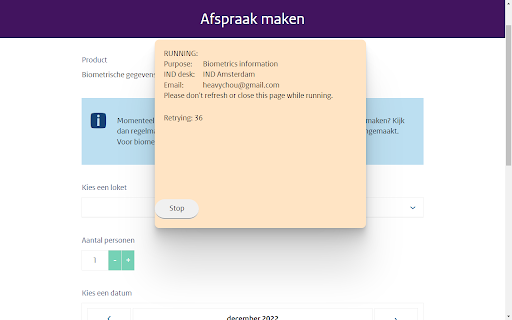

This extension helps to make an appointment at IND. This Chrome extension is designed exclusively to assist people who have a genuine urgent need to make an appointment at the IND but are unable to find available time slots through normal means. Its purpose is to reduce stress for those facing time-sensitive immigration matters—not to give unfair advantages or to support misuse. The extension continuously checks the IND online appointment planner and automatically books an appointment only when a slot within your preferred time window becomes available. Important limitation: 🔹 The extension will only search for and accept appointments within the next 7 days. This prevents misuse and ensures the tool remains focused on urgent needs. How to use the extension 1. Select the purpose of the appointment. 2. Choose the IND desk you want to visit. 3. Set your expected date and time range; the extension will only book a slot within this range. 4. Enter the required personal information (appointments can be made for up to six people at once). After configuration, click “Start”. A new tab will open with the IND appointment planner, and a status popup will show the extension’s activity. You may then leave it running in the background. The extension will continuously check for availability, and once it finds a suitable slot, it will book the appointment automatically and stop running. You will later receive a confirmation email from the IND. If no slot becomes available within 24 hours, the extension will stop itself. You may widen the expected date/time range and try again if needed. Your personal information: • Is stored only in your local Chrome browser memory, • Is never uploaded, transmitted, or collected in any way, • Can be deleted at any time by clicking the “Clear User Info” button. This ensures complete control over your data and prevents any external party—including the author—from accessing it. If you encounter any issues while using the extension, please contact the author for assistance. This extension is intended only for individuals with legitimate, urgent needs. It must not be used to profit, resell appointments, or create unfair disadvantages for others. Any abuse, especially for monetary gain, is strictly prohibited and may result in legal consequences for the individual misusing the tool.

ReloTalent Real Estate Properties Harvester
At ReloTalent we know how fast the real estate market is evolving, and how important it is for our customers to quickly find and propose properties to their clients. This is why we created this Chrome Add-on, to allow you to easily create properties in ReloTalent account directly from the real estate websites you are surfing for work! Find the property your customer needs then follow 4 easy steps steps to create it, the property will be automatically imported in your ReloTalent environment and you will be able to quickly share it with your client. ReloTalent Real Estate Properties Harvester is a Google Chrome addon that allows users to harvest data from real estate websites to their software environment. Once the data is harvested, it is used to create a propery in the software, which can then be suggested to users. The entire process of finding a house can be completed interactively in the software. The Real Estate Data Harvester is designed for relocation companies who help their customers find a new house abroad or in their new country of assignment. The addon makes it easy for relocation companies to quickly and easily gather data from a variety of real estate websites, so that they can find the best properties for their customers. ReloTalent Real Estate Properties Harvester is easy to use. Once the addon is installed, users simply need to visit a real estate website the addon has been enabled for and click on the addon's icon. The addon will then automatically harvest the data from the website and create a property in the software. The data that is harvested by the Real Estate Data Harvester includes: ReloTalent Real Estate Properties Harvester is a simple and powerful tool that can help relocation companies save time and effort when finding a new house for their customers. The addon is easy to use and it can harvest data from a variety of real estate websites. Here are some of the benefits of using ReloTalent Real Estate Properties Harvester: - Save time and effort: The addon can automatically harvest data from real estate websites, so you don't have to do it manually. - Improve accuracy: The addon is designed to harvest accurate data from real estate websites. - Increase efficiency: The addon can help you find the best properties for your customers more quickly and easily. - Improve customer satisfaction: The addon can help you provide a better service to your customers by giving them access to a wider range of properties. If you are a relocation company, ReloTalent Real Estate Properties Harvester is a valuable tool that can help you save time, improve accuracy, and increase efficiency.

TestFiltering+
TestFiltering+ automatically monitors your internet connection to ensure your filter is correctly blocking illegal/harmful content We work with specific partners to host test URL's on various lists and have test pages hosted where they will be blocked. This service was setup in response to the introduction of statutory guidance for schools in the UK about appropriate levels of filtering and monitoring of school internet connections. The UK Safer Internet Centre first published its filtering and monitoring definitions in 2016 to help both schools and providers understand what should be considered as ‘appropriate’.

ROAS monster Chrome Extension
ROAS monster Chrome Extension will connect your ROAS monster application data directly into your Facebook Ads Manager. ROAS Monster Chrome Extension is a performance boosting extension that displays additional metrics from store into Facebook ads manager. It pulls store data such as sales, orders and quantity, and displays them in the Facebook ads manager column, next to the basic metric, so you can compare Facebook data with real time store results for all the products you advertise. If you use the ROAS metric for your business, you can display the Real ROAS column, and if you use CPO (Cost per Purchase), you can display the CPO column. With all new metrics based on store data you can understand your ads better, and scale your business even faster. Find extension setup tutorial here: https://www.roasmonster.com/chrome-extension

Batch Cache
The Batch Cache allows you to organise your extensions in a neat dashboard. You can create lists for different use cases and edit the names of the lists and listed extensions. The next feature we added was the ability to append URLs. This is really helpful and saves time by taking a URL you are visiting and by clicking the extension and one of your saved sites you can open in a new tab and run the URL through a scan like a website page speed loading test as an example. Some use cases: Ahrefs Wayback Machine Google Page speed Insights and many more. This extension was designed to keep your browser clean and organised and to save you time. Enjoy using the Batch Cache. We dont capture any personal information, we do bookmark your saved URL addresses to your account for quick reference as is the nature of this extension.
