
dbhcchccbhpnohpmcallfdfcfnogdfpo
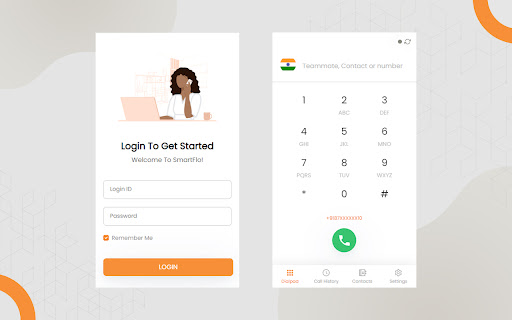

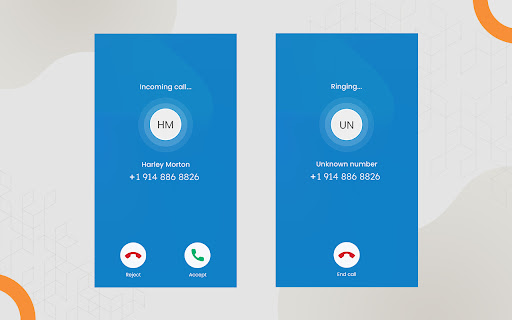
Smartflo provides phone systems and PBX hosted on cloud to help enhance your business communications. A cloud-hosted phone system that is bespoke as well as flexible and can be tailored to your business needs. With a range of innovative features and, with our easy-to-use portal, you are in total control. It allows you to monitor and track all the calls. This app is a softphone application with a simple user interface which allows you to make calls over the internet using VoIP. Contact Management – Manage your contacts on the go, choose which calls to pick and which one to block. You can easily make a list of contacts or delete the ones you don’t need. If needed, you can make a priority list for those Easy Access – No need to remember your softphone credentials. Just log in using your Smartflo account credentials for a seamless experience. Call History – Get all the details of your incoming, outgoing along with the details such as duration of call, time of call and whether the number is unknown or not.

Rocket Sender: WARocket Tool
WARocket tool. Customer service and engagement tool. Adds customer engagement amd privacy features. Sender and engagement tool. This tool adsds customer engagement, sender, privacy and automation tool. 🚀What are the features: - Blur out parts of messages locally. - Highlight unread messages. - Get shortcut to commonly used messages. Quick chat. - And many more. 🚀How can it be used? - Install the extension. This will open a new button on Web version of messaging tool. - Click on this to start using. 🚀Disclaimer: - We are not part of any messaging tool. This is a 3rd party tool. - This tool cannot be used for spamming.

WASender Bulk Messaging, AI Replies, and CRM
WASender is the easiest Chrome extension for sending bulk messages on WhatsApp without saving numbers. WASender is the easiest Chrome extension for sending bulk messages on WhatsApp without saving numbers. This bulk WhatsApp plugin lets you send personalized messages, attach files, and automate your outreach- all from your browser. With enhanced AI features like the Message Redrafter, Automatic Ban Reduction, and AI Replies, WASender is more powerful than ever! 👉Personalized Messages: Customize each message to the name and details of the receiver. Use placeholders like {name}, {email} to improve engagement and avoid looking spammy. 👉Send Attachments: Send images, PDFs, and other files with your messages to capture attention and make communication more powerful. 👉Batching and Time-Gaps: Avoid bans by mimicking human behavior. Set time gaps between messages and control batch sizes. 👉Contact Export: Easily download and manage your WhatsApp contact list with 1 click 👉Download reports: Report of sent/failed messages. Start off from where you left. 👉AI Message Redrafter: Draft your message in a way that it does not appear to be spammy or promotional. 👉Automatic Ban Reduction Features: The AI detects the possible reasons in your messaging habit that gets your number banned. Fix it all with just 1 click. 👉Automatic Reply Analysis: Automatically separate replies into auto-replies, unsubscribes, not interested, and Interested leads 👉Unsubscribers list: Refrain from messaging your unsubscribers in all future campaigns 👉AI replies and chatbot: Engage with your customers instantly, in their language using the AI chatbot. How It Works 1. 🧩Install WASender from the Chrome Web Store. 3. 💬Write your message and hit “Send.” ✅ Use the AI Redrafter to draft messages that don’t seem promotional ✅ Apply all reccomended Ban Reduction features from the dashboard ✅ Don’t sebd messages to the Unsubscribers in the future. 🧑💻 Install WASender today for FREE! 🎁

Quick Call by Callyzer
Make calls directly from your Chrome browser The Quick Call Extension makes it easy to connect your browser to your device for direct calling. It helps you find phone numbers on webpages and call them instantly through your device Key Features - The extension detects phone numbers on webpages and shows a call icon next to them. - Clicking the call icon will make a call through your device without dialing manually. - If a number is not detected, select it, right-click, and choose "Call with Quick Call" to make the call. How to Set Up 1. Install the Extension: Add the Quick Call Extension to your Chrome browser. 2. Link Your Device: Install Callyzer biz or Callyzer - Analysis Call Data app from Playstore. Open the Callyzer app on your device. 3. Go to the "Linked Quick Call Extension" option in the “More” section. Scan the QR code shown on the extension to connect your device and browser. How to Use Make Calls Instantly: Once your device is linked, click the call icon next to any detected phone number on a webpage to make a call directly from your device. Use Manual Call Option: If the call icon is not visible, select the number, right-click, and choose "Call with Quick Call" to initiate the call from your device.

Premium Sender
Bulk send personalized web messages, images, videos & docs. Export group contacts and direct message without saving numbers. 🚀 Enhance Your Web Messaging Workflow with Premium Sender! 🚀 Stop cluttering your phonebook! Premium Sender is the ultimate productivity and UI enhancement extension designed to organize your web-based communication. Perfect for professionals, support teams, and freelancers who want to manage their daily messaging efficiently. 🎯 Why Choose Premium Sender? Our tool works as a smart assistant right inside your browser, helping you format messages, organize contact lists, and manage your communication faster without bypassing any platform rules. ✨ Core Features & Benefits: • Quick Chat Connect: Instantly open chats with unsaved numbers. Save time and keep your personal contacts separate from business leads. • Smart Excel/CSV Sync: Seamlessly load your contact sheets to format and prepare personalized messages efficiently. • Intelligent Contact Backup: Safely download and export your chat lists, group participants, and labels for your own CRM records. • Active Number Checker: Verify if a number is active before reaching out, ensuring your communication efforts are highly targeted. • Media Attachment Assistant: Easily attach and send images, videos, PDFs, and documents directly from your organized lists. • Dynamic Text Templates: Use custom text formatting and auto-insert names to give your manual follow-ups a professional touch via excel and csv. 🔹 Important Disclaimer: Premium Sender is an independent Google Chrome Extension. It is NOT affiliated with, endorsed by, or sponsored by any messaging platform. It does not automate spam or bypass any official system limits; it simply enhances the user interface for better personal productivity. ❗ Responsible Usage Policy: This tool is strictly for managing communication with opted-in users. Users must comply with the terms of service of their respective web messaging platforms. Install Premium Sender today and work smarter, not harder! 🚀
