
dbgjpmlgafegkmecombkjjgmmiefbjek


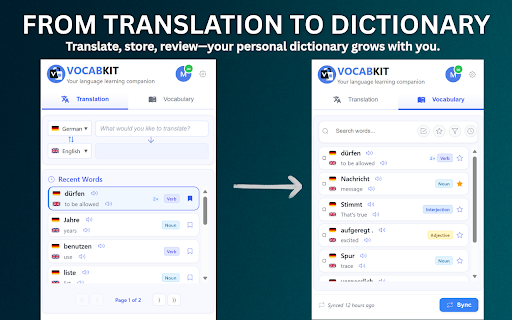

Vocabulary builder: on-page translation + save to Anki. OCR images/subtitles. 40 languages. Free daily translations. Stop switching tabs every time you meet a new word. VocabKit turns any webpage, article, PDF, or video into an interactive language lesson so you can translate in context, save vocabulary, and keep learning while you browse—without breaking your focus. A language learning extension and vocabulary builder: translate selected text on-page, without switching tabs, then save words to your vocabulary list. 🌍 40 Languages, 1,560 Translation Pairs Spanish, French, German, Japanese, Korean, Chinese (Simplified & Traditional), Arabic, Portuguese, Italian, Russian, Hindi, Turkish, Vietnamese, Thai, Dutch, Polish, Swedish, Indonesian, Greek, Hebrew, Czech, Danish, Finnish, Hungarian, Norwegian, Romanian, Ukrainian, Bengali, Tagalog, Malay, Persian, Swahili, and more! Translate text with one click, save words to your personal vocabulary list, and export them (Anki or CSV). This is the simplest way to build a vocabulary from real content. ⚡ Instant On-Page Translation (Alt+T) • Select a word or phrase and get a clean, context-rich translation without switching tabs. Works on websites, articles, and documents. 🎯 OCR Translation for Images & Subtitles (Alt+O) Translate text from ANY image or video frame, including hardcoded subtitles. Perfect for: • Streaming shows with burned-in subtitles (e.g., Netflix/Disney+ content) • YouTube videos without captions • Screenshots, memes, and social media images • Scanned documents and PDFs 🧠 Deeper Contextual Learning • Go beyond definitions: part-of-speech, example sentences, and meaning nuances to help you remember words naturally. 📚 Smart Vocabulary Builder (Save Words in 1 Click) • Save new words to your personal library. Review and manage your vocabulary directly in the extension with cloud sync across devices. ✍️ Personal Notes & Mnemonics • Add your own notes to make vocabulary stick. 📤 Export Your Vocabulary (Anki / CSV) • Export as APKG (direct Anki import) or CSV for other spaced-repetition workflows. 🗣️ Clear Pronunciation (Text-to-Speech) • Listen to audio for both the original word and the translation. 📺 Learn from Videos • Turn entertainment into learning: translate on-screen text and subtitles while watching videos online (OCR mode supports hardcoded subtitles). 🖼️ PDF & Image Support • OCR extracts text from visuals so you can translate and learn even when text isn’t selectable. Alt+T — Translate selected text instantly Alt+O — OCR mode for images, videos, and screenshots Alt+L — Open your vocabulary list 1️⃣ SELECT: Highlight any word or phrase 2️⃣ TRANSLATE: Press Alt+T (or click the VocabKit icon) 3️⃣ SAVE: Add it to your vocabulary list for review and export ✅ Perfect For… • Language learners who want to learn from real content • Readers building vocabulary from news, blogs, and articles • Students and researchers reading papers in another language • Professionals working with multilingual websites and documents • Video watchers translating on-screen text and subtitles • Anyone who wants a simple translate + save vocabulary workflow 🛡️ Privacy and Trust VocabKit respects your privacy: • No browsing history tracking (activates only when you select text) • Your vocabulary list stays private and is never sold • Minimal permissions requested only • GDPR-friendly approach 🎯 Ready to build vocabulary faster? Click “Add to Chrome” and start with free daily translations.

Vocabo
Vocabo helps you learn and remember new words in a foreign language. Transform your daily browsing into effortless language learning. Vocabo helps you discover, learn, and memorize new vocabulary naturally as you explore the web. 🌐 Universal Learning: Learn on any website—news articles, blogs, social media, anywhere you browse. 🗣️ 194+ Languages Supported: Practice virtually any language pair powered by Google Translate, including Spanish, French, German, Japanese, Korean, Chinese, Arabic, Portuguese, Italian, Russian, and many more. 💡 Smart Suggestions: Get instant vocabulary recommendations based on the content you're reading, perfectly timed for natural learning. 🔊 Pronunciation: Hear pronunciation with text-to-speech for better speaking confidence. 📚 Personal Dictionary: Build your vocabulary collection automatically as you learn, with easy review and export options. 📊 Progress Tracking: Visualize your learning journey with a progress graph showing words added over time, daily streaks, and your growing vocabulary. 🎯 Zero Friction: No sign-up required, completely free, and works seamlessly in the background while you browse. 🎨 Customizable Experience: Control where suggestions appear, adjust frequency, and personalize your learning flow. Perfect for language learners who want to maximize their screen time and turn everyday browsing into productive language practice. Start learning naturally today!

Vocably: Translate and Learn with Flashcards
AI dictionary. Translate on any website or YouTube. Learn your translations on mobile. Expand your vocabulary. Translate unfamiliar words while reading websites and watching YouTube videos. Vocably automatically turns your translations into detailed vocabulary entries and lets you learn them in the mobile or web app. You'll stop forgetting the words you've looked up — and expand your vocabulary all the way to fluency. Vocably is the intelligent language assistant designed for real-world browsing. Instantly translate text on any website or YouTube video and save it to your personal collection for long-term retention. Using a scientifically-proven Spaced Repetition System (SRS), Vocably tracks your progress and reminds you to review words exactly when you're about to forget them. Transform your daily internet usage into an enjoyable learning habit. Instant Translation: Select any word or phrase on any webpage to get a translation and detailed information about the new word. YouTube Integration: Hold Alt (or Option ⌥) to highlight and save unfamiliar words directly from YouTube subtitles. Detailed Information: Vocably provides clear, accurate definitions, phonetic transcriptions, examples, and other useful information. Multi-Language Support: Learn multiple languages and conveniently switch between them in the extension and app interfaces. 🧠 Learn Saved Words with Spaced Repetition Spaced Repetition (SRS): Efficiently move words from short-term to long-term memory with automated review schedules. Mobile Sync: Your saved words are always with you. Review them at any convenient time with our iOS and Android apps. Expand your vocabulary and reach fluency. Personalized Flashcards: Every word you translate automatically becomes a study card — no manual entry required. Select & Translate: Highlight any word or phrase on a website and click the Vocably popup button. Save: Add the word and its definition to your collection with a single click. Learn: Open the Vocably mobile app or website to study your saved words whenever it suits you. Turn every article, blog post, and YouTube video into a personal language lesson. Add Vocably to Chrome and start progressing in your language learning like never before.

Vocab Tracker
VocabTracker is inspired by LingQ, Readlang and LWT: it helps you track your vocabulary on any web page. VocabTracker is a vocabulary tracking tool which can let you track your vocabulary on any page so that you can use any website as a language learning resource. It supports the following features: - Support English, French, Spanish, German, Italian, Russian, Ukrainian, Japanese, Chinese, Korean, Dutch, Arabic, Latin, Polish and more languages are being added now. - Analyze words on any web page and highlight the words with different colors based on your familiarity with the words. - Support adding user's own dictionaries to the tool, for example: NCIKU, Glosbe, merriam-webster and so on. - Support flash card and SRS system to help you memorize your vocabulary. - Support two modes -- "Lemma" and "Variant": in "Lemma" mode, the tool can find the lemma for word variants such as "were", "was", "is", "are", "am" and treat those variants as the same word ("be"). - Support adding phrases to your vocabulary. - Support segmenting Chinese (both Mandarin and Traditional Chinese) and Japanese with a very high accuracy. - Support exporting vocabulary to CSV file so that you can add your vocabulary to Anki or other tools. Note: This extension doesn't save your vocabulary data locally -- it saves them on a remote server. So in order to use this tool, you will need to register a user for this extension first.

LingoPick
LingoPick is an AI-powered English word translation and recording tool that helps you effortlessly translate and collect words while reading, naturally boosting your vocabulary. 🎯 Quick AI Translation - Context-aware precise word translation for a natural and smooth reading experience. - Provides multiple definitions, example sentences, and common phrase collocations for comprehensive vocabulary understanding. - Supports translation into 33 languages including Chinese, Spanish, Arabic, Hindi, French, and more. 📚 Smart Word Collection - Optionally save words to your personal vocabulary library, creating your own personalized word bank. - Saves not only words but also the sentences they appear in, preserving authentic context. 🔄 Scientific Memory Training - Features a scientific flashcard review system for efficient learning reinforcement. - Start word review anytime, anywhere, making the most of your spare time. ⚡ Simple and User-Friendly - Minimalist design philosophy with powerful yet simple functionality, ready to use out of the box. - Double-click any word to translate - simple and intuitive operation. - Non-intrusive design that doesn't interfere with your reading experience or disrupt webpage layouts. ✅ Intelligent Context Understanding LingoPick provides truly intelligent translation that understands article meanings. Say goodbye to rigid dictionary lookups and help yourself memorize new words within context, multiplying your learning efficiency. ✅ More Than Just a Translation Tool - It's a Scientific Learning Method Follows the scientific vocabulary learning pathway of "Translate → Record → Memorize." No more rote memorization - naturally enhance your vocabulary while reading. ✅ Lightweight and Efficient User Experience Maintains minimalist design with sophisticated yet simple functionality. Uses non-invasive design that won't modify webpage content or interfere with your normal browsing, quietly providing thoughtful service. 🌟 4 Simple Steps to Start Your Smart Learning Journey 1. Install & Register - After installation, follow the guide to complete account registration. 2. Start Translating - Refresh the page you want to read, double-click any English word for precise translation. 3. Save Words - Click the bookmark icon to record valuable words to your personal vocabulary. 4. Review & Reinforce - Right-click anywhere on the page and select "Open LingoPick" to access the sidebar, where you can view and review your saved words anytime. Your feedback is invaluable to us! For any suggestions or questions, please contact us through: - Leave comments in the section below - Send email to: jedxie2022@gmail.com We take every piece of feedback seriously and continuously optimize the user experience!
