
dbfoemgnkgieejfkaddieamagdfepnff


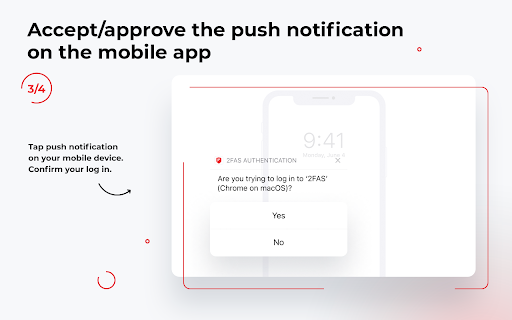

2FAS Browser Extension is simple, private, and secure: 1 click, 1 tap, and your token is automatically entered! Add 2FAS Auth to your web browser with our extension! Enter 2FA tokens automatically without re-typing for better security! The 2FAS Auth Browser Extension allows you to log in to any online service with 2-factor authentication enabled, faster! Easy set up in three steps: 1. Install the extension on your desktop browser 2. Open the 2FAS Auth app on your phone and pair your phone with your desktop browser 3. Start using the 2FAS Auth Browser Extension When you want to log in using a 2FA token, simply select two-factor authentication token input field, click the 2FAS Auth Browser Extension icon, and confirm login on your phone! Secure and fast log in. Simply pair the service you want to login to with your 2FAS Auth app, then 2FAS Auth will automatically select your token for future logins, no searching or typing required! 2FAS Auth is an easy-to-use authentication app that protects access to your online services and accounts. Relying on a single password for your personal accounts, like Facebook or Instagram, often puts your data and sensitive information at risk. The 2FAS Authenticator App generates one-time codes called Time-based One-time Passwords (TOTP) or HMAC-based (event-based) One-time Passwords (HOTP) for your account. By creating these codes offline and changing them every 30 seconds or every login, 2FAS drastically increases the security of your information.

2FA Authenticator
This extension generates 2FA authentication codes in your browser. 2FA Authenticator is an alternative Chrome extension to Google Authenticator. You no longer need to use your phone to authenticate. This extension provides you with 2-step verification codes directly in your browser. Features: - OTP code verification in your browser - One-click verification code autocompletion - Scan QR codes from the page - Display QR codes for quick scanning - Upload QR code images - Backup your accounts in Google Drive - Open source

Raindrop.io
Manage bookmarks, highlights, annotations and tabs. Save Anything from the Web Clip articles, photos, videos, PDFs and pages from the web and apps. Organize with Ease Thematic collections, suggested tags and custom filters. Sort items by date, title, site or manually by drag'n'drop. Full-Text Search & Permanent Library Entire content of every web-page and PDF that you’ve saved is fully searchable. Even if a page you’ve saved is taken down, you’ll still have a copy of it. For Teams and Individuals Enable access to your collection by team members or entire web. Permissions let you control who can access each of your collections. Take Your Bookmarks Everywhere Securely access the bookmarks you’ve saved in from anywhere — even outside of the browser. Extension for all popular browsers. Apps for Android, iOS, macOS and Windows. More than 2,600 integrations and programatic access through API. Private by Default Your privacy comes first. We keep your data safe, never sold. 256-bit encryption protects you while syncing. No tracking or intrusive advertising. 13 years in a business.

Two-Factor Authentication - 2FA
Enables users to easily obtain verification codes for two-factor authentication. This browser plugin's main function is to provide users with a unified way of managing 2FA keys for different websites. It allows users to easily obtain 2FA verification codes without having to switch back and forth between multiple websites. Additionally, the plugin also provides multiple backup options, allowing users to safely store their 2FA keys to prevent loss or forgetting. This plugin brings more convenience and security to users and is a very useful tool. If you encounter any problems during use, please don't panic. Negative reviews cannot solve the problem. You can provide feedback via the link below and I will follow up promptly. 👉 https://logspot.hocgin.top/addone-otp?active=feedback 👈 If this has been helpful to you, can you please give me a good review? 🌹

Authenticator App
Provides secure two-factor authentication(2FA). Safeguard your digital life with ease. Authenticator App is a highly secure web extension designed to provide two-factor authentication (2FA) for your online accounts. By generating unique Time-based One-Time Password (TOTP), the 2FA Authenticator provides an extra layer of protection to your accounts when logging in, mitigating the risks of unauthorized access and identity theft. Note: You need to download our Desktop app for the browser extension to work. Remember to use it with our Desktop app (Supporting Windows & Mac & Linux)! Whether it's popular apps or many online services, Authenticator browser extension has you covered, protecting your personal data and passwords from hackers and malicious attackers. With Authenticator web extension and Desktop app, you can: 1. Liberate yourself from dependency on your phone. Authenticator allows you to perform two-factor authentication without even reaching for your mobile, significantly boosting your productivity and saving your valuable time. 2. Enjoy seamless integration within the Apple Ecosystem. Authenticator web extension supports iCloud sync & backup authentication data across Apple devices, ensuring a smooth experience for Apple users. 3. Have additional account security. With our advanced encryption technology, your accounts remain protected from unauthorized access, safeguarding your personal information. 4. AutoFill your 2FA Codes & Passwords on web browsers. Web extension Features: 1. Scan QR code on the website to add 2FA account, seamlessly stored and backuped in your iCloud. 2. Copy your 2FA code with a click, without dependency on your mobile phone. 3. All your accounts are end-to-end encrypted on web extension and Desktop app. 4. AutoFill your 2FA Codes & Passwords on web browsers. Desktop App Features: 1. Store and generate 2FA codes. The code will update to a new one every 30 seconds. 2. Easy to setup & manage your accounts. Scan QR Codes or enter manually to add accounts. 3. 2FA encrypted Backup & Sync with iCloud. Sync your accounts across multiple devices using iCloud. 4. Secure use with app password or Touch ID. You are the only one who can read your codes. 5. Import and export 2FA accounts. You can import/export your data from/to other files. 6. User-friendly guide. The app has instructions that describe basic steps such as adding 2FA Code. 7. Support 11 languages: English, German, French, Japanese, Korean, Italian, Spanish, Portuguese, Russian, Simplified Chinese, Traditional Chinese. If you have any thoughts, questions or suggestions, please feel free to contact us at feedback@firstorder.ai Home page: https://authenticator.firstorder.ai Terms of Use: https://firstorder.ai/terms-of-service Privacy Policy: https://firstorder.ai/privacy-policy-authenticator
