
dbdlmgpfijccjgnnpacnamgdfmljoeee

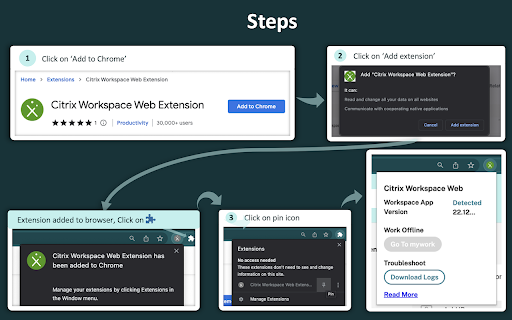


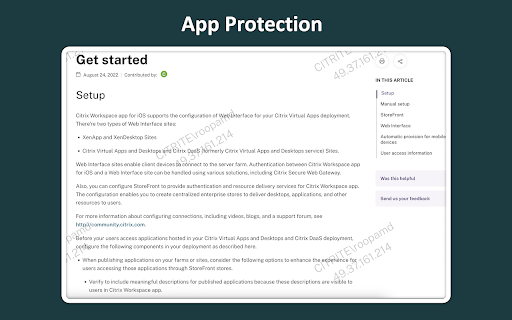
Launch your workspaces anytime, anywhere without an .ica file keeping your experience safe and reliable. Install this extension to detect your locally installed Workspace app from your browser. This will launch your browser with added security and reliability without the need to download an .ica file. Additional benefits to this are screen capture, app protection and seamless service continuity. Once installed, extension has access only to workspace websites (turns green) and don't have access to other websites (grayed out). The browser extension also detects the Workspace app version you are using and displays the version number. This will be accessible for both on-premises and cloud users. 1. Reliable: No more failures when launching Citrix workspace virtual desktops and apps, simultaneously launch multiple apps without failure. 3. App Protection: Prevents screen capture by displaying an IP address watermark. 4. Login timeout tooltip: Prompts users to start using offline mode if the authentication is not successful within 30 seconds. Note: Feature support depends on the platform support and entitlement

CTX Launcher for Managed Guest Sessions
A helper extension for Chrome Enterprise with requirements to auto-launch Citrix Workspace after entering a managed guest session A helper extension for Chrome Enterprise customers with requirements to auto-launch Citrix Workspace after entering a managed guest session

My Apps Secure Sign-in Extension
My Apps Secure Sign-in Extension This extension is required for both App Proxy link translation and application password-based single sign-on. It may also be optionally used to launch the My Apps portal to search the applications you have access to. With this extension you can: • Sign into password-based single sign-on applications- both directly from the application's login page and from the My Apps portal • Access internal company URLs while remote • Launch into the My Apps portal to search across the applications you have access to THIRD-PARTY SOFTWARE NOTICES AND INFORMATION This software is based on or incorporates material from the projects listed below (collectively, "Third Party Code"). Microsoft is not the original author of the Third Party Code. The original copyright notice and license, under which Microsoft received such Third Party Code, are set forth below. Microsoft reserves all rights not expressly granted herein, whether by implication, estoppel or otherwise. The MIT License Permission is hereby granted, free of charge, to any person obtaining a copy of this software and associated documentation files (the "Software"), to deal in the Software without restriction, including without limitation the rights to use, copy, modify, merge, publish, distribute, sublicense, and/or sell copies of the Software, and to permit persons to whom the Software is furnished to do so, subject to the following conditions: The above copyright notice and this permission notice shall be included in all copies or substantial portions of the Software. THE SOFTWARE IS PROVIDED "AS IS", WITHOUT WARRANTY OF ANY KIND, EXPRESS OR IMPLIED, INCLUDING BUT NOT LIMITED TO THE WARRANTIES OF MERCHANTABILITY, FITNESS FOR A PARTICULAR PURPOSE AND NONINFRINGEMENT. IN NO EVENT SHALL THE AUTHORS OR COPYRIGHT HOLDERS BE LIABLE FOR ANY CLAIM, DAMAGES OR OTHER LIABILITY, WHETHER IN AN ACTION OF CONTRACT, TORT OR OTHERWISE, ARISING FROM, OUT OF OR IN CONNECTION WITH THE SOFTWARE OR THE USE OR OTHER DEALINGS IN THE SOFTWARE. The MIT License Permission is hereby granted, free of charge, to any person obtaining a copy of this software and associated documentation files (the "Software"), to deal in the Software without restriction, including without limitation the rights to use, copy, modify, merge, publish, distribute, sublicense, and/or sell copies of the Software, and to permit persons to whom the Software is furnished to do so, subject to the following conditions: The above copyright notice and this permission notice shall be included in all copies or substantial portions of the Software. THE SOFTWARE IS PROVIDED "AS IS", WITHOUT WARRANTY OF ANY KIND, EXPRESS OR IMPLIED, INCLUDING BUT NOT LIMITED TO THE WARRANTIES OF MERCHANTABILITY, FITNESS FOR A PARTICULAR PURPOSE AND NONINFRINGEMENT. IN NO EVENT SHALL THE AUTHORS OR COPYRIGHT HOLDERS BE LIABLE FOR ANY CLAIM, DAMAGES OR OTHER LIABILITY, WHETHER IN AN ACTION OF CONTRACT, TORT OR OTHERWISE, ARISING FROM, OUT OF OR IN CONNECTION WITH THE SOFTWARE OR THE USE OR OTHER DEALINGS IN THE SOFTWARE.

Citrix Web Extension - Beta
Launch your workspaces anytime, anywhere without an .ica file keeping your experience safe and reliable. Chrome extension to enable Service Continuity in Citrix Workspace. This extension enables the Service Continuity feature when accessing Citrix Workspace via Chrome browser (Workspace app for Web). Service Continuity removes (or, if not possible, minimizes) the dependency on the availability of the components involved in the connection process, allowing users to connect to their virtual apps and desktops regardless of the cloud services' health status. In addition to installing this extension, you must also install Citrix Workspace app on your device.

Secure Shell
Terminal emulator and SSH and SFTP client. Secure Shell is an xterm-compatible terminal emulator and stand-alone ssh client for Chrome. It uses Native-Client to connect directly to ssh servers without the need for external proxies. A SFTP command line client is included. On ChromeOS, you can create SFTP mounts and access them from the Files app! It has been well tested for a couple of years. Please read the FAQ, available here: https://hterm.org/x/ssh/faq. You can also exchange feedback in the chromium-hterm mailing list, available here: https://hterm.org/x/ssh/contact. The changelog is available here: https://hterm.org/x/ssh/changelog
