
daohopfhkdelnpemnhlekblhnikhdhfa

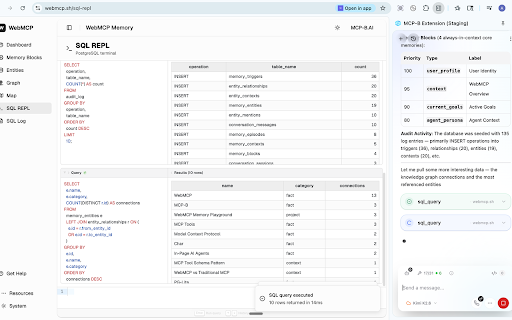

AI-powered browser assistant with Model Context Protocol integration for enhanced web interactions This extension let's you call webmcp tools and script any website

Page Agent Ext
AI-powered browser automation assistant. Control web pages with natural language. Page Agent Ext — AI-Powered Browser Automation 🌟 What is Page Agent Ext? Page Agent Ext brings AI-powered automation to your browser. Built on the open-source Page Agent framework, it lets you control web pages across multiple tabs using natural language — no scripting required. - Natural Language Control — Command your browser in plain language, no code needed - Cross-Tab Automation — Seamlessly operate across multiple tabs and pages - Smart HTML Cleaning — Intelligently extracts and simplifies page structure for accurate AI understanding - Bring Your Own LLM — Use OpenAI, Anthropic, or any compatible API with full data control - Privacy-First — Zero data collection; all data flows directly to your chosen LLM provider - Open Source — MIT licensed, built on the Page Agent framework with full transparency - 🧪 Connect from your own in-page agents - 🧪 Connect from local MCP Page Agent Ext performs DOM analysis locally in your browser. When you initiate a task, sanitized page structure is sent to the LLM API you configure. Your data is never collected or stored by us. - Your API Key — Configure your own LLM API (OpenAI, Anthropic, etc.). Data goes directly to your provider - Test API — A free test endpoint is available for evaluation; we recommend your own key for regular use Terms of Use & Privacy: https://github.com/alibaba/page-agent/blob/main/docs/terms-and-privacy.md This project is MIT licensed. Review the code, verify privacy claims, or extend it for your needs: https://github.com/alibaba/page-agent

WebMCP - Model Context Tool Inspector
Inspect, monitor, and execute WebMCP tools manually or with Gemini ⚠️ Prerequisites: Go to chrome://flags and enable the "WebMCP for testing" flag in Chrome 146.0.7672.0 or higher. 🚨 This extension does not implement production-level security boundaries. Do not use this extension while navigating untrusted websites.

webcode bridge
webcode bridge (Browser Extension) ⚠️ IMPORTANT This extension is a companion for webcode gateway. You must install and start the `webcode gateway` extension in VS Code before using this. 🚀 Introduction webcode bridge is the connector that links Web AI Chatbots (Gemini, ChatGPT, DeepSeek, etc.) to your local VS Code environment. It intercepts specific AI tool calls and securely forwards them to your local VS Code server, allowing the cloud AI to "see" and "operate" on your local projects. 1. Preparation: Open VS Code, ensure webcode gateway is installed, and click the status bar to start the service. 2. Auto Connect: Open Gemini or other supported AI pages. The extension will automatically detect and connect to the local service (the icon will turn green). 3. Start Chatting: Open a new chat, type your actual request first, then add `/webcode` or `@webcode` at the end of the same message. When webcode asks whether to add the initialization prompt, choose Add or press Enter. webcode replaces the trigger word with the initialization prompt, then you can review and send the message yourself. 4. Troubleshooting: If the icon is red or gray, click the icon to view detailed troubleshooting steps. 📥 Get VS Code Extension Search in VS Code Marketplace: `webcode gateway`

AgentBoard
A switchboard for AI in your browser: wire in any model, script WebMCP tools, connect remote MCP servers, bring your commands. - Multi agent: Configure as many profile as you want, switch mid-conversation. - Your provider: OpenAI, Anthropic, Google, or your own completion-compatible endpoint. - Your settings: System prompts, temperature, thinking settings. - Your keys: Bring your own API keys. No lock-in, no upselling. - Your tools: Script WebMCP tools for page interactions. Connect remote MCP servers. - Your commands: Template prompts with arguments; type `/analyze`, not paragraphs. Bring your own models—local, fine-tuned, custom—to power multiple agent profiles. Connect remote MCP servers: bring external tools (APIs, databases, services) into browser context. Script WebMCP tools that interact with page content — think, Greasemonkey for the AI age. Built for power users.
