
dakjaeligofcdjlcoifkiappabgladep


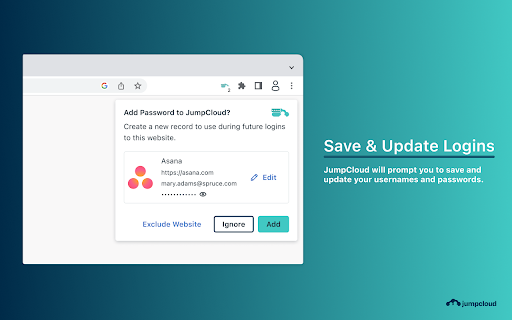

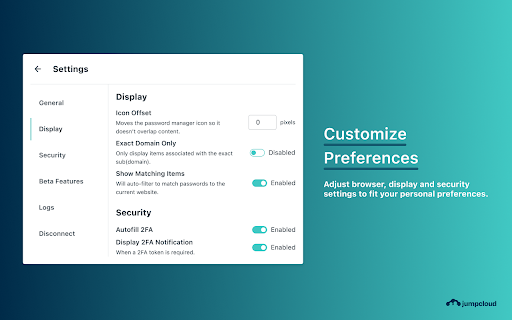
Securely manage and share passwords & 2FA with your team The JumpCloud Password Manager enables your team to securely manage and share passwords & 2FA and share while providing you with full visibility and control over passwords used across your organization. Below are some of the features of Password Manager: • Passwords and other types of secrets are stored locally across your organization's devices and are synced and shared in an end-to-end encrypted way through JumpCloud relay servers. This removes the need for a master password and offers your end users a seamless login experience. • Password & 2FA auto-fill in browsers and native applications removes the need for users to create, remember, and manually input credentials. • Password & 2FA sharing between users and groups reduces the risks involved with users sharing passwords in an insecure way while providing you with visibility and control over who has access to what credentials. • Strong and unique password generation reduces the likelihood of your company passwords being guessed and compromised by hackers. • Centralized admin management through the JumpCloud admin console in a fully integrated way allows you to manage identity, access, and devices from a single console.

RPass
RPass extension by Rippling Strengthen company security with hassle-free password management Eliminate employee password sharing on Post-Its, emails, chat sessions, and other insecure methods once and for all. Rippling’s built-in password manager, Rpass, makes it easy to strengthen your company’s security while ensuring users have the access they need to do their jobs. Automate password access across the user lifecycle * Automatically share passwords with employees based on attributes like role, location, and department using dynamic policies * When HR hires a new employee, Rippling will automatically apply these policies and share the relevant passwords via Rpass * Instantly revoke access and reassign passwords with one click when employees are offboarded, ensuring the security of the company vault Store and share passwords securely * Enable employees to safely share passwords directly from the Rpass software, which transfers them from client to client using secure enterprise-grade encrypted communication * Customize permission policies to tightly control who can and cannot share passwords * Passwords are stored in a zero-knowledge vault and will always stay private Protect against phishing * RPass will only fill passwords into the same website domain from which they were saved, protecting users from inadvertently entering passwords on a phishing site * RPass will detect and prevent passwords from being filled on insecure HTTP sites Access to RPass is by invitation only. If your Rippling account manager has enabled RPass on your account, go ahead and install it here.

SAML-tracer
A debugger for viewing SAML messages A tool for viewing SAML and WS-Federation messages sent through the browser during single sign-on and single logout.

Rovo: Search, Chat, and more
Take Rovo anywhere you work. Easily access Search, Chat, and Agents, and look up definitions outside your Atlassian products. 🚀 Take Rovo anywhere you work Rovo integrates directly with your browser to provide quick access to Search, Chat, Agents, and definitions. Whether you're searching for information or need help moving work forward, Rovo is here to help. 🔎 Find, Learn and Act - Universal Search: Quickly search Atlassian and connected third-party products when you open a new tab. - Contextual Chat: Engage with Chat and Agents wherever you are, even outside Atlassian products. - Definitions: Get AI-generated summaries and definitions within your working pages*, enhancing your understanding and productivity. 🙂 Make Rovo your own - New tab experience: Customize your new tab page with Rovo, providing quick access to Search, recommended links, and Chat suggestions. - Personalized results: Rovo personalizes your experience, offering Search suggestions and Chat responses tailored to your needs. Use the Rovo Chrome extension if your company uses Atlassian Rovo. More about Rovo at rovo.com. *Available in Atlassian products and Google Docs. More to come. For more information about the permissions this extension requires, see https://support.atlassian.com/rovo/docs/rovo-browser-extension/. By downloading the Rovo extension, you acknowledge Atlassian's Privacy Policy and Acceptable Use Policy. See, https://www.atlassian.com/legal/acceptable-use-policy

JumpCloud Go™
JumpCloud Go™ enables faster, safer, seamless user authentication. Enhance security and productivity without compromise. Enable faster, safer, and frictionless user authentication with JumpCloud Go™. Seamlessly connect users from a trusted device to any JumpCloud managed resource using hardware backed device platform authentication with biometric support. Reduce the risk of phishing or other credential based threats by streamlining authentication workflows and reducing user authentication fatigue. If this extension is installed on a JumpCloud-managed device that is enrolled in an organization with the JumpCloud Go feature enabled, users working from their JumpCloud managed device accounts will be able to authenticate to their JumpCloud protected web-based resources using JumpCloud Go. Currently, this extension is supported on MacOS and Windows devices.
