
dakbdekmmaendfjkpedbcekghhiabjli
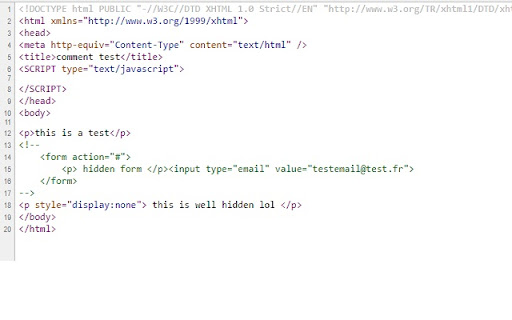
Uncomments hidden stuff in the HTML and reveals hidden elements UnCommenteR helps you reveal everything a webpage might be hiding by removing: Easily discover elements or features that are normally concealed on any website. Plus, you can perform advanced text manipulation with the built-in “sed-like” regex feature—great for transforming or inspecting page content. Whether you’re performing a pentest, bug hunting, or just curious about a site’s hidden sections, UnCommenteR makes it simple to see what’s lurking behind the scenes.

Pentest Recon+
The Pentest Recon+ Chrome extension is a powerful tool designed for penetration testers, cybersecurity professionals, and anyone interested in monitoring and analyzing web traffic in real-time. Here's a comprehensive explanation of what this extension does and why it’s a valuable addition to your toolkit. 1. Web Request Monitoring: - The core functionality of Pentest Recon+ is to monitor web requests made by your browser. Every time you visit a website, various HTTP requests are sent to fetch the resources needed to display the page—like HTML, CSS, JavaScript, images, etc. - Pentest Recon+ captures these requests, logging crucial details such as the URL, HTTP method (GET, POST, etc.), status code (e.g., 200 for success, 404 for not found), request type (e.g., XMLHTTPRequest, main_frame), and the exact time the request was made. 2. Real-Time Logging: - The extension operates in real-time, meaning as soon as a web request is completed, it’s logged immediately. This allows you to see the flow of requests as they happen, which is invaluable during penetration testing or when analyzing the behavior of a website. 3. Detailed Request Information: - For each captured request, Pentest Recon+ provides detailed information. This includes: - URL: The destination address of the request. - Method: The HTTP method used (e.g., GET, POST). - Status Code: The response status code, indicating whether the request was successful, redirected, or encountered an error. - Type: The type of request, which can help identify whether it was an AJAX call, a document load, etc. - Timestamp: The exact time the request was completed, which is useful for tracking the sequence of actions. 4. Local Data Storage: - All captured request data is stored locally on your machine using Chrome’s storage API. This means you can access the logged information anytime by simply clicking on the extension icon, without needing an internet connection. 5. User-Friendly Interface: - The extension includes a clean and intuitive user interface, accessible via a popup window. This interface displays the logged requests in a scrollable list, with each request presented in a clear and organized manner. You can quickly review the details of each request without needing to dig through complex logs. 6. Background Operation: - Pentest Recon+ runs in the background as a service worker, which means it continues to monitor and log web requests even when you’re not actively interacting with the extension. This ensures that you don’t miss any critical data, especially during long penetration testing sessions. Why You Should Install Pentest Recon+ 1. Essential for Penetration Testing: - If you’re a penetration tester, Pentest Recon+ is an essential tool. It allows you to observe and analyze the interactions between your browser and web servers, helping you identify potential vulnerabilities, track suspicious behavior, and understand the flow of data. This can be particularly useful for testing the security of web applications, APIs, and other online services. 2. Enhanced Security Awareness: - For cybersecurity professionals, this extension offers insights into how web applications communicate, making it easier to spot unusual or potentially malicious activity. By monitoring requests in real-time, you can quickly detect anomalies that might indicate a security issue, such as unexpected redirects, suspicious POST requests, or unauthorized data transmissions. 3. Educational Tool: - For students and enthusiasts learning about web development and cybersecurity, Pentest Recon+ serves as an educational tool. By visualizing web traffic, users can gain a deeper understanding of how the internet works, how data is exchanged between clients and servers, and how various web technologies interact. It’s a practical way to see HTTP requests in action and learn about the importance of secure web practices. 4. Convenient and Easy to Use: - Unlike more complex network monitoring tools, Pentest Recon+ is simple to install and use. There’s no need for additional configuration or setup—just add the extension to Chrome, and it starts working immediately. This convenience makes it accessible to users of all skill levels, from beginners to advanced professionals. 5. Privacy-Focused: - Pentest Recon+ stores all data locally on your device, meaning your web request logs are not sent to any external servers or third parties. This focus on privacy ensures that your data remains secure and within your control, which is particularly important when working with sensitive information during penetration tests. 6. Completely Free: - The extension is free to use, providing a cost-effective solution for monitoring and analyzing web traffic. Unlike some paid tools that offer similar functionality, Pentest Recon+ gives you access to essential features without any financial investment, making it an excellent choice for both professionals and hobbyists. 7. No Impact on Performance: - Despite its powerful capabilities, Pentest Recon+ is designed to operate efficiently without affecting your browser’s performance. It runs quietly in the background, ensuring that your browsing experience remains smooth and uninterrupted. 8. Regular Updates and Support: - The extension is actively maintained, with regular updates to improve functionality, fix bugs, and add new features. Users can expect ongoing support and enhancements, ensuring that the tool remains relevant and effective in the ever-evolving field of cybersecurity. In summary, Pentest Recon+ is a must-have Chrome extension for anyone involved in penetration testing, cybersecurity, or web development. Its ability to monitor and log web requests in real-time, combined with a user-friendly interface and a focus on privacy, makes it an invaluable tool for professionals and learners alike. Whether you’re conducting a security assessment, learning about web technologies, or simply curious about how websites interact with your browser, Pentest Recon+ provides the insights you need in a convenient and accessible package. By installing Pentest Recon+, you equip yourself with a powerful resource that enhances your understanding of web traffic, improves your ability to detect security issues, and ultimately contributes to a safer and more secure online environment.

OSINT Angel
OSINT Angel is a browser extension that aids in gathering and analyzing OSINT data from various sources. OSINT Angel is a powerful cybersecurity tool designed to bring Open Source Intelligence (OSINT) capabilities directly to your browser. The world of the internet is teeming with potential threats and hazards. Understanding these risks is crucial for cybersecurity analysts, researchers, and enthusiasts alike. This is where OSINT Angel comes into play, serving as your personal guardian in the vast cyber realm. Through integrating multiple threat intelligence APIs, the OSINT Angel extension provides real-time, in-depth data on IPs, URLs, and hashes directly from your browser. The extension will fetch data from reputable sources like VirusTotal, IBM X-Force, AbuseIPDB, IPQualityScore, and ThreatJammer, allowing you to perform comprehensive and efficient cyber threat intelligence operations. Once you've installed the OSINT Angel, you can simply right-click on any IP address, URL, or hash within your browser and select 'Perform OSINT.' The extension will quickly evaluate the selected data point against multiple threat databases. The process includes checking IPs for malicious activity, assessing URLs for potential threats, and verifying hashes against known malware databases. This comprehensive analysis is then neatly formatted and copied to your clipboard. This reduces the time-consuming process of manual threat hunting and analysis, freeing you to focus on more strategic aspects of your cybersecurity work. The extension also provides a notification once the OSINT is complete, ensuring you don't miss any crucial information. Beyond the technical, OSINT Angel also respects your privacy. All analysis is done on-demand and no personal data is stored or shared with any third parties. This ensures that your cybersecurity research doesn't compromise your own personal security. OSINT Angel is not just a tool, it's a companion for anyone interested in cybersecurity. Whether you're a seasoned analyst, a cybersecurity student, or just a curious mind, OSINT Angel provides invaluable insights in a fast and user-friendly manner. Utilizing OSINT Angel can significantly enhance your understanding of the cyber threat landscape, making the internet a safer place for everyone. Upgrade your browser today with OSINT Angel, and let it guide you through the intricate world of cybersecurity and threat intelligence. Requires your own APIKEYS for VirusTotal, IBM X-Force, AbuseIPDB, IPQualityScore, and ThreatJammer all free and available once registered.

DIRFOX - Endpoint Fuzzer for Pentesters
Fuzz endpoints using custom or GitHub-hosted wordlists. Built for security researchers and pentesters. 🔍 DIRFOX – Endpoint Fuzzer for Pentesters Discover hidden endpoints effortlessly, built for professionals. Dirfox is a lightweight yet powerful browser extension designed for penetration testers, bug bounty hunters, and cybersecurity enthusiasts. With a sleek Apple-style interface and real-time scanning capabilities, Dirfox helps you uncover hidden directories and endpoints from any website — fast, accurate, and efficiently. 🚀 Key Features : ✅ Custom & GitHub Wordlist Support Use your own wordlists or fetch popular ones directly from GitHub. 📡 Live Scanning with Status Code Filtering Watch your scan progress in real time and filter results by HTTP status codes (200, 403, 404, etc.). 🧠 Persistent Background Scanning Close the popup or switch tabs — your scan keeps running in the background without interruption. 📊 Auto-Save 200 OK Results Successful results are automatically saved and available in the scan history. 🌗 Modern Apple-style UI with Dark Mode Enjoy a clean, responsive interface with smooth transitions and a dark/light mode toggle. 🛠️ Full Scan Control Start, stop, or restart your scan anytime with intuitive controls. 🧩 Fullscreen Monitoring Mode Track scans in an immersive fullscreen view — perfect for focused workflows. 🧼 Clear History Button Easily delete all scan history with a single click. ❤️ Built-in Author Page & Support Links Learn more about the developer, explore other tools, and support the project directly from the extension. 🔒 Why Dirfox? Dirfox isn't just another endpoint scanner — it's a must-have tool that gives you: - Faster, smarter endpoint fuzzing. - Real-time feedback with clean visual progress. - Auto-saved results for efficient analysis. - A smooth, elegant user experience inspired by Apple-style design. Perfect for CTFs, bug bounty programs, and professional pentesting projects. 💡 Ready to uncover the hidden? 📥 Install Dirfox now and take your recon to the next level.

FindAllLinks
Find paths in the html/js This tool helps you find URLS and API endpoints embeded in js files and html content.
