
daimnfdnllelmegllinlifhmlomcfgfo
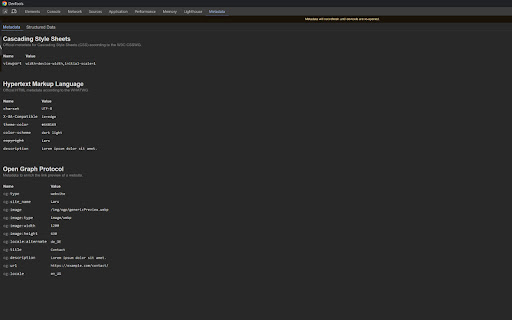
View metadata of the current website inside Devtools. The Metadata Viewer allows you to view the metadata of the website you are currently viewing in a visually appealing way. Additionally it will display additional information to specific meta-tags, including links to the specification, examples, type of the metatag, possible values and if the metatag is deprecated or not. Just open the Devtools and click on the "Metadata Viewer" tab.

Ripper Web Content | Capture Metadata Content
Extension that analyses and extracts metadata from content found on the web. Ripper Web Content is a versatile tool that analyses images and documents on a website, extracting detailed information and facilitating various operations on them. This extension is valuable in digital forensics and investigative environments, as well as in the OSINT (Open Source Intelligence) field due to its reverse lookup and face analysis capabilities. - Ability to obtain and download image metadata. - Reverse image search with Google Lens and TinEye. - Analysis with FotoForensics. - Face detection: number of people in a photo, gender, age and mood. - Fast image download. - Document scanning (.pdf, .docx, .pptx, .xlsx), metadata extraction and downloading.

META SEO inspector
Meta SEO Inspector helps web developers and curious users explore what’s hidden behind any web page. Instantly check a site’s HTML… Meta SEO Inspector helps web developers and curious users explore what’s hidden behind any web page. Instantly check a site’s HTML for SEO issues, verify metadata, and ensure compliance with Google’s Webmaster Guidelines. Features 🌟 NEW! – Can be opened on an always-open sidebar. ⭐ One-click insights – Instantly view all metadata and structured data (including full JSON-LD). ⭐ Smart alerts – Get notified when tags are missing, too short, or too long. ⭐ Actionable advice – Learn what’s wrong and how to fix it to improve your Core Web Vitals and search visibility. ⭐ Analyze competitors – Compare your site’s structure and content with others. ⭐ Easy exporting – Copy meta values, print reports, or export data in seconds. ⭐ Multilingual interface – Available in many languages. ⭐ Free and regularly updated – Continuously improved with community feedback. Perfect for developers, marketers, or anyone curious about what makes a web page tick.

Image Metadata Viewer
Simply right click an image and click "View Image Metadata" to see a popup of all available image data. (Make sure to refresh your open tabs after installing) For Stable Diffusion users, there is a specialized layout that intelligently organizes prompt and model parameter data in a readable and copyable way. Works with Automatic1111 and related UIs (does not support ComfyUI nodes yet). Makes tuning parameters for your images much more convenient! No ads or other monetization. I was sick of seeing all the broken or ad-ridden extensions claiming to show metadata which should be simple so I made this extension. More features to be added. If you have ideas for features or bugs, feel free to send me an email.

IPTC Photo Metadata inspector
Right-click on any image and select "View IPTC Photo Metadata". IPTC's GetPMD tool shows all metadata embedded in the image. Many images on the web contain embedded metadata such as creator, location, copyright and licensing information, even people and products depicted. IPTC's Photo Metadata Inspector tool lets you see embedded metadata in many image files. For eligible images, a context menu will appear when you right-click on the image. Select "View IPTC Photo Metadata" and you will be taken to IPTC's Get Photo Metadata (GetPMD) tool which will display all metadata embedded in the image file. NOTE that this tool needs to download your image from the web to process it. Therefore it does not work with local images accessed via file:// URLs.
