
dagniddgipkffcehffkjgbdobhldacgl
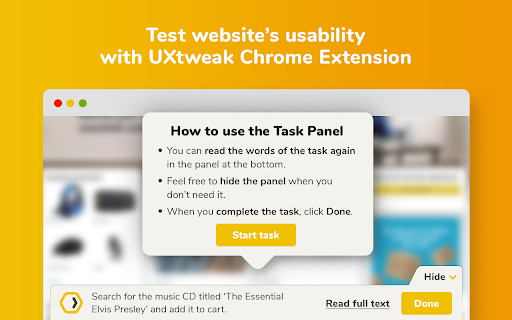

Uxtweak's browser extension for website usability testing studies UXtweak is a powerful UX research platform offering tools for improving usability of websites and mobile apps, from prototypes to production. Via the UXtweak extension, you can provide the web owners with useful insights on how you interact with their websites. These insights can then be used to make the website better and easier to use for you! Website usability testing is a method for evaluating how intuitive and easy to use a website is for its users, by collecting data on how they solve tasks and interact with the website during an online test. Users are notified about the nature of all collected data, and are asked to give explicit consent prior to entering the study. How to use the extension? 1. Install the extension into your web browser. 2. Visit the address of the Website Testing study provided by the study conductor. 3. The extension will record your interaction with the website (in the form of raw interaction data, e.g. clicks, scrolls, and mouse movements). UXtweak's Chrome extension collects data ONLY on the tested website. Based on the study settings, and the level of consent the user has given, UXtweak can collect the following data: ⦁ User's interaction data from the tested website (mouse and/or keyboard events, such as the cursor's location on the screen) ⦁ Metadata regarding the browser, operating system, device, and approximate location ⦁ IP address (special consent required for EU residents) - optional ⦁ User's identification on the UXtweak platform (special consent required for EU residents) - optional ⦁ Form inputs, such as e-mail addresses and phone numbers (special consent required for EU residents) - optional ⦁ Audio, camera and screen recording (special consent required) - optional UXtweak takes users' privacy very seriously and is fully compliant with the GDPR. For more information, please visit the related section on the UXtweak's website here: https://www.uxtweak.com/legal/gdpr-compliance Which permissions does the extension ask for? ⦁ Storage permission - to store data about the study the user is currently participating in. ⦁ Tabs permission - to determine whether the user is currently viewing the tab with the study, and to be able to collect the data as well as display the Website Testing Task panel on the website being tested. ⦁ Scripting permission - to inject the recording code snippet into the website being tested. ⦁ Host permission – to allow a website to be tested as part of a Website Testing study (as the extension cannot determine in advance which site is going to be tested). Changelog: • 1.1.5 – Add support for Bulgarian, Greek and Romanian languages • 1.1.4 – Add support for studies in Portuguese language • 1.1.3 – Add experimental support for cross-domain recording • 1.1.2 – Prevent browser from suspending the extension during active study • 1.1.1 – Prevent injection of content script to frames multiple times • 1.1.0 – Support for recording of iframes added dynamically • 1.0.2 – Support for recording of cross-origin iframes • 1.0.1 – Update meta description • 1.0.0 – First public release

JokeTab: Fun jokes for you - Free money for charity
We want you to smile while helping charities for free! Enjoy a laugh with Dad jokes, puns, knock-knocks and more... all while helping to make the world a better place! Here’s how it works: JokeTab shows you a new joke every time you search. While you're smiling, we’re quietly doing something awesome in the background: enabling donations to charity from online stores when you shop — at no extra cost to you. JokeTab partners with thousands of popular online retailers. When you make a purchase from one of them, the store pays us a small referral fee. We donate 100% of that money to great causes, like helping kids with cancer or protecting the environment. Key features: 😄 A fresh, funny joke every time you search ❤️ Donations to charity generated automatically as you shop 🛍️ Works with thousands of your favorite stores 🧾 No signup, no credit card, and no email required — completely free 🔒 Private and secure: we don’t track your searches or sell your data JokeTab makes doing good effortless (and funny). Add it now — it’s free, it’s fun, and it makes the world a little better. JokeTab may get paid referral fees or commissions directly from companies and/or via affiliate programs on sites visited and/or products purchased while using this browser extension. These commissions/affiliate-payments become the donations that go to your selected charity.

Qualtrics URL Tracker
This extension tracks which URLs the participant has opened during the Trust in Chatbots for Information Search experiment. Once the experiment is over, it automatically stops. It is designed specifically for that experiment and would not work with others. The extension does not track any personally identifying information, browsing history, or page activity. Its sole purpose is to keep track of the sources of information the participant has clicked, and nothing more.

Peek for YNAB
Check on your YNAB category and account balances, and quickly add transactions. The Peek for YNAB extension gives you a snapshot of your current YNAB category and account balances. You can pin your favorite categories and accounts, view recent transactions, and add transactions right from the extension. Split transactions and transfers are fully supported. You can also setup customizable notifications and alerts for each budget. Peek for YNAB is a third-party extension, and is not maintained or supported by YNAB (the company). Please do not reach out to YNAB's official support channels for help or issues related to this extension. Instead, please refer to the extension's help page: https://peekforynab.com/help

OpenText Core SCA Select Extension
Open Source Select will help developers find and use the right open source and reduce friction between organisations and developers Open Source Select helps you find and use policy compliant and great open-source for any development project. The OpenText Core SCA Select Extension is a free plugin created with developers in mind, enabling you to check the health metrics and license information of an open source project at a glance. If you need more granular data, the extension can lead you to Open Source Select for more detailed information. The three types of metrics you can examine are: Community - How healthy the community around a project is. Popularity - Is it used by many? Is the usage declining? Security - How well does the maintainers apply security best practices. The extension now supports Start Left Policies. This lets you immediately see if the open source you are browsing is compliant with your company’s open source policy, without the need to import and scan code with Software Composition Analysis tools and common source code repositories and package registries such as GitHub, pypi, npmjs, nuget and many others are supported.
