
dafcleomcfoaebdijilonkoelljljpai
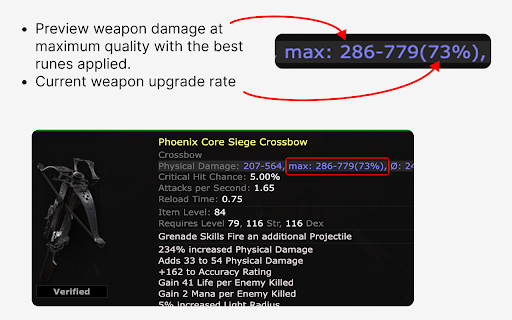


Shows items true potential - displaying stats when fully upgraded or without defense runes - to help you find undervalued gear. Take your Path of Exile 2 trading to the next level with Poe2 Real Armour. This extension enhances the trade interface by displaying the maximum potential an item can achieve by maximising quality, sockets and relevant runes. Perfect for players looking to spot undervalued bases and build powerful gear more efficiently. Features: • Calculates maximum item potential with maximised sockets, runes and quality • Helps identify underestimated gear for upgrades • Seamless trade-site integration Ideal for serious traders and min-maxers. Install Poe2 Real Armour and trade smarter today.

POE Trade Evaluator
Evaluates items on the Path of Exile trade site POE Trade Evaluator adds instant item analysis to the Path of Exile trade site. Features: • Automatic scoring and highlighting of valuable items • Detailed mod and synergy breakdowns • Price-to-value comparisons • Customizable interface • No external tools required Works directly on pathofexile.com/trade Not affiliated with Grinding Gear Games.

POE2 Trade Butler
A Chrome Extension for POE2 Trade with a sidebar and history management. This plugin is publicly available on the following GitHub: - https://github.com/NERDHEAD-lab/POE2-Trade-Butler ### Feature A major update (3.0.0) with many changes has been released. - A convenience toolbar has been added beneath the existing sidebar collapse/expand toggle. - Usability has been significantly improved for Settings, Favorites, and Preview. - To address the 100 KB account storage limit available to extensions, an option to switch to Google Drive has been added. ### Bug Fixes - The toggle button next to the sidebar now respects the sidebar transparency setting; the toolbar under the toggle also follows the same transparency. - Fixed an issue where the user guide could be skipped, missing, or fail to close properly. - Corrected unnatural translations in some Settings labels. - Fixed an issue where, after more than 30 seconds of inactivity, certain actions intermittently did not work on the first attempt. - Fixed issues where settings could be manipulated while changes were being applied, or changes failed to apply and triggered a refresh. - Fixed an issue where no scrollbar appeared when there were many Favorites items.

POE TradeNinja
Adds a Trade button to items in Path of Exile build pages and handles trading process. **Unfortunately not compatable with version 3.26 of POE, no planned update as of yet due to real life commitments ** Elevate your Path of Exile trading experience with PoE Trade Ninja — an essential Chrome extension for players who rely on PoE Ninja for build exploration and item pricing. Seamlessly search for items from any PoE Ninja build with just a click, saving you time and maximizing your trading efficiency. Install PoE Trade Ninja now and take full control of your Path of Exile trading strategy. Easily search for build items and stay ahead of the competition with this powerful tool. ------------------------------------------------------------------------------------------------------------------------------------------------- Key Features: Direct Item Search: Instantly search for any item featured in a PoE Ninja build with a single click, connecting you directly to the best trade options available. Automatic Build Parsing: Effortlessly analyze any build on PoE Ninja and find the exact items used in the build, including mods and variations. Seamless Integration: Fully integrated with PoE Ninja, ensuring you get the most accurate and up-to-date item information. User-Friendly Interface: Simple and intuitive design that fits naturally into your PoE Ninja browsing experience. ------------------------------------------------------------------------------------------------------------------------------------------------ How It Works: PoE TradeNinja enhances your experience on the poe.ninja website by adding an additional layer of functionality. As you explore builds on PoE Ninja, this extension allows you to instantly search for the exact items used in those builds. With just a single click, you can search the market for the items, mods, and variations that you need, ensuring you can replicate any build or optimize your trading decisions. If you frequently use PoE Ninja to browse builds or price-check items, this extension is a must-have. It cuts down the time spent manually searching for items by providing instant access to trade searches directly from the build pages. Whether you're trying to copy a top-tier build or simply looking for price trends, PoE TradeNinja makes it easier and faster. ------------------------------------------------------------------------------------------------------------------------------------------------ Compatibility: PoE TradeNinja is designed to work seamlessly with the PoE Ninja website and is compatible with the latest versions of Chrome and Chromium-based browsers. ------------------------------------------------------------------------------------------------------------------------------------------------ Updates and Improvements: We're constantly working to improve PoE TradeNinja with new features and enhancements. Stay tuned for updates that will further expand the extension's capabilities and make your Path of Exile experience even better. This product isn't affiliated with or endorsed by Grinding Gear Games in any way.

Path of Exile Trade Omnisearch
Faster trade search. Adds an omnisearch box with hotkeys to the Path of Exile trade site. Press ? after installing. Press `;` to bring up the omnisearch box. Start typing to find and jump to any filter in any language, including the filters on the left hand side of the trade UI (corrupted, split, DPS, item category, etc.). It also adds a variety of hotkeys to navigate the UI, so that you never have to resort to using the mouse. For example: * `;` + `frac strength` brings up fractured strength, fractured strength and dex, etc. * `;` + `links` jumps to the socket links filter, after which you can press `tab` to navigate.
