
dacblbllifgkolpkpocnnnahbgoccpfb
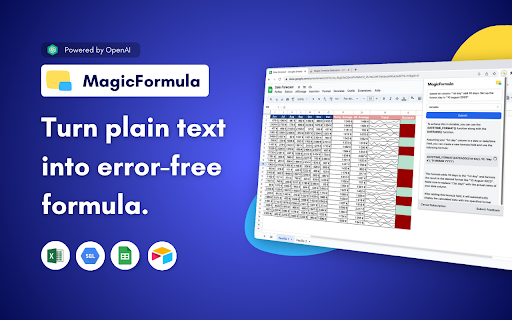
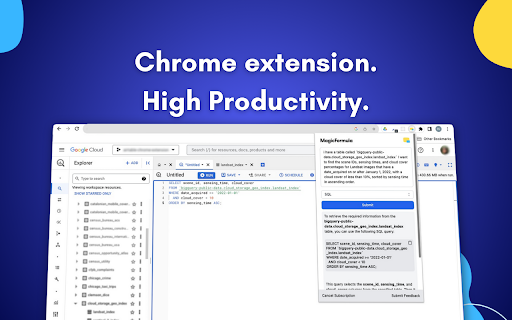
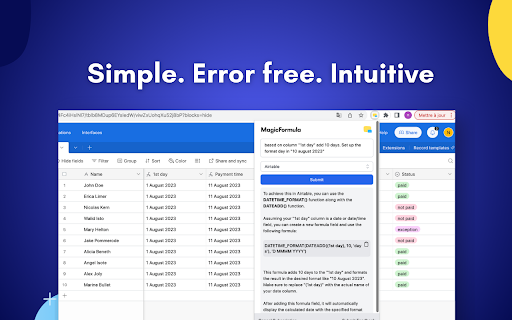

Master Spreadsheet & Database with AI - Turn text into formulas MagicFormula is a Chrome Extension powered by AI that helps you to create formulas from plain text. We envision our tool to be the ultimate Spreadsheet & Database assistant, thanks to : 🎉 Simplicity: Seamless integration with your preferred data analysis platforms – Excel, Google Sheets, Airtable, and SQL – we offer a unified and efficient workflow that optimizes your work. 🧮 Error-Free Formulas: MagicFormula's intelligent algorithm ensures precision and eliminates formula-related errors. Say goodbye to formulaic mistakes and work confidently with accurate data. ⚡️ Boosted Productivity: You'll unlock newfound efficiency, enabling you to concentrate on deriving valuable insights from your data. No more endless searching... 🔌 No-Code Power: Advanced analytical capabilities are at your fingertips, even if you're not a coding expert. Our extension bridges the gap between your data analysis goals and the complexities of formula & Query , granting accessibility to powerful tools for all.

nichesss
Create articles from your favorite keyword research tools with 1-click. Writing articles for your website or blog can take a long time and be extremely tedious -- especially when you have to bounce back and forth between various sites. It can be really hard to grab the information from tools like ahrefs, SEMRush, Keywords Everywhere, and then spend hours writing an article. But with nichesss, you can save time and make it easy to write an article once you've identified keywords. Just add the nichesss extension to your web browser and use your favorite keyword tool. Then, with just one click, nichesss will make an article for you based on the keywords you've selected. You won't have to spend hours combining keyword research and writing articles anymore. nichesss makes it faster and easier to write articles that rank!

Stacks - Web Clipper and AI Assistant
The fastest way to save links, notes, and files with AI-powered recall. Instead of dumping content into endless folders or tabs, Stacks lets you save with context. It connects the dots across your browsing - helping you remember why you saved something, surface it at the right time, and organize without effort. ✨ Key features: - One-click save for links, text, notes, screenshots & more - AI-powered recall to find what you forgot - Smart suggestions as you browse - Collections to organize your thinking - Private by default, built for creators and curious minds Whether you're researching, planning, learning, or building - Stacks is your second brain in the browser. Here's everything Stacks can do for you: ✨ One-Click Saving - Save any webpage, article, video, or document instantly - Support for YouTube, LinkedIn, Twitter, and more - Quick keyboard shortcut (Ctrl/Cmd + K) 🔍 Smart Search & Discovery - Get personalized recommendations in Google search results - Find your saved content when you need it most - Search across all your bookmarks instantly 🤖 AI-Powered Organization - Automatic categorization of saved content - Smart collections based on topics and themes - Custom folders and tags for personal organization 💼 Professional Features - Create shareable collections - Collaborate with team members - Build a searchable knowledge base - Access from any device or browser Perfect for: - Researchers & Students - Professionals & Teams - Content Creators - Digital Collectors ⚡️ Install Stacks now and transform how you save and find online content.

Chat with Desksense AI Powered by GPT4
The Ultimate AI Assistant with GPT-4 powered responses. Answers any queries, summarize articles, create emails, content & AI images. Desksense ChatGPT AI app provides Free Chat GPT & GPT-4 access, AI writer for Email, Blogs, Articles, Tweets, Linkedin posts, Facebook Posts, Replies and more. Desksense AI uses OpenAI ChatGPT to summarize Youtube videos & Blog in one-click. Desksense AI app revolutionizes your online search experience by integrating Open AI ChatGPT alongside your Google search engine. With Desksense you can access instant AI-generated responses, providing valuable insights and information right alongside the search results you're browsing. With just a CMD+ I OR CTRL+ I Desksense makes it easy for you to access the ChatGPT on any website. Use "Shortcuts" for Advanced users. 👉👉 Save ANY ChatGPT, GPT-4, Claude3 OR Genini Pro response to your Desksense Account in one-click. 👉 [New Update] Desksense comes with new Chat GPT models like; GPT-4-o-mini and other LLM's like Claude3, Gemini Pro & Llama 3version. 👉 [New Update] Desksense comes AI Image Analyzer 👉 Desksense iOS App is now live in App Store. 👉 New AI Summarizer is now live with upload file feature. 👉 AI Writer for ANY content with ChatGPT-4, GPT-4-o-mini, Claude 3 & Gemini Pro option (Emoji, character limit included with a different lanuage model.) 👉 FREE AI Chatbot integrated with ChatGPT & GPT-4 in web app 👉 Get ChatGpt AI response or replies with 'Tone' and 'Emoji' 👉 Unlimited AI response on Google Search 👉 One-click AI summarizer for Youtube videos 👉 One-click AI summarizer for ANY website 👉 ChatGPT AI Image generator using Dall-E 👉 Save ChatGPT response in your account for later use. 👉 Save your frequently used prompt(s) 👉 List of 100+ preset prompts and option to edit and save in your account. 👉 Easy Access with CMD + I OR CTRL + I on ANY website 👉 Grow your Social Media presence using Desksense AI response in LinkedIn posts, Twitter & Facebook posts. 👉 Write faster and smarter emails on Gmail, Tweets, Linkedin Posts and Facebook posts 👉 Generate online content, video script, hashtags & keywords and topics for blog posts, articles and socials using Desksense AI ChatGPT App. 👉 Share your saved response to social media using our Desksense Web App 👉 Copy to clipboard, Save, Favorite and add tags to ChatGPT responses as Card. 👉 Desksense Chat GPT & GPT 4 Android Mobile App 👉 Auto Dark/light mode 👉 Change the Tone of your response and include emoji when needed. 👉 AI Chatroom Collaboration with your Team 👉 AI Chatbot in Extension 👉 AI Content Generator - AI Email Writer, AI Article Writer using ChatGPT, GPT-4, GPT-4-o-mini, Claude3 and Gemini Pro., AI Code Generator, AI Social Media Post Generator and more... Are you a busy professional juggling multiple tasks? A student striving for academic excellence? Or someone seeking to optimize their daily routines? Look no further! Desksense is here to revolutionize your digital experience. Desksense is a powerful chrome extension that leverages the ChatGPT API to enhance your productivity. It provides a range of AI applications, including ChatGPT & GPT-4 AI chatbot, summarizers, AI writers, and more, accessible on any website. Yes, Desksense is completely free to download and use. Every free user gets 5000 Word limit for month. No, you do not require a separate ChatGPT account. Simply sign up for free at Desksense.com to access the extension. Yes, Desksense chrome extension works seamlessly in all countries, ensuring that users worldwide can benefit from its features. To install Desksense on your browser, you will need to follow these steps: 1) In your browser open the browser's app store or extension store 2) Search for the Desksense in the browser's app store or extension store (or click for : Google Chrome | Edge) 3) Click on the "Add to Browser" or "Install" button to begin the installation process. 4) Follow the prompts to give the extension permission to access certain parts of your browser, if prompted. 5) Once the installation is complete, you will be redirected to our onboarding page 6) That’s it ! you are done :) Please pin the ext. on top bar to get on-time updates. If you have any questions, please feel free to reach us at support@desksense.com === VERSION 1.0.13 ==== * NEW FEATURE: AI Writer for ANY content with newest version of GPT models (Emoji, character limit included with a different lanuage model.) * NEW FEATURE: AI Image Analyzer that analyses any image and gives you response describing the image. * File Summarizer: Upload any file & summarize in one-click * Minor Bug fixes

Tab Reminder
Have you ever opened a website and thought "I want to read this later" -- then completely forgot about it? Tab Reminder lets you set a reminder on any tab and come back to it exactly when you're ready. No bookmarks to dig through, no tabs left open for days. How it works: - Click the Tab Reminder icon on any tab - Choose a time -- in 20 minutes, 1 hour, 3 hours, tomorrow, next week, or a custom date and time - Get a native browser notification when it's time, and click it to go straight back to the page Key features: - ⏰ Quick reminder presets or custom date & time - 🔁 Repeating reminders -- hourly, daily, or weekly - 📋 Full dashboard to view and manage all your reminders - 🕓 Reminder history so you never lose track - 🔗 Webhook support for automation (Zapier, Make, etc.) - 🦊 Works in Chrome, Firefox, and Brave
