
cpnngmckccgcopllekpgppnfhaefbaam
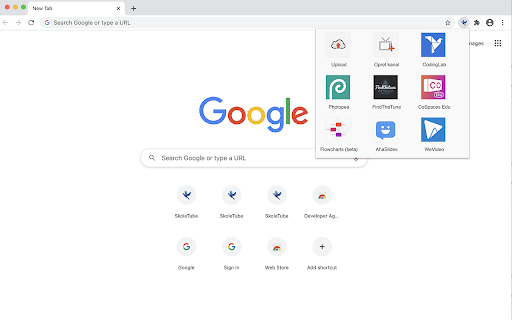
Skoletube's chrome extension Med denne extension har du altid Skoletube lige ved hånden. Du kan via et enkelt klik åbne og starte alle Skoletubes værktøjer. Du kan også uploade filer og oprette kanaler.

IntoWords Cloud
IntoWords - Streamlined Reading and Writing Support IntoWords integrates seamlessly into your browser and provides tools to support reading and writing tasks. Whether you're writing emails, reports, or browsing the web, IntoWords offers real-time assistance to boost your productivity. • Context-aware word suggestions for accurate writing • Text-to-speech that enhances reading comprehension • Context-based word suggestions for fluent writing • Support for spelling, grammar, and punctuation • Speech-to-text for faster writing and fewer errors • Customizable settings to match your workflow Accessibility IntoWords Cloud is accessible online from PC, Mac, and Chromebook. Learn more on our website: https://www.vitec-mv.com/programmer/intowords/ Privacy Policy By using the service, you accept our privacy policy and end-user license agreement (EULA). Read our terms and conditions to understand how we protect your data and privacy: https://vitec-mv.com/dk/betingelser-og-vilkar/privatlivspolitik/

Padlet Mini
Collect and bookmark the best of the web for yourself or with friends. Dostoevsky said that beauty will save the world. Padlet offers beautiful boards and canvases for visual thinkers and learners. Use boards to collect, organize, and present anything. Use sandboxes for whiteboarding, lessons, and activities. Over 40 million people every month actively use Padlet around the world. Here are some of the ways they use it: - Create interactive lessons - Design collaborative worksheets - Brainstorm ideas - Make slideshows - Build meeting agendas - Solicit feedback - Collaborate on files with clients - Store instructional videos - Share marketing assets - Manage real-estate listings on a map - And more Dostoevsky would have loved Padlet.

SkoleGPT Webudvidelse
SkoleGPT i Chrome-sidepanelet med chat, oplæsning, websøgning og dokumenthjælp. Højreklik på et tekststykke du ikke forstår. SkoleGPT læser teksten, samt resten af hjemmesiden og prøver at forklare dig kontekst, på et niveau du forstår.

Picto4me
Search images and pictograms for Augmentative and Alternative Communication (AAC) Picto4me - Your AAC Pictogram Search Assistant Picto4me is a powerful Chrome extension that helps educators, therapists, caregivers, and families quickly find and customize pictograms for Augmentative and Alternative Communication (AAC). • Search Pictograms Instantly Access thousands of pictograms from the ARASAAC database directly from your browser's side panel. Search in multiple languages including English, Spanish, and more. • Customize Your Pictograms Personalize each pictogram with extensive options: - Toggle color or black & white mode - Set custom background colors - Add colored frames with adjustable width - Apply plural indicators - Add strikethrough for negation - Customize skin and hair colors for inclusive representation - Add text labels above or below the image - Choose between standard (500px) and high resolution (2500px) • Easy Export Options - Download customized pictograms as PNG files - Copy directly to clipboard - Drag and drop into documents, presentations, or communication boards • Multilingual Support - Interface available in English and Spanish - Search pictograms in your preferred language - Settings saved locally for a personalized experience PERFECT FOR: - Speech-language pathologists creating AAC materials - Special education teachers preparing visual supports - Parents and caregivers building communication boards - Therapists designing intervention materials - Anyone working with individuals who use AAC Powered by ARASAAC (Aragonese Portal of Augmentative and Alternative Communication), providing free access to high-quality pictographic resources. Note: This extension requires an internet connection to search and retrieve pictograms from the ARASAAC database # Picto4me Chrome Extension - Release Notes #### SVG Editor for Noun Project Icons - New dedicated editor for customizing Noun Project SVG icons - Customization options include: - Image size adjustment (10-100%) - Background color selection - Icon color/fill modification - Horizontal and vertical flip transforms - Frame with customizable width and color #### Drag and Drop Support - Drag images directly from search results to external applications - Drag customized images from both ARASAAC and SVG editors - Visual feedback with grab cursor on draggable elements #### Custom Color Palettes - Add multiple custom colors to any color picker - Custom colors are persisted across sessions - Separate palettes for each context (background, icon, frame colors) - Always-visible "+" button to add new colors to the palette - Default image size changed from 100% to 90% for better visual presentation - Frame width default increased to 10px - Improved color picker UI with checkmark button to confirm custom color addition - Source toggle buttons redesigned as compact pill-style buttons - Fixed SVG stroke color selection - Fixed SVG image sizing issues - Various UI and stability improvements - Initial release with ARASAAC pictogram search - Pictogram customization editor - Download and copy to clipboard functionality - Multi-language support (10 languages)
