
cpeocgdgoopflcgmpohkcgnigkfhokdm

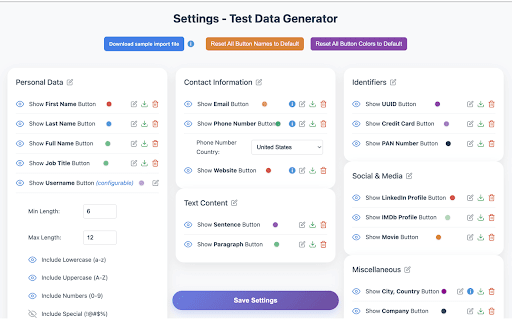


Stop wasting time manually typing fake data. Generate 20+ types of realistic test data (names, emails, UUIDs, credit cards, IP addresses, and more) with a single click. Data is automatically copied to your clipboard—just paste and go. What you get: • Instant generation of names, emails, phone numbers, UUIDs, credit cards, addresses, and more • One-click copy to clipboard—no typing, no hassle • Import your own custom datasets via JSON • Customize button colors and labels to match your workflow • Works 100% offline—no server calls, no privacy concerns • Toggle visibility to keep only the data types you need Perfect for: ✓ Developers testing forms and databases ✓ QA engineers running test scenarios ✓ Designers creating realistic mockups ✓ Anyone who needs fake data fast

Yi Fake Filler
Fills web forms with fake data. Easy, powerful, and clean! Tired of manually filling out form fields during development and testing? **Yi Fake Filler** instantly populates web forms with realistic dummy data or your own custom values. Designed for developers, testers, and power users, it streamlines your workflow by eliminating repetitive manual data entry. * **Intelligent Recognition**: Automatically detects field types (names, emails, passwords, phone numbers, addresses, dates, and more) to insert realistic default fake data. * **Custom Override Rules**: Take full control by mapping specific text values or custom generators to target elements using their `name`, `id`, `placeholder`, or CSS selectors. * **Universal Input Support**: Works seamlessly with text fields, numbers, select dropdowns, textareas, checkboxes, radio button groups, passwords, and dates. * **Bypasses Framework Bindings**: Fires native browser events (`input`, `change`, `click`) to ensure compatibility with modern frontend frameworks like React, Vue, and Angular. * **Multiple Activation Methods**: Trigger form-filling instantly with one click from the toolbar popup, a global keyboard shortcut (**Alt + Shift + F**), or by right-clicking on any editable field. * **Dynamic Page Friendly**: Works on multi-step forms, modals, and Single Page Applications (SPAs)—just click again when new fields appear. * **Lightweight & Privacy-First**: Zero tracking, extremely performant, and runs only when you request it. 1. Navigate to a webpage containing a form. 2. Click the **Yi Fake Filler** icon in your Chrome toolbar and click **"Fill Active Form"** (or use **Alt + Shift + F**). 3. To customize default values, right-click the extension icon, choose **"Options"**, and define your custom override match rules. Say goodbye to tedious placeholder typing. Install **Yi Fake Filler** today and supercharge your testing productivity!

Random Data Generator
This is use to generate random person data for dummy data This extension is used to generate the random dummy data for Testing the apps or softwares

Network++
Supercharge DevTools with Network++: API inspection with native GraphQL support, JSONPath querying, and Postman-style collections. Supercharge Chrome DevTools with API inspection, GraphQL support, JSONPath querying, and Postman-style collections — all without leaving your browser. • Edit & Replay — Modify headers, URL, or body of any captured request and resend it instantly • JSONPath Explorer — Click any JSON value to generate its JSONPath, then run live queries against response data • JWT Decoder — Auto-detects Bearer tokens and decodes the payload inline • Saved Collections — Save and organize requests into persistent folders across DevTools sessions • Smart Filtering & Search — Filter by XHR, Fetch, or GraphQL; search across URLs, bodies, and response payloads • One-Click Export — Export requests to Playwright, Cypress, or Postman format • Auto-detects GraphQL via URL, headers, and body patterns • Shows operation name, type, variables, and syntax-highlighted query • Handles batched queries, APQ, and @defer/@stream responses • Error count badges highlight failing operations instantly • 100% local — no telemetry, no external servers, no tracking • Works offline and on internal networks • Minimal permissions required

DataDuck - Format and create test data offline
Generate Payment Info, Texts, Files and format Json Offline with DataDuck. DataDuck is a Chrome extension with multiple functionalities to ease test data generation for testers, QA engineers, and developers. With its simple interface, you can generate realistic and multilingual data for your apps instantly without any effort. Multilingual Text Generation > Generate random text in different languages with dynamic lengths (up to 2500 characters) to test multilingual content and interfaces. Realistic Personal Data > Create real-looking names, birthdates, addresses, phone numbers, and email addresses for various countries and cultures in an instant. Payment Data Simulation > Create realistic payment details like card numbers, BIC, IBAN, routing numbers (where applicable), expiry dates, and CVV for finance testing. JSON Formatting & Validation > Format and validate JSON data with built-in tools to ensure your data is well-formatted. File Generation > Create test files as large as 30 MB in size with dynamic content generation that conserves memory by streaming the data in chunks. User-Friendly Interface > Enjoy a minimalistic and simplified experience that allows you to create a wide range of test data within a few clicks. Whether you need to populate forms with actual information or simulate complex financial transactions, DataDuck is a one-stop solution to accelerate your development and testing cycles.
