
cpelimllnoliknlehbfkfeilggmomekh
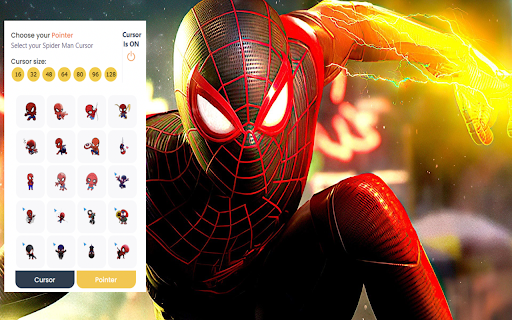
Spiderman custom cursor for chrome. New browser experience with Spider Man cursor. Created for Spider Man Marvel fans. New browsing experience by using this Spider Man custom cursor chrome extension. Spider Man Cursor Extension Features: - Give you different Spider Man cursor design for you to replace default cursor. - Allow you to select your preferred cursor sizes. - Click on the task bar extension icon located at right hand top corner to open up Spider Man cursor setting box. - Quick access to More cursor theme in setting box. ------------------- ! After installing this extension, refresh the previously opened tab if you want to use it on this page. ! According to the rules of the Chrome Web Store extension cannot work on the store pages and home page. Please open any other website (for example, google.com) after installing this extension and check how the extension will work on it. If you have any questions about our Spider Man cursor extension or just want to give us some feedback, feel free to send us a message or write a review! We'd love to hear from you.

Anime Cursor - Custom Cursor for Chrome™ - All in One Anime Cursors
Give your browser some anime flair! Demon Slayer, One Punch Man, Dragon Ball and more now turn into cursors! Turn Every Click into an Anime Adventure! Welcome to Anime Cursor – the ultimate Chrome extension for anime fans! Transform your boring mouse cursor into iconic characters from your favorite anime series and browse the web with style, energy, and personality! Regular updates with fresh content Perfect for anime fans who love personalization ✨ Whether you're a ninja, a titan slayer, or a super saiyan — we’ve got something for you. 🎯 Choose your favorite anime, set your cursor, and make your browsing experience truly epic! 🔄 After installing the extension, make sure to refresh any tabs you had open so the cursors can be applied properly. ⚠️ Please note: the extension may not work on the Chrome Web Store or the browser’s home page. 🌐 To test it, try opening a different website (like google.com). 🖥️ If you enjoy the experience, you might also love our Custom Cursor App for Windows! 👆 Click the extension icon and hover your mouse inside the preview area to see your selected cursor in action. About Us Gameograf.com crafts premium Chrome new tab themes and extensions. Explore top collections in Fortnite, anime, cars, music, K-pop, celebrities, and more. Google Chrome Affiliate Program Disclosure This extension may open gameograf.com on new tabs to display info about its features and related content. All redirects comply with Chrome policies and require user approval.

Squid Game Cursor
Squid Game custom cursor for chrome. New browser experience with Squid Game cursor. Created for Squid Game fans. New browsing experience by using this Squid Game custom cursor chrome extension. Squid Game Cursor Extension Features: - Give you different Squid Game cursor design for you to replace default cursor. - Click on the task bar extension icon located at right hand top corner to open up Squid Game cursor setting box. - Quick access to More cursor theme in setting box. ------------------- ! After installing this extension, refresh the previously opened tab if you want to use it on this page. ! According to the rules of the Chrome Web Store extension cannot work on the store pages and home page. Please open any other website (for example, google.com) after installing this extension and check how the extension will work on it. If you have any questions about our Squid Game cursor extension or just want to give us some feedback, feel free to send us a message or write a review! We'd love to hear from you.

Demon Slayer Cursor
Demon Slayer custom cursor for chrome. New browser experience with Demon Slayer anime cursor. Created for Demon Slayer fans. New browsing experience by using this Demon Slayer custom cursor chrome extension. Demon Slayer Cursor Extension Features: - Give you different Demon Slayer cursor design for you to replace default cursor. - Allow you to select your preferred cursor sizes. - Click on the task bar extension icon located at right hand top corner to open up Demon Slayer cursor setting box. - Quick access to More cursor theme in setting box. ------------------- ! After installing this extension, refresh the previously opened tab if you want to use it on this page. ! According to the rules of the Chrome Web Store extension cannot work on the store pages and home page. Please open any other website (for example, google.com) after installing this extension and check how the extension will work on it. If you have any questions about our Demon Slayer cursor extension or just want to give us some feedback, feel free to send us a message or write a review! We'd love to hear from you.

Blackpink Cursor
Blackpink custom cursor for chrome. New browser experience with Blackpink Kpop cursor. Created for Blackpink fans. New browsing experience by using this Blackpink custom cursor chrome extension. Blackpink Cursor Extension Features: - Give you different Blackpink cursor design for you to replace default cursor. - Allow you to select your preferred cursor sizes. - Click on the task bar extension icon located at right hand top corner to open up Blackpink cursor setting box. - Quick access to More cursor theme in setting box. ------------------- ! After installing this extension, refresh the previously opened tab if you want to use it on this page. ! According to the rules of the Chrome Web Store extension cannot work on the store pages and home page. Please open any other website (for example, google.com) after installing this extension and check how the extension will work on it. If you have any questions about our Blackpink cursor extension or just want to give us some feedback, feel free to send us a message or write a review! We'd love to hear from you.
