
coplgpbgjpljpkhbkkpllhlhogmhjcbd

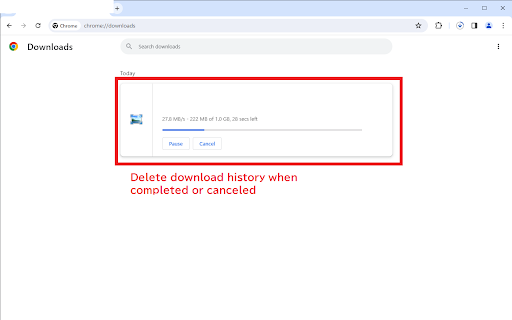
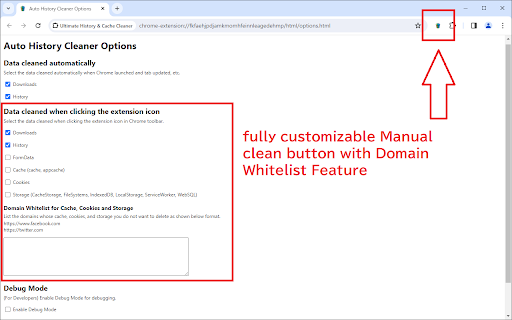
Automatically delete history and download history. Bundled a customizable & powerful manual clean button. This chrome extension deletes history and download history automatically. It requires less user interaction and features simple operation. This extension does not collect any user data. Use the following permissions to delete history data and save preferences. - history, downloads, storage, browsingData Release Notes: - v1.1.0.6: Removed the delayed deletion for Google search for the back button's functionality.

Clear Cache & History Cleaner
With this plug-in, you can delete history and cache when opening the browser. When you delete cache and history, the browser becomes faster. Quickly clear your cache without any confirmation dialogs or pop-ups. It’s a straightforward solution for cache management It provides instant removal of cache, download history, cookies, saved passwords, and more. Another Chrome extension that lets you customize what and how much data you want to clear, including cookies, app cache, files, and passwords.

Miracle Cache Cleaner
Clean your browser history, cache and cookies in just one click using Miracle Cache Cleaner Miracle Cache Cleaner is a simple and easy-to-use browser's history, cache, cookies, and downloads Cleaner. The main purpose of this extension is that it can increase the user's browser speed and user experience.

Clear Browsing History
Clear Browsing History Extension lets you clear browsing history on closing browser and disable browsing history saving easily! Keeping your browsing activity private is essential in today’s digital world. Our Chrome extension is the ultimate solution to clear browsing history quickly, efficiently, and securely. Whether you want to clear browser history for privacy reasons or to free up space, this tool makes it incredibly simple. Why Use This Chrome Extension?🗂️ 1. Instant History Cleaning – With just one click, you can clear history without any hassle. 2. Customizable Options – Choose whether you want to clear web browser history for the past hour, day, week, or all time. 3. Secure & Private – No data is stored or shared. Your information remains yours alone. 4. User-Friendly Interface – A clean and easy-to-use design ensures smooth navigation. 5. Works with Google Chrome – Specifically designed to clear browsing history Chrome without affecting other browser settings. If you’re wondering how to clear browser history effortlessly, this extension is the answer. With a simple installation, you can: * Delete all browsing logs in one click * Clear browsing history without needing to navigate deep into settings * Clean Chrome browser history without disrupting your workflow * Clear web logs while keeping other browsing preferences intact Benefits of Using This Extension 🤯 1️⃣ Speed Up Your Browser Over time, stored history and cached files can slow down your browser. By regularly cleaning browser history, you improve speed and performance. 2️⃣ Enhanced Privacy Protection Protect yourself from prying eyes by making sure you clear browsing stories after every session. Whether you’re using a shared computer or just want extra privacy, this tool ensures your data isn’t left behind. 3️⃣ Free Up Storage Space A cluttered history can take up unnecessary storage. When you delete all browsing history, you also remove redundant cached files, making your browser lighter and more efficient. 4️⃣ Hassle-Free User Experience Forget about navigating through complex settings. This tool makes it effortless to clear the browsing history with just a single button press. ➤ Instant Clean-Up – Clear browsing data in seconds ➤ Flexible Time Range Selection – Remove history from the past hour, day, or all time ➤ Privacy-Oriented – No data tracking or sharing ➤ Compatible with Latest Chrome Updates – Always up-to-date ➤ Lightweight & Fast – No impact on browser performance Who Needs This Extension? If you frequently search for ways to clear web browser history, then this tool is perfect for you. It’s especially useful for: - Professionals who use shared computers - Students who want to maintain their online privacy - Anyone who needs to clean my browser history quickly and efficiently Step-by-Step Guide to Use 1️⃣ Install the Extension – Download and add it to your Chrome browser. 2️⃣ Open the Extension – Click the icon to access the settings. 3️⃣ Select Time Range – Choose how far back you want to clear browser history. Why This is the Best Tool to Clear Web History ? 🌟 Not all extensions offer the flexibility and ease of use that this one does. With a browser delete history function that works instantly and efficiently, you won’t need to waste time digging through settings. Q: Will this extension affect my saved passwords? A: No, the extension only clears the browsing history and does not interfere with saved passwords or autofill data. Q: Can I choose a specific time range? A: Yes! You can clear web browser history for the last hour, day, week, or all time, depending on your needs. Q: Does this extension work on all versions of Chrome? A: Yes! It’s regularly updated to remain compatible with all the latest Chrome versions. 👆🏻 Ready to clean Chrome browser history in seconds? Install the extension today and take control of your privacy. With just one click, you can clear browsing history and browse with peace of mind. Don’t wait – protect your online activity now!

CleanItUp - Auto History & Cache Cleaner
Automatically clean your browsing data with customizable schedules and data types. Keep your browser fresh and clean without any effort! This data cleaner helps you remove your browsing information automatically or with just one click. What can it do? • Clear internet browser history whenever you want • Auto history cleaner that works while you browse • Clear browser cache and other data automatically • Choose how often to clean (every 5 minutes, hourly, daily, or weekly) • Pick exactly what you want to clean: History Cookies Downloads list Saved passwords Forms and searches And more! Why use our cleaner for Chrome? • Super easy to use • Works by itself - set it once and forget it • Get friendly pop-up messages when cleaning is done • Dark mode for night time use • Save your settings and bring them to another computer Perfect for: • People who share computers • Anyone who wants to keep their browsing private • Students using school computers • Everyone who likes a clean, fast browser This auto history cleaner Chrome extension helps you keep your browser running smoothly. Just pick what you want to clear, choose when to clear it, and let it work for you! Free up space and protect your privacy with the best data cleaner tool for your browser. Clear cache and history automatically - no need to remember! 🔒 Safe to use ✨ Makes your browser faster 🎯 Easy for everyone ⚡ Works automatically Try the smart way to keep your browser clean today!
