
conkpddcbkijggndfocgjlopkccmpfea
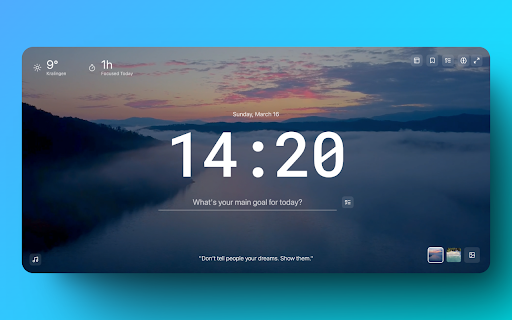


Transform your tabs into a productivity workspace with Pomodoro timer, ambient sounds, task management, tab organization. 🎯 Transform Your New Tab into a Powerful Productivity Hub Opus combines a beautiful Pomodoro timer, ambient soundscapes, todoist integration and intelligent tab management tools to help you stay focused and productive. ⏱️ Focus Timer • Customizable Pomodoro timer with flexible work/break intervals • Beautiful ambient video backgrounds • Track your daily focus time • Smart website blocking during focus sessions • Visual and audio notifications 🎵 Ambient Sound Mixer • 40+ high-quality ambient sounds • Create and save custom sound combinations • Nature sounds, urban environments, and binaural beats • Adjustable volume for each sound 🎬 Custom Backgrounds • Beautiful ambient video backgrounds • Add your own video backgrounds • Integration with Pexels for high-quality videos • Seamless background switching ✅ Task Management • Seamless Todoist integration • Create and manage tasks directly in your new tab • Set priorities and due dates • Track completed tasks with satisfying animations 📑 Smart Tab Management • Save and organize tab sessions • Quickly restore tab groups • Drag-and-drop tab organization • Automatic session naming 🌟 Additional Features • Intelligent website blocking during focus mode • Real-time weather display • Inspiring quotes that change periodically • Beautiful, distraction-free interface • Keyboard shortcuts for quick access Perfect for: • Students focusing on study sessions • Professionals managing multiple projects • Anyone looking to improve their productivity • Remote workers maintaining focus Get started with Opus today and transform the way you work! 🚀

Pomodoro Grande: Advanced Productivity Timer
A complete productivity app featuring a custom timer, visual task boards, time tracking, focus music, and a website blocker. Boost your productivity with Pomodoro Grande, the all-in-one Pomodoro timer designed to help you stay focused, block distractions, and manage your tasks effortlessly. 🎵 Why You'll Love It • Built-in Background Music – Stay in the zone with focus-friendly sounds. • Customizable Pomodoro Timer – Set work/break intervals that fit your workflow. • Pause & Resume Timer – Pick up right where you left off. • Auto-Start Sessions – Start your timer automatically when you open your browser. • Ultra Focus Mode – Block distractions for deep work sessions. • Website Blocker – Filter domains and subdomains to prevent time-wasting sites. • Kanban Board – Enhanced Todo management with a new Kanban board layout for better. • Today's Hourly Analytics – View your productivity breakdown by the hour. • Quick Break Skip – Stay flexible with one-click break skipping. • Custom notifications – Choose alert sounds or go silent. • Session analytics – Track your focus performance over time. • Customizable Badge – Personalize your extension badge color. • Dark Mode Support – Added ability to switch between Light, Dark, and System themes in Settings. Pomodoro Grande combines all the tools you need to focus, manage tasks, and block distractions in one powerful extension. 🔒 Privacy First – No Data Collection Pomodoro Grande respects your privacy. We don’t track you or collect any personal information.

Pomodoro Focus - Task Management
Maximize productivity with an ever-visible foreground timer plus personalized task management on every tab. 🔓 Unlock unparalleled productivity with Pomodoro Focus - Task Manager: Your go-to companion for mastering the Pomodoro Technique, time management, focus, and efficient task tracking thanks to the Chrome Side Panel integration. A Seamless Pomodoro Timer: Constantly visible on every page and tab, this foreground timer lets you embrace the Pomodoro Technique without switching or disrupting your flow. Advanced Task Management: Whether doing work, study, or personal development, you can easily add, view, and manage tasks. See your completed to-do list items and what's next at a glance. 1) Persistent Visibility: No more tab-switching! The Pomodoro timer stays visible across all your browsing, boosting your focus and productivity. 2) Universal Integration: Work, study, or research across multiple tabs - the timer keeps your concentration intact. 3) Efficient Task Management: Manage your to-do lists easily. Track your progress and view completed items swiftly. 4) Personalized Time Management: Customize your focus intervals and break times to suit your unique work rhythm, fully adapting the timer to your needs.

Focus Mode Pro - Block Distractions | Zovo
Block distracting websites and boost productivity with focus timers. Built-in Pomodoro timer. Whitelist your work sites. Struggling to stay focused while browsing? Between social media, news feeds, and endless tabs, your most productive hours slip away. Focus Mode puts you back in control -- block distractions instantly and build better browsing habits. - Smart Website Blocking -- Add distracting sites to your blocklist with one click, or toggle pre-built lists for Social Media, News, Entertainment, Gaming, and Shopping. During a focus session, blocked sites show a motivational page with an inspirational quote instead. - Pomodoro Focus Timer -- Start a Quick Focus session right from the toolbar. Work in focused intervals with automatic short and long break reminders. Track your remaining time on the blocked page so you always know when your next break is coming. - Nuclear Mode -- Lock your blocklist for a set duration. Once activated, blocking cannot be turned off until the timer expires. No exceptions, no override. Use keyboard shortcut Alt+Shift+N to activate instantly. - Blocking Schedule -- Set recurring schedules to automatically block sites on specific days and times. Define your start time, end time, and active days -- Focus Mode handles the rest without you thinking about it. - Focus Score & Streaks -- Track your daily Focus Score, day streaks, focus time, blocked attempts, and top distractions. See exactly which sites tempt you most and watch your habits improve over time. - Ambient Sound -- Play calming background audio during focus sessions to help you concentrate. Choose your sound type and adjust the volume to match your environment. - Notification Muting -- Suppress browser notifications during focus sessions so nothing breaks your flow. - Quick Toggle -- Start or stop Focus Mode with one click from the popup, or use the keyboard shortcut Alt+Shift+F. No complicated setup required. 1. Install Focus Mode -- it's ready to use in seconds with zero configuration 2. Add distracting websites to your blocklist or enable pre-built lists (Social Media, News, Entertainment, Gaming, Shopping) 3. Hit Quick Focus to start a Pomodoro session, or set a recurring schedule for hands-free blocking 4. Blocked sites show an inspirational quote and your session stats -- hit "Return to Work" to get back on track 5. Check your Focus Score, streaks, and top distractions in the Stats tab WHO IT'S FOR Perfect for students studying for exams, remote workers fighting tab overload, freelancers billing by the hour, developers in deep work, and anyone who wants to reclaim their attention from the internet. Focus Mode works entirely on your device. All data stays local -- your browsing activity, blocklists, and productivity stats never leave your browser. No accounts required, no tracking, no data collection. The extension uses declarativeNetRequest to redirect blocked sites and storage to save your settings. That's it. Install Focus Mode now -- your focused self will thank you.

Focus Timer
Use Focus Timer to build deep work habits with structured pomodoro sessions, distraction-free workflow, and smart breaks 🕑 Focus Timer helps you reclaim your time, boost productivity, and build lasting habits with structured sessions based on the pomodoro method. Getting started with this productivity tool is easy. Choose your preferred session length, start your task, and stay focused. When your work period ends, you’ll get a reminder to take a short break before continuing. 💡 Why choose Focus Timer: 1️⃣ Build a consistent work habit with structured time blocks. 2️⃣ Use the pomodoro method or set custom 25 minute timer intervals. 3️⃣ Take breaks to maintain energy and clarity. 4️⃣ Improve productivity while avoiding burnout. This online timer extension is ideal for students, writers, developers, and anyone who wants to bring more structure and productivity into their day. 🌟 With flow focus timer, you can: - Structure your day with timed sessions. - Minimize distractions and stay productive. - Apply the pomodoro technique for steady focus. - Build a workflow that supports consistent focus. 🚀 How to get started: 1️⃣ Add Focus Timer to your Chrome browser. 2️⃣ Choose your preferred session length. 3️⃣ Start working and continue until the session ends. 4️⃣ Take a short break when prompted. 5️⃣ Repeat throughout your day as needed. 📈 How focus timer supports productivity: ➤ Prevents fatigue with regular breaks. ➤ Adds structure to your day with clear work sessions. ➤ Shows clear start and end points for each session. This productivity tool offers a clean, distraction-free workspace to protect your deep work sessions. It is lightweight, quick to set up, and helps you spend your work time on meaningful tasks. 🛠️ Key benefits: ✨ Simple setup to quickly begin your work sessions. ✨ Seamless Chrome integration for your productivity workflow. ✨ Adjustable pomodoro timer and break durations. ✨ Supports intentional time management. ✨ Helps maintain consistent productivity. 📚 Who will benefit: 🔹 Students looking to structure their study time with a 25 minute session. 🔹Writers maintaining momentum on projects with structured pomodoro sessions. 🔹 Developers managing clear work sessions with the focus timer. 🔹 Designers working without distractions using an online timer. 🔹 Anyone seeking to improve productivity with a structured routine. ✨ How focus timer helps daily: 1️⃣ Uses the pomodoro method and this online timer for effective work. 2️⃣ Supports breaks to refresh your energy. 3️⃣ Encourages consistent work habits with each session. 4️⃣ Keeps your workspace clear during sessions. 5️⃣ Helps you stay present and intentional during tasks. ❓ Frequently Asked Questions: 🔹 What does Focus Timer do? It helps you build effective habits using a pomodoro timer with structured blocks and breaks to improve productivity. 🔹 How does the Pomodoro method work? The method uses timed intervals — typically 25 minutes of focused work followed by a 5-minute break. After four sessions, you take a longer break. Focus Timer automates this cycle to help you stay in flow. 🔹 Does it work offline? Yes. The extension works entirely offline — no internet required. Everything runs locally in your browser. 🔹 Do you collect any personal data? No. We don’t track or store any personal information. The extension respects your privacy and keeps everything on your device. 🔹 Will I get notified when a session ends? Yes. Focus Timer will notify you with a browser notification and a gentle sound when your session or break ends. You can disable the sound in the extension settings — browser notifications remain enabled by default. 🔹 Can I customize timer durations? Yes, you can set your preferred lengths for work sessions, short breaks, long breaks, and intervals between long breaks. 🔹 Does it support dark mode? Yes. Focus Timer is designed primarily for dark mode to reduce eye strain and help you stay focused in low-light environments. This productivity tool is designed for anyone seeking to organize their day and work efficiently. By applying the pomodoro technique and structured work blocks, you can maintain steady energy, develop lasting habits, and achieve more. 🎯 Ready to work with clarity and intention? Add Focus Timer to Chrome now to build your focus habit and get more done using the pomodoro technique. Start today and see how Focus Timer makes your work clearer, calmer, and more productive — one focus session at a time.
