
cobekobjpobenpjdggbpkkklkcfoinen

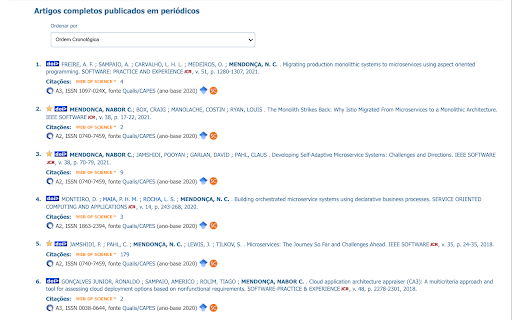
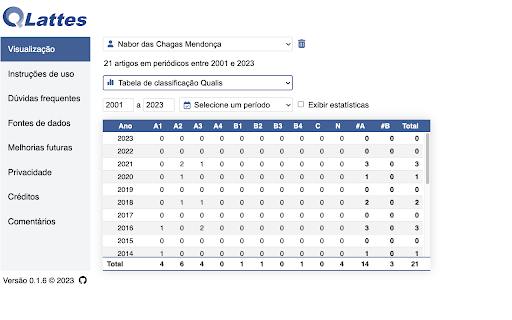
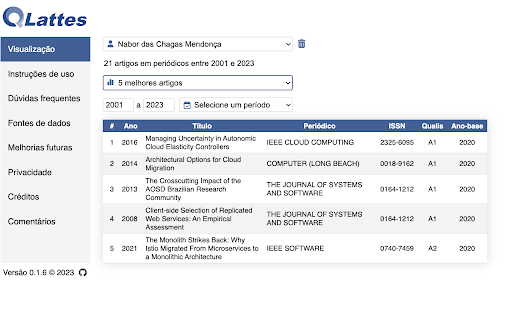
Automatically annotate the Qualis classification of journal publications in CNPq's CV Lattes pages.

SEI Pro
Adiciona ao Sistema Eletrônico de Informações (SEI) funções avançadas Extensão para o Chrome que adiciona ao SEI funções avançadas Na página inicial: - Agrupamento de lista de processos por data de recebimento, autuação, envio, último acesso, marcadores, tipo, responsável, ponto de controle, unidade de envio e acompanhamento especial - Gerenciar projetos - Pesquisar link permanente - Exportar informações de processos em planilha CSV - Alterar o layout do SEI (Estilo Avançado + Modo Noturno) - Gerenciar processos favoritos - Controle de Prazos - Menu Suspenso - Ordenar tabelas ao clicar no seu cabeçalho - Histórico de processos visitados - Rolagem infinita na pesquisa de processos - Utilizar caixas de seleção inteligentes - Remover paginação de processos Na página de processos: - Menu e ícones rápidos na árvore de documentos - Verificar código de integridade (Hashcode) - Valores padronizados ao inserir novo documento - Reproduzir vídeo na visualização de documentos - Duplicar documentos com 1 click - Utilizar endereços amigáveis em processos e documentos - Alertar sobre documentos não assinados ao enviar um processo - Permitir cores personalizadas em Marcadores - Visualizar parágrafos numerados no visualizador de documentos - Informações adicionais na árvore do processo - Anotação diretamente pela árvore do processo - Dividir as informações do documento na árvore do processo em duas linhas - Redimensionar automaticamente a árvore do processo pela sua largura total - Ações em Lote - Enviar múltiplos documentos externos No editor de texto: - Inserir documento externo (HTML, Google Docs e Google Planilhas) - Adicionar estilo a tabela - Adicionar link de legislação - Primeira letra maiúscula (exceto artigos e preposições) - Inserir referência de documentos do processo - Inserir nota de rodapé - Inserir sumário - Inserir dados do processo - Gerar link curto do TinyUrl - Gerar código QR (QRCode) - Redimensionar imagens - Inserir quebra de página - Alterar título da página - Abrir, editar e remover hiperlinks - Inserir equações (fórmulas matemáticas) - Adicionar tabela rápida - Copiar formatação do texto - Aumentar ou reduzir o tamanho da fonte - Alinhar o texto à esquerda, ao centro, à direita ou justificadamente - Adicionar link de documento público - Adicionar marca d'água de minuta ao documento - Adicionar marca de sigilo e tarjas pretas de confidencialidade (LGPD) - Enviar múltiplos documentos externos - Enumerar Normas (Legística) - Gerar Certidão de Documento Oficial com Sigilo (LGPD) - Enviar múltiplas imagens, formatar e editar opções avançadas - Reduzir a qualidade das imagens inseridas nos documentos - Adicionar teclas de atalhos no editor de documentos - Adicionar referências internas - Ferramentas de Inteligência Artificial (ChatGPT) Conheça mais sobre o projeto em: https://seipro.app Privacidade de dados do usuário (Privacy Policy / User Data Privacy): https://bit.ly/SeiProPrivacyPolicy Conheça também o SEI Legis. Adicione ao SEI a função de enumerar normas conforme regras de redação legislativa: https://chrome.google.com/webstore/detail/gmepnnlhjedfmkncmocpljoimbmkblgj

Call Timer for Meet
This extension adds a timer to your Google Meet calls with customizable time limits and alerts. ═══════════════════════════════════════════════════════ CALL TIMER FOR MEET ═══════════════════════════════════════════════════════ Track your Google Meet call duration with a sleek timer. Set time limits, get alerts, and view total call time automatically. Call Timer for Meet helps you stay on track during your Google Meet calls with a clean, unobtrusive timer that integrates seamlessly into the Meet interface. ⏱️ Real-Time Timer • Automatically starts when you join a meeting • Displays elapsed time in an elegant floating button • Shows total call duration when you leave the meeting 🎯 Smart Time Management • Set custom time limits for your meetings • Visual red alert when time limit is reached • Optional sound notification to stay on schedule • Configure everything with a simple hover panel 🎨 Seamless Integration • Positioned next to Google Meet's native controls • Matches Google Meet's design language • Hover to access all settings and controls • No intrusive popups or distractions 🌍 Multi-Language Support • Available in 17 languages • Automatic language detection based on your browser • Supported: English, Spanish, French, German, Italian, Portuguese, Polish, Russian, Ukrainian, Chinese, Japanese, Dutch, Swedish, Danish, Catalan, and more ♿ Accessible Design • Full ARIA support for screen readers • Keyboard navigation friendly • High contrast colors for readability • Enhanced Performance: Uses modern browser APIs for better efficiency and lower CPU usage • Improved UI: Cleaner design with smooth animations and transitions • End Screen Display: Beautiful time summary on the "You left the meeting" screen • Sound Notifications: Optional audio alert when reaching your time limit • Better Integration: Timer positioned alongside Meet's native buttons for a cohesive experience • Bug Fixes: Resolved timer reset issues and improved state management This extension does NOT collect, store, or transmit any personal data. Everything runs locally in your browser. Your privacy is fully respected. If you notice any translation errors or would like to contribute a translation for a new language, please contact us through the support section. v4.0.1 • Fixed Windows compatibility issues with improved element detection • Enhanced Mac reliability and initialization timing • Increased wait time to 60 seconds for better compatibility • Implemented MutationObserver with fallback strategies • Added race condition protection and improved error handling • Code cleanup and improvements v4.0.0 • Major UI/UX redesign with native Google Meet integration • Added sound notification feature with user control • Implemented MutationObserver for better performance • Enhanced end-call screen with total time display • Fixed timer reset and state management bugs • Improved accessibility with ARIA attributes • Updated all translations and added Ukrainian support • Migrated from JavaScript-injected CSS to native CSS loading • Removed unnecessary permissions for better security v3.0.1 • Added timer position validation on screen resize v3.0.0 • Updated styles for new Google Meet interface • Added draggable timer functionality • Added reset timer and reset position buttons v1.0.4 - v1.0.0 • Initial release with basic timer functionality • Turn on/off timer feature • Red alert when exceeding 45 minutes • Display total call time on call end Enjoying the extension? Please leave a review - it helps other users discover it!

Presença Meet: Google Meet Attendance
Crie listas de presença de forma automática no Google Meet. Com o PresençaMeet você poderá criar, de forma automática, listas de presença no Google Meet. Você decide quando começar a chamada e os participantes responderão no bate-papo para confirmar a presença. Ao finalizar, você realizará um download da lista.

Meet Attendance
Meet Attendance requires logging in and Syncing your Chrome browser. When in Meet select the participants view. Accept the permissions. Close and reopen the people to capture attendance. Click the Attendance icon to open the Attendance Spreadsheet. Mouse over for further options, Add a sheet in the Spreadsheet, Create a new Spreadsheet, Turn Attendance collection off, Auto Scroll through participants, Snapshot attendance. Attendance duration will be tracked. Premium: Compare your classroom roster to the participants in the meet. Know who is absent from your Meet. Set the frequency for auto capturing attendance. Leaving the Participants view open attendance will be captured at the set frequency. Subscribe to premium for $2.50 monthly. Subscription management at claycodes.web.app
