
cnpobimfhckpdcmjooelogkanaloeenc
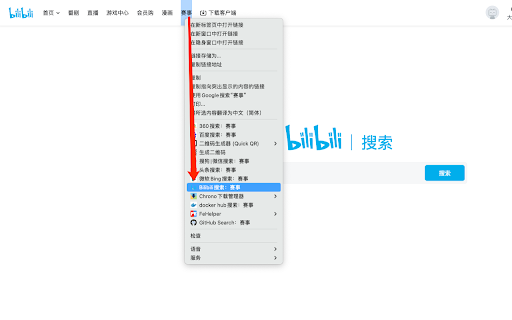
Bilibili搜索,便捷右键搜索。无推广绑定。 任意页面右键菜单快速打开BiliBili搜索首页,划词选择快速使用BiliBili进行搜索相关内容。

Extension for Bilibili Player
Add useful keyboard shortcuts and default settings for bilibili player. This is a simple and small extension for Bilibili player. 3.0 Updates (2024/11/26): Now you can customize individual shortcuts, and disable specific shortcuts individually! The options for bilibili video player: ∙ Enable keyboard shortcuts. ∙ The space bar is always used for play/pause. ∙ Turns off bullet screen by default. ∙ Autoplay. ∙ Exit fullscreen when video ended. ∙ Prevent bottom bullet screen. ∙ Turn off lights by default. ∙ Auto turn on/off lights when ↕ scrolling. ∙ Set default screen mode: normal | wide screen | web fullscreen. * It turns off bullet screen(also known as Barrage/Danmaku/弹幕/Danmu) on www.bilibili.com by default. But you can change this behavior in the options. Keyboard shortcuts for bilibili video player: ∙ D Key: Toggle bullet screen. ∙ Shift+D Key: Show bullet screen on/off status. ∙ F Key: Toggle full screen. ∙ W Key: Toggle web full screen. ∙ T Key: Toggle wide screen. ∙ J Key: Step backward. ∙ Shift+J Key: Long step backward. ∙ K Key: Play/pause. ∙ L Key: Step forward. ∙ Shift+L Key: Long step forward. ∙ M Key: Toggle mute. ∙ N Key: Next video if possible. ∙ P Key: Toggle Picture-in-Picture (PiP) mode. ∙ I Key: Toggle lights. ∙ C Key: Toggle captions. ∙ + Key: Increase playback rate (default +0.25, max is 5). ∙ - Key: Decrease playback rate (default -0.25, min is 0.25). ∙ 0 Key: Reset playback rate to 1. ∙ Shift+S Key: Screenshot as a file. ∙ Alt+Shift+S Key: Screenshot to clipboard. ∙ , (comma) Key: Previous frame (while paused). ∙ . (period) Key: Next frame (while paused). ∙ Shift with '+' Key: Video size: 50% → 75% → 100% ∙ Shift with '-' Key: Video size: 100% → 75% → 50% ∙ Shift+0 Key: Video size: 100% ∙ B Key: Hide or show video title in the top center. ∙ G Key: Hide or show video time progress in the top left corner. ∙ H Key: Hide or show current time in the top right corner. ∙ Backspace Key: Jump to the beginning and play. You can custom "long step forward/backward" and "the step unit of playback rate" in shortcuts page. In the popup page, you can quickly navigate to Bilibili home page, quickly search for Bilibili, as well as extension options.

KILL Bilibili search placeholder
Stop showing me your DAMN default search recommendations! Are you still annoyed by the *mysterious* recommended searches in Bilibili's top search box that you can't hide? Install **KILL Bilibili Search Placeholder** and make it vanish from your sight!

Search Tool (AI)
Quickly switch between customized search engines; Add a custom search engine in the right-click menu. New AI model support. Integrated with leading global Large Language Models (LLMs)! Instantly summarize web content, ask intelligent questions, and generate quick insights—all within your browser. Effortlessly connect to OpenAI (ChatGPT, GPT-4), Azure OpenAI, Anthropic Claude, Google Gemini, DeepSeek, and more. Just add your API Key and enjoy AI-powered productivity anywhere on the web! It supports configuring any search engine, similar to the search engine configuration in chrome settings, such as Baidu search, Bing search, JD search, Douban search, headline search, etc. After configuration, support: 1. shortcut keys switch between search engines. For example, on the Baidu search page, press the shortcut key (configurable) to quickly switch to Google search without reentering the search term, and then press the shortcut key to quickly switch to Bing search. 2. click the plug-in pop-up menu in the upper right corner (shortcut keys can also be configured) to quickly switch to the specified search engine. If it is on the search engine page, it will automatically bring the search term and jump to the specified search result page; Otherwise, directly jump to the specified search results page. 3. support the configuration of search engines in the right-click menu. If only one search engine is configured, it is in the top-level menu, or multiple search engines can be configured. After selecting a text, right-click it, and "search for" selected text "using XX" will appear in the right-click menu

BiliScope - Bilibili插件,你的B站小助手
可以显示视频的AI内容总结,在B站的各类网页上显示用户的详细信息,包括关注数、粉丝数、投稿数、签名、投稿词云等等。还可以给UP主做备注和标签! 当浏览B站时,把鼠标悬停到up主的链接上,会出现上图所示的信息卡片。 目前在卡片中显示的信息有 * up主的ID * up主的等级 * 与up主的关注关系 * 快速关注/拉黑up主的按键 * up主是否在直播 * 给up主的备注 * up主的关注数,粉丝数,投稿数 * up主的标签(默认是最常投稿的分区) * up主的认证 * up主的签名 * up主全部投稿标题和描述生成的词云 把鼠标悬停到视频上,会显示上图所示的AI内容总结。点击总结中的章节可以跳转到对应时间的视频。 自动显示动态和视频评论区的IP属地。 备注说明 在每个up主主页的右下角会有备注栏,可以填写备注。也可以在信息卡片上直接点击up主的名字打开备注栏。 备注的第一行(以` `为界限)会显示在up主的卡片上。其余部分只会显示在主页备注栏。 在备注的任何地方可以添加`#标签名#`的标签,如果up被备注了任何标签,up主卡片上就不再会显示最常投稿区,而会显示在备注中的标签。 你可以在B站以`#标签名`为关键词进行用户搜索,可以搜索到标签对应的up主。 在设置(点击浏览器扩展栏上的Biliscope图标)中可以添加标签对应的颜色,也可以开启让up主的名字显示成标签对应的颜色的功能。
