
cnpgabmfnfehdamobkafalnpdoigdlil


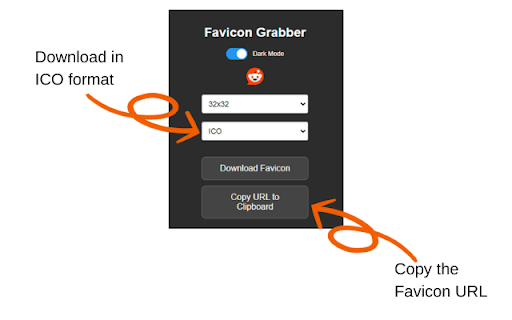

Discover, preview, and download all favicons from any website Easily capture and save favicons from any website with FaviGrab! This lightweight extension allows you to: Automatically discover all favicons on any page (link icons, Apple Touch icons, manifest icons, and more) - Download high-quality favicons in PNG, ICO, SVG, or WEBP format - Choose from 7 sizes (16x16 up to 512x512) - Copy any icon straight to your clipboard - Download all discovered icons at once as a ZIP - See icon types, sizes, and formats at a glance - Keep track of recent grabs with built-in history - Dark mode for late-night favicon hunting Perfect for web developers, designers, and anyone who needs quick access to website icons. FaviGrab simplifies the process of obtaining favicons, eliminating the need for digging through source code or guessing file paths. Go to the site you want favicons for Open the extension FaviGrab automatically scans and shows every icon it finds Pick your format, then download or copy! Lightweight and private. No background processes, no data collection, no accounts. FaviGrab only runs when you click it. Streamline your workflow and enhance your projects with FaviGrab, your go-to tool for effortless favicon grabbing! Download FaviGrab now and start collecting website icons. Let us know of any features you would like to see!

Favicon Stealer
Stealthily pilfer favicons from every website you browse. Surf the web as usual and watch your loot grow! FaviconStealer - Sneakily Collecting Icons from Websites You Visit Stealthily pilfer favicons from every website you browse. Surf the web as usual and watch your loot grow! FaviconStealer "steals" the icons from every website you visit. Just browse the internet as you normally would and witness your collection of pilfered favicons expand. It's fun, utterly useless, and completely free! Key Features: 1. Automatic Pilfering: Silently swipes favicons from every site you visit, no action required. 2. Visual Showcase: Displays your "loot" in a sleek grid layout. 3. Privacy Assured: All data stays local - we're icon thieves, not data thieves! 4. Fun Factor: Adds a quirky twist to your everyday web surfing. 5. Memory Lane: Revisit your online footprints through icons. Why Install It? - Pure Entertainment: No pressure, no purpose, just fun! - Unique Collection: Own your personal web icon museum. - Surprise Discovery: Stumble upon forgotten interesting sites. - Zero Hassle: Doesn't affect your normal browsing experience at all. Whether you're a web surfing pro or a casual user, FaviconStealer adds a dash of whimsy to your online life. Start your icon heist journey now and see how quickly you can amass 100 different favicons! FaviconStealer works locally and doesn't send data anywhere, so your "criminal activities" remain private. Install now and make your web adventures more iconic!

Get Favicon
This extension displays the current page's favicon as well as the favicon's URL and dimensions. This extension is very small and very simple. I wrote it for myself one day to meet my own needs, but I'd really like some feedback. Can it be improved? What were you looking for when you came across it? Does it do what you want? If not, what is it missing? Can/should it display more of the image's meta info? Maybe auto-save the icons of all open tabs into a folder? Please let me know.

Favicon & Icon Downloader
Extract the highest resolution site icon or favicon from any webpage. Favicon Finder Pro: The Ultimate High-Resolution Icon Extractor. Tired of downloading blurry 16x16 favicons? Favicon Finder Pro is the essential tool for web designers, developers, and marketers who need the highest quality site icons and brand logos instantly. Our powerful analysis engine goes far beyond simple link scraping to find the absolute best asset available on any webpage, ensuring you get the sharpest result for your projects every time. Our Intelligent Multi-Source Search sets us apart. We systematically search page headers, internal browser caches (for those hidden 128px favicons), common logo paths like /logo.png, and aggressively target high-resolution positional Header Logos to find the largest asset available. Furthermore, if the website offers no high-quality assets, we automatically provide the reliable Google S2 Favicon service link for that domain as a fallback, guaranteeing a 512x512px option. To help you choose, our Source Options Panel lets you easily review and switch between all discovered image sources, including the S2 Fallback and the Internal Chrome Favicon. Instantly transform small icons into professional-grade assets with our One-Click Upscaling to 512px. You can download the final icon in either PNG or SVG format, choosing from three powerful processing modes: Vector Trace (SVG) to convert pixel-based images into perfectly scalable vectors; Sharpen Pixels for a crisp, native bitmap zoom; or Smooth Edges for clean, anti-aliased scaling. All scaling operations strictly preserve aspect ratio, ensuring your logo never appears stretched or distorted. Stop wasting time digging through code. Whether you are a content creator needing a high-res site icon or a developer verifying assets, Favicon Finder Pro is built for professional results. Our secure extension architecture even handles CORS bypass, allowing you to fetch high-res images that would otherwise be blocked. Install Favicon Finder Pro today and gain access to high-quality, perfectly sized, and processed website logos and favicons with zero hassle.

High-Res Favicon Downloader
Downloads the highest resolution favicon from the current website. Supports PNG, SVG, ICO, and other formats. Downloads highest resolution square icon (favicon) available on any give site and stores it in your Downloads folder with a simplified name "domain-com-favicon.png". Great when you need square icon to update your CRM or any other productivity app.
