
cnnlcgcbchhbgagkiaphfoiglddejnbh
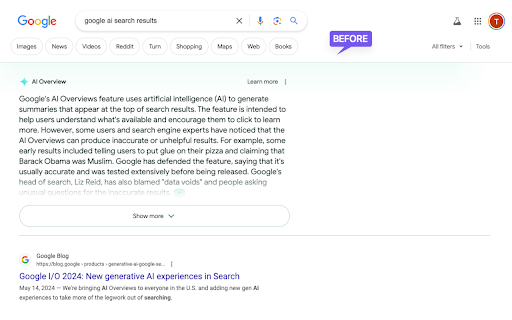

Blocks Google AI Overview. Because it sucks and I don't want to see it. Small, open source extension that blocks the "AI Overview" google search results.

Disable AI Overview | Turn Off AI Overview
The Problem Google Search now shows AI Overview panels above traditional links. Many users find these summaries distracting and want their classic Google search results back. If you’ve wondered can you turn off AI Overview or searched for how to remove AI Overview from Google Search, you've found that Google does not currently offer a built-in option. But this Chrome extension is the solution you've been waiting for. The Solution Disable AI Overview is a lightweight browser extension that automatically hides the AI Overview section on Google Search. This chrome extension to remove AI-Overview works instantly and requires no setup, making it a simple for everyday use. Q: Can you turn off AI Overview on Google? A: Not natively, but this chrome extension lets you turn it off permanently in less than 15 seconds. Q: Is this a browser extension or a website setting? A: It is a fast browser extension that works directly in your browser, no Google account changes required. Q: How to turn off AI Overview? A: Install the extension and it immediately removes AI Overview from search pages. Q: How to remove AI Overview from Google Search? A: The extension removes the section entirely so only standard links appear in your search results. - Turn off AI Overview on Google automatically - Remove the section without affecting other results - Lightweight, fast browser extension - Works instantly after install - Works on Google Search - Works on Chrome, Edge, Brave, and Chromium browsers - Works on macOS, Windows, Linux, ChromeOS

AIBlock - Block AI Images Across the Web
Block AI Images and Google's AI Overview Answers in Real Time AIBlock is your all-in-one Chrome Extension for real-time AI detection. Whether you’re concerned about deepfakes, generative AI images, or other forms of synthetic media, AIBlock helps you stay informed and avoid being misled by fake images online. Our powerful vision model automatically checks every image you encounter and alerts you if it’s likely AI-generated. • Remove AI Answers – Eliminate Google’s AI Overview responses and avoid inaccurate AI-generated search results. • Intuitive Overlays – Get a clear badge or highlight over suspicious images for confident browsing. ➤ Premium Features Upgrade to AIBlock Premium for full control over your AI browsing experience. • Hide AI Images Completely – Remove AI-generated images from your browsing entirely. • Customize Overlays – Choose how AI-detected images appear: hide the red overlay, remove red badges, or disable green checkmarks. • Enhanced Detection – Access the most advanced AI detection models with higher accuracy and continuous updates. • Full Customization – Tailor how AI images are displayed to match your preferences. ➤ Why Choose AIBlock? • Accurate AI Classification – Our AI detection models continuously refines its detection capabilities, giving you the best chance of spotting synthetic images. • Easy to Use – No special setup required; just install and let the extension do the work. • Privacy-Focused – We only process image URLs to classify them; we never track your personal info or browsing history. Who Needs This Extension? • Journalists and researchers verifying media authenticity • Social media users spotting potential fakes or edited photos • Anyone wanting peace of mind in today’s AI-driven world Install AIBlock today and take control of your browsing experience. Explore confidently, knowing each image is double-checked for authenticity. Whether you’re a casual user or a professional, stay protected with the most comprehensive AI image detection solution on the Chrome Web Store!

No AI Overview Block Thingy
Removes the intrusive and often blatantly incorrect "AI" Overview from standard searches. Features: - Deletes the AI Overview box from the top of Google search results - Simple switch to toggle AI Overview blocking - Legacy Mode: Forces all searches to Google's "Web" mode - Now Trademark infringement free!

Turn Off AI Overview (& Other Google Features)
Control your Google Search experience: Toggle AI Overview, hide elements (ads, featured snippets, etc.), and filter domains. July 2025 Update: Made sure it works with recent changes of AI Overviews. Customizable Search Experience for Google—Hide AI Overviews, Ads, & More. "Turn Off AI Overview" gives you full control over your Google Search results. With a single click, hide AI-generated overviews, remove sponsored ads, and filter out distracting features like autocomplete, 'People Also Ask,' discussions, and featured snippets. Customize your search experience by excluding specific websites or limiting results to trusted sources. Easily tailor your Google search environment for a cleaner, more focused experience—all without storing or accessing data outside your browser. 𝐅𝐞𝐚𝐭𝐮𝐫𝐞𝐬 • Hide AI-generated overviews with one click • Remove sponsored ads, 'People Also Ask,' discussions, and featured snippets • Exclude results from specific websites (e.g., Reddit, Pinterest) • Limit search results to only your trusted websites • Customize Google Search without affecting data privacy 𝐏𝐫𝐢𝐯𝐚𝐜𝐲: This extension operates locally on your browser. No data is stored, shared, or accessed outside of your browsing environment.
