
cnlaohencefcfmblbcphhmfcehekfnik
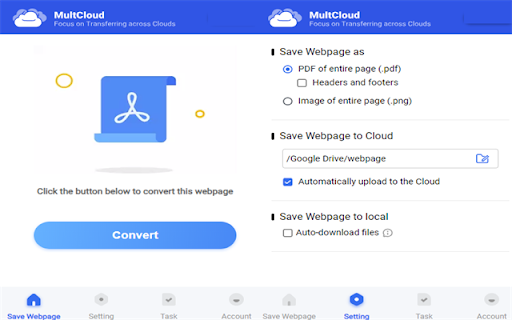
Save webpages in Chrome as PDF or images and save to the cloud or local. The extension enables you to easily convert webpages as images or PDF, and save them to cloud or local storage. Moreover, you can even select a specific folder (in cloud or local) where the file should be saved. With the extension, you can: * Convert webpage content into PDF or images for easy offline read anywhere and anytime you want. * Save image files (opened by Chrome) with a few clicks directly to your cloud drive. * Download important documents from the browser to your local or cloud storage. Key Features: * Simple interface makes it easy for anyone to convert website to PDF. * High quality conversion, convert web page content to PDF without distortion. * Support converting website as PDF without header and footers.

Webpage to PDF
Convert any web page or local HTML file into a PDF document that resembles as closely as possible what you see in the browser. Need to save a webpage as a high-quality PDF? Quickly convert any webpage or local HTML file into a secure PDF document with just one click. Perfect for: - Archiving digital receipts, invoices, or order confirmations. - Saving long articles or blog posts for offline reading. - Creating shareable snapshots of web designs or reports. - Keeping permanent records of changing web content. This extension securely reads the content of your current web page and sends it to GrabzIt's API for conversion. Our powerful PDF engine works to make the final document closely resemble the actual web page, preserving the original styling and layout. The PDF is then automatically downloaded to your computer. For added privacy, you can even secure your downloaded PDF by setting a document password! Once installed, simply follow the instructions in the extension popup to create your free GrabzIt account and start converting. - Free Tier: Core webpage-to-PDF conversions are free forever. - Premium Features: You will automatically start with a free trial of our Premium tier. Afterward, you can optionally upgrade to automatically hide cookie notices, increase your monthly conversion allowance, and add custom headers and footers to your PDFs. Backed by GrabzIt Limited's enterprise-grade infrastructure. Fast, secure, and reliable.

HTML to PDF
HTML to PDF: Streamlined transformations for every webpage! Convert any HTML file to PDF swiftly! ⚡ Before we dive in, know that HTML to PDF is your ultimate browser extension for seamless, rapid, and high-quality document conversions. 💪 Whether you’re preparing reports for work, creating professional presentations, or archiving your favorite web pages, this intuitive tool ensures smooth, effortless transitions HTML to PDF format! 🤗 👉 HTML to PDF is designed for: ⏩ Students & Instructors 📖 – Easily transform class handouts or educational sites ⏩ Office Teams 👔 – Rapidly finalize documents from any web-based source ⏩ Freelancers & Creators 💼 – Quickly showcase or submit static pages for review ⏩ Bloggers & Writers ✒️ – Swiftly archive online articles into a tidy library ⏩ Social Media Planners 🤳 – Efficiently compile web-based event pages or announcements ⏩ Anyone eager for effortless HTML capturing 🎉 – Grab entire pages in seconds without extra fuss 🔎 What can HTML to PDF do? ✅ Convert one or several web pages into documents instantly ✅ Integrate resizing and basic layout adjustments ✅ Safeguard data with reliable security measures ✅ Keep color clarity sharp and preserve style elements ✅ Function across different browsers and operating systems ✅ Offer quick, user-friendly controls for daily tasks Lightning-Fast Transformations ⚡ • 🚀 Experience swift output with our HTML to PDF converter that delivers files in seconds. • ⏱️ Perfect for last-minute tasks or quick shares. Seamless Browser Compatibility 🌍 • 🔗 Easily integrate with major browsers to chrome HTML document to PDF with a single click. • 🔥 Works efficiently on different platforms without additional software. High-Quality File Conversions 🎯 • 📜 Convert entire webpages into documents while preserving formatting and structure. • 📖 Ensure clarity in documents, ideal for official records and presentations. Effortless File Management 📂 • 📂 Organize documents with ease using HTML file convert to PDF functionality. • 🗄️ Sort, rename, and categorize documents for better accessibility. Customizable Output Settings ⚙️ • ✏️ Adjust margins, layout, and page size before finalizing your conversion. • 🖼️ Maintain image quality and sharp text rendering. Enhanced Security & Privacy 🔒 • 🛡️ Protect your sensitive documents with built-in encryption features. • 🔐 Convert confidential data without storing or sharing personal information. II. Why opt for HTML to PDF? 💡✅ Smooth, Clear Interface 🎯 • 👌 Enjoy a clutter-free design with straightforward menus that help you quickly learn to convert HTML file to PDF. • 👍 Ideal for users who value speed and simplicity. Reliable Performance 🔧 • 💪 Dependable conversions even for large or media-rich pages. • ✅ Minimize errors and ensure consistency in every output. Ongoing Feature Upgrades ♻️ • 🔄 Regular updates introduce new functionalities driven by user feedback. • 📈 Continuous improvements keep the tool ahead of the curve. Solid Security Architecture 🔒 • 🔐 Industry-standard encryption protects your data throughout the process. • 🛡️ Trust that privacy is maintained at all stages. Comprehensive Assistance 🙌 • 📖 Access detailed FAQs and user guides to support every step. • 💡 Get tips and insights for optimizing your conversion experience. Dynamic User Base 🌎 • 🤝 Connect with a vibrant community to share ideas and best practices. • 🎓 Enhance your skills through collaborative learning. III. Getting Started with HTML to PDF 🚀📝 Swift Installation ⚙️ • 🛠️ Install the extension directly from your browser’s store and pin it for instant access. • 🤔 It’s so straightforward that you might even wonder, how can i convert HTML to PDF with just a few clicks. Choose & Load 🗂️ • 🔗 Either paste a URL or apply the tool to your active tab for rapid loading. • ⚡ Experience smooth and efficient page processing. Adjust Layout & Settings 🎛️ • ✏️ Customize margins, orientation, and page size to suit your needs while preserving design elements. • 📸 Ensure every detail of your webpage is captured perfectly. Convert with One Click ✅ • 🚀 Start the conversion process instantly and enjoy a seamless transformation. • 🎉 Watch as your webpage turns into a high-quality documents in moments. Store & Share 📥 • 💾 Save your documents locally or upload them to your preferred cloud service. • 📤 Share your documents effortlessly via email or collaboration platforms. Organize & Optimize 🔍 • 🗂️ Rename, reorder, or merge files to keep your digital library orderly and accessible. • ⚙️ Optimize your files for efficient retrieval and management. Friendly Control Panel 🚦 • ⌚ Monitor conversion progress and manage multiple tasks in real time. • 💬 The integrated help section explains HTML format to PDF naturally. Consolidated Batch Conversion 🏷️ • 📑 Group multiple URLs for simultaneous processing—ideal for bulk archiving or marketing projects. • ⏱️ Save time by processing many pages at once. Cloud Sync & Integrations 🌥️ • ☁️ Seamlessly connect to popular cloud services for hassle-free storage. • 📱 Access and distribute your files from any device. Updated Security Protocols 🛡️ • 🔐 Rely on robust encryption that protects your data throughout the conversion process. • 🤝 Convert sensitive content with complete confidence. Configurable Output Options ⚒️ • 🎨 Customize footers, watermarks, and page breaks to match your brand identity. • 🏆 Achieve professional results tailored to your style. V. Who Reaps the Most Gains? 🌍✨ Scholars & Educators 🎓 • 📚 Transform research articles and course materials effortlessly—ideal to convert .html to PDF for academic purposes. • 📝 Maintain a consistent format for lecture notes and publications. Workplace Specialists 🏢 • 📊 Standardize internal reports and presentations to enhance team collaboration. • 🔗 Streamline file sharing across departments. Creative Designers 🎨 • 🖌️ Turn design mockups and web prototypes into polished documents for client reviews. • 💼 Showcase your creative work in a professional format. Researchers & Analysts 🔬 • 📈 Securely archive data, charts, and references for thorough offline review. • 🔍 Ensure every detail is preserved for accurate analysis. Writers & Publishers ✍️ • 🖨️ Archive articles and manuscripts in a professional, print-ready format. • 🔒 Preserve the integrity of your digital content for long-term access. Social Media Enthusiasts 🌐 • 📱 Quickly convert event pages or posts into shareable Portable Document Format files for digital portfolios. • 🗃️ Organize social media content into an accessible document archive. VI. HTML to PDF: Everyday Advantages for All Users 💼📌 Seamless Drag-and-Drop 🌈 • 🖱️ Easily add page links without complex procedures—simply drag and drop for instant processing. • 🚀 Enjoy the efficiency of our powerful HTML file to PDF converter. Unified Workspace 🔗 • 🖥️ Manage all your conversions within a single, streamlined interface to keep your desktop organized. • ✨ Benefit from a clutter-free environment that enhances productivity. Resource Hub 📚 • 📖 Access comprehensive tutorials and support materials to boost your conversion skills. • 💡 Learn best practices and tips for optimal document management. Smart File Coordination 🔖 • 📂 Automatically organize and retrieve your files with minimal effort. • 🗄️ Keep your files sorted and easily accessible. Native Browser Integration 🌐 • 🚀 Launch conversions directly from your browser’s toolbar without extra software. • ⚡ Enjoy immediate access to all conversion features. Handy Mobile Support 🤖 • 📲 Process conversions on the go with an optimized mobile interface. • 💼 Stay productive even when away from your desk. Automatic Device Sync 🔄 • 🔄 Start a conversion on one device and pick it up seamlessly on another. • 🔗 Keep your workflow uninterrupted across devices. Broad Platform Coverage 💡 • 💻 Compatible with Windows, macOS, and Chrome OS—ensuring universal functionality. • ✅ No additional plugins are required for full performance. Transparent Updates 🔔 • 🔔 Benefit from regular updates that enhance security and add new features. • 🆕 Stay in the loop with improvements that keep your conversions smooth. Instant Conversions 🍀 • ⏱️ Generate documents in seconds, saving valuable time with our advanced tool. • ⚡ Experience the efficiency of chrome HTML to PDF for fast results. Smooth Collaboration 🎉 • 🤝 Standardize outputs for consistent quality across teams and projects. • 💬 Enhance communication by using uniform file formats. Secure File Handling 🏆 • 🔒 Protect sensitive information with robust security measures throughout each conversion. • 🛡️ Rely on top-notch encryption for every document. Accelerated Processes ✨ • 🚀 Automate repetitive tasks and process multiple files simultaneously to boost productivity. • 🔧 Optimize your workflow with streamlined operations. “Can it handle multi-page sites?” 🙋 • 🌐 Yes, it processes entire websites seamlessly, ensuring every section is captured. • 👍 Our solution makes it easy to convert HTML in PDF without any hassle. “What about data privacy?” 🔒 • 🔐 Advanced security protocols guarantee that your data remains protected during every conversion. • 💖 Your sensitive information is handled with utmost care. “Is there a limit to page size?” 📏 • 📏 The extension efficiently manages large or complex pages without compromising quality. • 📐 It adapts to extensive content to ensure consistent results. “How to convert HTML to PDF offline?” ⚙️ • 📶 Offline mode is available to queue tasks for conversion once connectivity is restored. • ✈️ Perfect for use during travel or in low connectivity areas. Built-In Layout Automation 📐 • 🖋️ Automatically adjust margins and orientations to achieve perfect output. • ✂️ Streamline editing with intuitive settings that simplify your work. Universal Utility 🌏 • 🏫 Ideal for academic, corporate, or personal projects—transforming web content HTML in PDF format consistently. • 💼 Rely on the extension to deliver high-quality documents every time. Vibrant Community Forum 👥 • 💬 Connect with other users to exchange tips and creative solutions for file management. • 🌟 Build a network of insights to enhance your conversion techniques. XI. Your Everyday Web-Content Ally 🤗🚀 HTML to PDF stands as your reliable partner for daily conversions. It offers robust features, lightning-fast processing, and top-notch security. Whether archiving a webpage or preparing vital documents, this tool simplifies your workflow. Unrestricted Web Page Reach 🌠 • 📚 Easily store offline versions of essential articles and posts. • 🔍 Capture entire websites seamlessly, ensuring no content is missed. Minimalistic Layout 🖥️ • ✨ Enjoy a clean, intuitive interface that highlights all key functions. • 👌 Simplify routine conversions with user-friendly design. Ever-Evolving Tech 🚀 • 🔄 Benefit from periodic enhancements that introduce advanced functionalities. • 🧩 Merge multiple captures into a single file with ease. All-In-One Document Toolkit 🔎 • 🗃️ Organize, rename, and manage files without switching between apps. • 💼 Streamline your workflow with a comprehensive solution. Smart Cloud Linking ☁️ • ☁️ Seamlessly sync with your preferred cloud storage services. • 📲 Ensure your documents are always accessible wherever you go. Simplify Your Workflow 🤸 • 🛠️ Eliminate the need for multiple tools by using an all-in-one solution. • 📋 Maintain an organized digital workspace with automated processes. Elevate Team Collaboration 👨💻 • 🤝 Standardize documents for smooth peer reviews and consistent branding. • 🏢 Achieve uniformity across projects regardless of team size. Preserve Organizational Ease 🗃️ • 📂 Easily sort and archive documents for future reference. • 🗄️ Keep your files systematically organized with built-in management features. Keep Sensitive Data Encrypted 🏵️ • 🔒 Rely on robust security standards to protect your intellectual property. • 🛡️ Ensure confidential documents remain secure at every stage. Accessible for Diverse Users 🕺 • 👌 Whether you are a novice or an expert, the tool is designed for ease of use. • 💪 Empower every team member to boost productivity with standardized conversions. XIV. Pro Tips for Mastery 🚧🔑 Name Files Intelligently 📝 • 📅 Attach clear labels and dates to ensure quick retrieval of documents. • 🗂️ An organized archive minimizes confusion during busy projects. Learn Shortcut Keys 🗝️ • ⌨️ Familiarize yourself with built-in shortcuts to speed up repetitive tasks. • ⚡ Simple key combinations can drastically increase efficiency. Update Regularly 🌈 • 🔄 Keep your extension up to date to benefit from new features and performance boosts. • ✅ Regular updates ensure a secure and smooth user experience. Alternate Connectivity Modes 🚗 • 📶 Use offline mode when connectivity is low and sync updates later. • 🔗 Maintain a continuous workflow even under challenging network conditions. Leverage Batch Functions 🍔 • 🕒 Process multiple conversions simultaneously to save time on large projects. • 📈 Optimize resource management with efficient bulk processing. Trust HTML to PDF for its power, dependability, and convenience. Seamlessly integrate it into your workflow to archive web pages and compile professional documents. With robust security and regular updates, it elevates your productivity and performance. Acquire & Integrate 📲 • 🔍 Locate HTML to PDF in your browser’s extension catalog and install it with ease. • 📌 Pin the icon for immediate access whenever you need it. Convert & Review 🎉 • 👀 Initiate a conversion by selecting a page and watch the process run seamlessly. • ✅ Review the final file to ensure it meets your layout and design expectations. Store & Share Online 🌐 • 💾 Save your files locally or directly to your preferred cloud platform. • 📤 Easily share documents with colleagues for collaborative projects. Monitor Next Features 👀 • 🆕 Stay updated with the latest improvements and new functionalities. • 📝 Provide feedback to help shape future updates and enhancements. 📥 Acquire & Install: Head to your browser's extension marketplace and seamlessly integrate HTML to PDF into your workflow. 🚀 Begin Instant Conversions: Simply upload your files—let the extension handle conversions effortlessly in seconds. 🖼️ Verify Before Completion: Always review your files before finalizing, ensuring every result meets your expectations. 🌐 Distribute & File: Effortlessly share completed documents with colleagues or securely store them in your favorite cloud platform. 🔄 Stay in the Loop: Look forward to exciting new updates designed to elevate your document management experience. Discover unparalleled convenience and consistently high-quality results with HTML to PDF. Integrate it once, and you'll wonder how you ever worked without it. From creative projects to meticulous archival tasks, this extension transforms file handling into a fast and straightforward process. 🚀

Website to PDF Converter,Batch Save Web Pages
Convert an entire website to PDF with on click, Batch Save Web Pages as PDF files Website to PDF Converter is your ultimate tool for effortless web page archiving. With just one click, you can save entire websites as PDF files, making it the ideal companion for researchers, students, and anyone who wants to preserve online content for offline use. 1. One-Click PDF Archiving: Save entire websites as PDFs with a single click, capturing all pages and content for future reference. 2. Effortless Offline Access: Access your saved web pages offline, ensuring you have important information even without an internet connection. 3. Organized Storage: Manage your saved websites in a clean and organized library, making it easy to find and revisit your archived content. 4. Share and Collaborate: Share your archived web pages with colleagues or friends, promoting knowledge sharing and collaboration. 1. Academic Research: Easily save academic papers, online articles, and research materials as PDFs for later reference. 2. Offline Reading: Save your favorite blogs, news articles, or tutorials and read them offline during your commute or in areas with limited connectivity. 3. Web Design Inspiration: Capture website designs and layouts that inspire you for future reference and design inspiration. 4. Legal Documentation: Archive web pages containing legal information or important documents for legal professionals. 5. Historical Preservation: Contribute to preserving online history by saving web pages for historical or cultural significance. 6. Market Research: Analyze competitors' websites and save their information for reference. 7. Travel Planning: Save destination-related information like maps, reviews, and travel advice before a trip. 8. Study Notes: Save online courses, textbooks, and tutorials as PDFs for studying and note-taking. 9. Project Management: Archive project documents, progress reports, and meeting records for future reference. 10. Technical Support: Save web pages related to software and technical issues for tech support and troubleshooting. 11. Creative Collection: Collect web pages with art, design, and creative inspiration to fuel your creativity. Get started with Website to PDF Converter today and simplify your web archiving needs. Preserve knowledge, save time, and access web content anytime, anywhere!

Transfer Google Photos to iCloud
No need to download or export first and re-uplpad, just directly transfer Google Photos to iCloud online by using MultCloud MultCloud is a free web-based tool that enables you to easily transfer, migrate, backup, sync or move files from one cloud to another and access all your online files on different clouds with a single login. Over 40 cloud services supported (both iCloud Photo and iCloud Drive are supported). Some use scenarios: * Transfer photos from Google Photos to iCloud Photo * Migrate or move data between two iCloud Drives * Backup iCloud Photos to NAS * Sync OneDrive with Google Drive * Transfer Google Drive to iCloud Key Features: * Directly transfer files from one cloud to another for free. * File transfer in background, allowing you to close browser. * Transfer cloud data offline without going through your computer. * Schedule automatic data transfer between two cloud services. * Real-time cloud-to-cloud sync. * Convert emails to PDF and save to local or cloud drives.
