
cngdhnfjakplnhplnmlgjalmfcochdgj


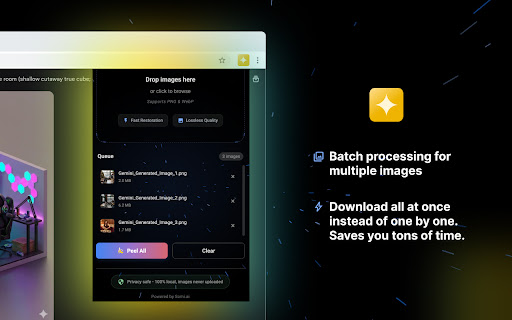

Peel Banana is a simple tool that erases the Gemini watermark from your images. No editing skills needed. Just drop your image in and download the clean version. Why Peel Banana? Peel Banana Gemini watermark remover removes the "Gemini" watermark from AI-generated images in one click. No Photoshop, no online tools, no compromises on quality. Unlike generic watermark removers that blur or smudge, Peel Banana uses the exact mathematical inverse of Gemini's watermarking process. The result? Clean restoration, not cover-up. Your images stay yours. Everything happens locally in your browser. No uploads, no servers, no tracking. We couldn't see your images even if we wanted to. Built for speed. Drag, drop, done. Process dozens of images at once and download them all with a single click. Features: - One-click watermark removal. - Batch processing for multiple images. - Drag-and-drop simplicity. - Bulk download option. - Zero data collection. No accounts, no sign-ups, no analytics. How to Use: 1. Download your image from Gemini using its download button (not "Save image as..."). 2. Click the Peel Banana icon in your toolbar. 3. Drop your PNG files in. 4. Hit "Peel All". 5. Download and you're done. Good to Know: - Works with PNG files downloaded via Gemini's official download button. - JPEGs saved via right-click won't work because compression destroys the data needed for restoration. - Removes the visible watermark only. Invisible SynthID watermarks remain intact.

Gemini Image Toolkit - Bulk Download, Automate & Remove Watermarks
Bulk download and automate Gemini images without watermarks. Features AI Automator, Bulk Watermark Remover, and crop presets. Gemini Image Downloader helps you download and organize AI-generated images directly from Google Gemini. Save images individually or in bulk, export your library, and streamline your creative workflow with structured file management. Ideal for creators who generate high volumes of images in Gemini and need fast, organized downloads. While Google Gemini makes image generation easy, downloading and organizing large volumes of images can be time-consuming. This extension simplifies the process with: 📥 One-click image download from Gemini 📦 Bulk image download (Premium) 🗂 Library export support 📂 Custom folder selection 🧠 Automatic folder organization ⚡ Lightweight and fast performance If you frequently create images using Gemini, this tool helps you manage them efficiently. 📥 Download Images Instantly Save images directly from the Gemini interface without manual right-click actions. 🗂 Export Your Image Library Keep a local backup of your AI-generated images for projects and clients. 📦 Batch Downloads (Premium) Download multiple images at once to speed up your workflow. 📂 Custom Folder Selection Choose exactly where your downloads are stored. 🗃 Smart Organization Automatically structure files into organized folders for easier management. ━━━━━━━━━━━━━━━━━━━━━━ 🎯 Built for AI Image Workflows ━━━━━━━━━━━━━━━━━━━━━━ Designed for creators, marketers, and teams who rely on Gemini for image generation and need a faster way to download and organize their output. Users must comply with Google Gemini’s terms of service and applicable copyright guidelines when downloading or using images. 🚀 Save Time. Stay Organized. Scale Your Workflow.

Gemini 批量去水印工具|Prompt Case
Gemini Watermark Remover is a browser extension built specifically for images generated by Gemini. It helps you quickly remove the “Gemini” watermark in the bottom‑right corner of Nano Banana, and Pro images in bulk while preserving the original image quality and details. All processing is completed locally in your browser. No images are uploaded to the cloud and no image data is stored, so you can focus on creating while keeping both privacy and security protected. Main features: - Automatically detects and removes corner watermarks from hundreds of Gemini images in one batch. - Supports common image formats such as PNG, JPG, and WebP. - Uses open‑source algorithms to preserve as much of the original texture and color as possible. - 100% local computation, without relying on any AI services, servers, or third‑party APIs. - Simple and intuitive interface. Just drag and drop your images to process them. Perfect for: - Designers, creators, and marketers who frequently use Gemini to generate assets. - Anyone who needs to use AI images in presentations, social posts, or commercial projects and wants a cleaner, more professional layout. After installation, click the Gemini Watermark Remover icon in your browser toolbar, then drag and drop or upload your Gemini images to instantly get new files with the watermark removed.

Gemini & Nano Banana Watermark Remover — 1-Click Clean, Batch ZIP Export
Remove Gemini image watermarks. Process locally in the popup. 🍌 Gemini & Nano Banana Watermark Remover — The fastest way to get clean, watermark-free images from Google Gemini AI. ✨ WHY CHOOSE THIS EXTENSION? Tired of the Gemini watermark ruining your AI-generated images? This extension removes watermarks instantly with pixel-perfect precision — all processed locally in your browser. No uploads, no servers, 100% private. ▸ 1-Click Clean Download Remove watermark from the latest image with a single click. Works directly on gemini.google.com. ▸ Batch Export to ZIP Process multiple images at once and download them all in a single ZIP file. Perfect for bulk workflows. ▸ Local Processing Tool Upload your own Gemini/Nano Banana images and remove watermarks offline. No internet required. ▸ 100% Private & Secure All processing happens locally in your browser using HTML5 Canvas. Your images never leave your device. FREE: • 3 images per day • 1-click download for latest image • 3-image mini batch export • Local processing tool PRO ($69/year or $12/month): • Unlimited images • Unlimited batch export • ZIP delivery for all exports • Auto-detection mode • Priority support 🎯 PERFECT FOR • Content Creators — Get clean images for social media, blogs, and videos • Designers — Use AI-generated images in professional projects • Marketers — Create watermark-free visuals for campaigns • Researchers — Document AI outputs without distracting logos • Anyone using Gemini AI — Save time with 1-click clean downloads 1. Open gemini.google.com and generate images 2. Click the extension icon 3. Choose "Download Latest" or "Export All" 4. Get clean, watermark-free images instantly Technical: The extension uses a mathematically precise Reverse Alpha Blending algorithm to restore original pixel values hidden beneath the semi-transparent watermark overlay. No AI guessing — just math. • No server uploads — everything runs in your browser • Open algorithm — transparent, auditable code ✓ Google Gemini (gemini.google.com) ✓ Google AI Studio (aistudio.google.com) ✓ Nano Banana & Nano Banana Pro images ✓ Works with both 48×48 and 96×96 watermark sizes Q: Does this remove invisible SynthID watermarks? A: No. This tool only removes the visible Gemini logo watermark. SynthID is an invisible digital signature embedded in the image data and cannot be removed by any tool. Q: Is this legal? A: This tool removes visible watermarks for personal use. Please respect copyright and usage policies when sharing AI-generated images. Q: Why is processing so fast? A: All computation happens locally in your browser using optimized JavaScript. No network latency, no server queues. Have questions about batch export, ZIP downloads, or local processing? Use the in-extension feedback option — we're here to help. Thank you for choosing us to remove your Gemini & Nano Banana watermarks! 🍌

Gemini Watermark Remover Pro
Remove watermarks from Gemini AI generated images with one click. Extract clean images instantly. Remove Gemini AI watermarks instantly with one click! Gemini Watermark Remover Pro is a powerful Chrome extension that automatically detects and removes watermarks from images generated by Gemini AI. Whether you're saving images for personal use, creating collages, or need clean visuals for your projects, our extension makes it effortless. ✨ Features - One-click removal: Automatically removes Gemini watermarks as you browse - Real-time processing: Watermarks disappear instantly on page load - Clean export: Save images without the overlay watermark - No quality loss: Only removes the watermark overlay, original image quality preserved - Dashboard analytics: Track your usage, see removal statistics, and monitor your quota - Free tier: Remove up to 100 watermarks per month for free - Pro plans: Upgrade for unlimited removals and priority support 🔧 How It Works 1. Install the extension and pin it to your Chrome toolbar 2. Open a supported page with a Gemini-generated image 3. View any Gemini AI image you want to save 4. Watermarks are automatically hidden — no manual action needed! 5. Right-click and "Save image" to download clean versions 💳 Pricing - Free Tier: 100 watermark removals per month - 6-Month Plan: $15 — unlimited removals for 6 months - Yearly Plan: $24 — unlimited removals for 12 months (best value!) 🔒 Privacy & Security - We do not collect, store, or transmit your images - The extension only modifies the page display locally - OAuth sign-in is used only for subscription management (optional) - No tracking, no ads, no data selling 📋 Requirements - Google Chrome (version 120+) - No special Gemini permissions required - Optional internet connection for dashboard/subscription features ⚠️ Disclaimer This extension is designed for personal, non-commercial use. Users are responsible for ensuring they have the right to use, modify, and download Gemini-generated images. This extension is not affiliated with or endorsed by Google or Gemini. Use responsibly and respect copyright laws.
