
cmnlolelipjlhfkhpohphpedmkfbobjc


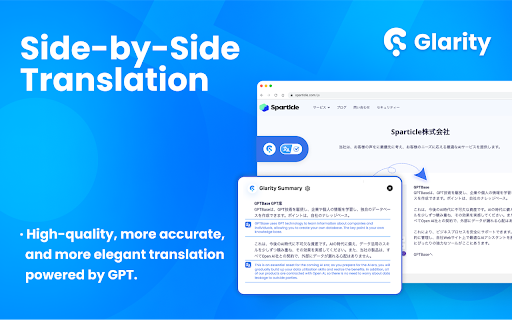


Summarize YouTube videos, web pages, and translate text with ChatGPT, helping you read and write in your mother tongue, all for free Glarity : an open-source ChatGPT Summary extension for YouTube, Google, Twitter, and any webpage. It provides cross-language summaries to effortlessly summarize videos, searches, PDFs, emails, and webpages. It supports free side-by-side translations, email writing assistance, Web Content Q&A, and much more! Source code: https://github.com/sparticleinc/chatgpt-google-summary-extension ⭐️Key Features⭐️ 📺 YouTube Summary ✅ Generate video summaries in over 12 languages. ✅ Produce video highlights with timestamps. ✅ Create FAQs for Youtube videos. ✅ Generate market subtitles for Youtube videos. ✅ Engage in AI chat with YouTube videos. 🔍 Google Summary ✅ Search Summary: AI delivers comprehensive explanations and answers to questions. ✅ Google Cross-Language Search: Expand the language scope of searches, with AI assisting in assessing content relevance. 📄 Web Summary ✅ Generate webpage summaries for any webpage. ✅ Engage in conversations with AI about web content, supporting custom prompts such as extracting page content. 📑 PDF Summary ✅ Generate PDF Summaries: Facilitates the creation of multilingual summary content for local PDF files. ✅ Chat with PDF: Allows interactive conversations with PDF content using customized prompts, such as "ask anything about PDF." ✅ Text Selection Analysis and PDF Translation: Provides functionality for extracting and translating text from selected areas within PDF documents. 🌐 Translation ✅ Mirror Translation /Side-by-Side Translation:Effortlessly compare original and translated text side by side ✅ 4 Translation Engines: Easily switch between LLM Enhanced, Google, DeepL and Microsoft engines. ✅ Webpage Translation / Selected Text Translation:: Customize translation prompts and translation areas for an immersive translation experience ✅ YouTube Bilingual Subtitles ✅ Quick Translation Options 🖱️ ⭐️ Shortcut Key Translation: Hover over text and press a designated shortcut key (supports Ctrl, Alt, Shift, Tilde, etc.) to translate. ⭐️ Mouse Translation: Trigger translation by double-clicking, long-pressing, or clicking the mouse wheel. ⭐️ Touch Translation: Supports translation with two, three, or four-finger taps, as well as double and triple taps. 🖼️Screenshot &Ask AI ✅Image Translation:Capture screenshots and translate text within the images into different languages seamlessly ✅Screenshot Capture* allows users to capture the current tab interface and save it to their local computer. ✅AI Inquiry: Enables translation of text, interpretation of mathematical formulas, and answering questions within images using AI. ✍️Writing Assistant ✅ Gmail Email AI reply ✅ Web Page Rewriting Capability ✅ Twitter Post Composition 👍ChatGPT Model: ✅ Support for seamless switching between ChatGPT-4o and ChatGPT 4o-mini. ✅ Enable interaction with ChatGPT on any interface (shortcut key: Ctrl+M). 👍Claude.ai Model: ✅The Claude WebApp is free to use, without the need to consume any tokens. Users only need to have a Claude account and authorize access to Claude.ai cookies for seamless usage. ✅Claude WebApp excels at summarizing long texts, offering faster and better performance. 1. Significant improvements have been made to the webpage translation functionality. The translation experience is now greatly enhanced with the use of the AI-LLM translation model. 2. Added multiple translation style options. Users can now choose from different translation display styles according to their preferences. 📙--------------FAQ-------------- 1. How to summarize YouTube? Install and pin Glarity extension, open a YouTube video, then click 'Generate Summary' with glarity to instantly receive highlights, key moments, FAQs, and more, or ask questions about any part of the video. 2. Is Glarity free to use? Yes, using the extension is completely free. However, if you employ the Glarity mode or the OpenAI key mode, service providers will charge a certain fee based on token consumption. At present, the ChatGPT mode is completely free of charge; you can choose different modes according to your situation. 3. Do I need a ChatGPT/OpenAI account? No, you do not. Glarity offers a Glarity mode, allowing you to enjoy Google/YouTube summaries without the need for a ChatGPT/OpenAI account. Of course, if you do have a ChatGPT/OpenAI account, you can still select the ChatGPT mode or OpenAI key mode in the extension. Both of these options remain free and powerful by default. 🔐 Privacy and Security At Glarity, we prioritize your privacy. We have implemented strict measures to ensure that your data stays within your browser and is not shared with anyone. Our focus is on protecting your privacy, which is why we don't display ads or sell your data. We have put in place various online security measures to safeguard your information. Here are the specific types of data we handle: 1. Personally Identifiable Information: If you decide to create an account with Glarity, we will securely transmit your username and password to our server for authentication purposes. 2. Web page data and prompts: Glarity uses the GPT language model provided by OpenAI. When you interact with the AI through the extension, we only exchange data related to your actions, such as the prompts you provide and the content of the web pages you're browsing. 3. Anonymized extension usage statistics: We collect anonymous usage statistics and monitor various metrics to analyze feature usage and identify any bugs or issues that need improvement. This helps us enhance the product and provide a better experience for our users. 📪 Contact us: Any questions or suggestions? Please contact us at 💌 Support@felo.ai Experience the incredible capabilities of AI assistants powered by ChatGPT—try it out now!!

Summary Webpage - Summarize Youtube videos | AI - Assistant
Summarize any webpage or Youtube video using AI and save time. Get the summary. Summary Webpage is a free Chrome Extension that lets you quickly access the summary of the YouTube videos you are watching or any articles. Use this extension to save time and learn quicker. The ultimate tool for easy and efficient web page summarization! With just a few clicks, you can now summarize any web page or Youtube video. What is special about the extension? • Summarizes any website with AI. • Summarizes the transcript of any Youtube Video. • Uses templates to modify the result for study, science or journalistic purposes. • Copy button - for quickly copying and pasting text Extension works by extracting readable content from the webpage and sending it to AI with the prompt to produce a summary that highlights the key information. Also, you can quickly view and access the summary of the video by clicking the summary buttons on the video thumbnail while browsing videos on YouTube. With the Summary, you'll save time, stay informed, and never have to wade through lengthy content again. Try it out today and see just how much more efficient your reading and research can be! Save your time. Learn more in less time!

Eightify: AI YouTube Summarizer
Summarize YouTube videos with AI. Save time on long videos — get instant, high-quality summaries and key insights. Top Features: ✅ Instant Video Summary: Get a concise YouTube video overview in just 5 seconds. ✅ Key Insights Extraction: Understand main points without watching the entire video. ✅ Timestamped Navigation: Skip unnecessary content and jump to important parts. ✅ Multilingual Support: Summarization and translations in 40+ languages. ✅ Top Comments Overview: See what others think at a glance. ✅ Improved Transcript Generator: Access transcriptions that outperform YouTube subtitles. ✅ One account, unlimited devices: Use on Chrome, iOS, and Android. Eightify is your ultimate YouTube summary tool, powered by Claude and ChatGPT. This Chrome Extension creates concise video summaries and extracts key insights from any YouTube video. Save hours and grasp main ideas instantly while researching, learning, or enjoying your free time. Perfect for: • Podcasts and interviews • AI, Science and Tech videos • Business, Investing, and Trading • News, Politics, and Trends • Health, Wellness, and Personal Growth How to Use: 1. Install Eightify Chrome Extension. 2. Go to any YouTube video. 3. Click the Eightify button. 4. Get your summary and insights instantly. FAQs: Q: Can I try Eightify Summarizer for free? A: Yes! We offer a 7-day free trial of our Chrome Extension. Experience unlimited YouTube video summaries, key insights extraction, and transcript generation powered by ChatGPT and Claude. No charge until trial ends. Q: How do I cancel my subscription? A: Visit our app or website, log in to your account, and navigate to the subscription section. You can cancel anytime, even during the trial period. Q: Can I customize key insights? A: Yes! Customize focus (insightful, actionable, controversial, funny), format (list or Q&A), length, and grouping. Enable/disable emojis, and titles for insight clusters. For more information, visit our website: https://eightify.app/youtube-summary-chatgpt Summarize news, tutorials and podcasts right in the YouTube tab! Install Eightify now and save time on long videos.

Lunabot - AI on any webpages
Chat with a powerful AI assistant and enjoy a great experience, anytime and anywhere! Lunabot is a cross-platform ChatGPT assistant that supports any web page on mainstream browsers and can quickly handle various tasks to improve your work efficiency. You can easily select text and use quick commands and prompts to process tasks quickly while also saving chat history, which is never lost. Lunabot's use cases are very wide-ranging. Whether you are studying at school, working in the office, searching for information, or learning new knowledge. It can help you quickly complete various tasks, from writing to translation. Support Engines: GPT-3, GPT-4, Claude, Claude v2 The following is a list of main functions: ⏺ Use ChatGPT on any webpage ⏺ Quick commands and prompts to handle tasks quickly ⏺ Quickly process selected text ⏺ Save chat history, which is never lost ⏺ Supports cross-system use on mainstream browsers ⏺ Support Models: GPT3, GPT4, Claude 2, Claude 3, Gemini Pro ⏺ Forever AI: Integrate with multiple providers, keep you online with AI all the time Common quick commands include: ⏺ Article summary: intelligently extract key information from long articles to quickly understand the main content ⏺ Email writing: write emails in chat style and send important information anytime, anywhere ⏺ Translation: translate the entire webpage or selected text for easy reading and understanding of global information ⏺ Grammar fix: real-time check your grammar and spelling errors to make your writing more accurate ⏺ Calculator: enter mathematical expressions in the chat interface to get calculation results Our vision is to become one of the world's leading AI assistants, making people work and live more intelligently. We are committed to using the most advanced technology and methods to provide you with the best products and services to meet your needs and expectations. If you have any questions or suggestions, please feel free to contact us.

Relingo - Master vocabulary while browsing websites and watching YouTube
Relingo extract words, full-text immersive translation while browsing. Also supports bilingual subtitles for Youtube, Netflix, etc. Relingo can help you quickly read and understand the content you are interested in, and gradually learn and memorize words while browsing the web without being disturbed. ★ Read based on interest and master vocabulary unconsciously Gradually learn and memorize English words while browsing websites/watching videos. You can learn English on any platform such as Medium, Facebook, Twitter, Youtube, and BBS. You can also learn English on BBC, WSJ, The Economist, Techcrunch, The Verge, etc. Website to learn English. ★ Support learning English by watching video subtitles through Youtube, Netflix, TED, and Coursera Learn English while watching videos. Supports bilingual subtitles and highlighted subtitles for new words. ★ Highlight new and difficult words to match your English level Relingo automatically highlights and translates based on the difficulty level you set and the vocabulary you have collected. When browsing the web, just focus on unfamiliar vocabulary and strengthen your memory in different contexts. ★ Accumulate a personal vocabulary book and master it through daily reading By reading and watching videos, you constantly build and train your vocabulary book. The collected words will pop up repeatedly in subsequent readings, constantly refreshing your word memory, and unknowingly expanding your vocabulary. ★Learn English unconsciously and stress-free While browsing web pages that interest you on a daily basis, you can quickly understand articles and master new words faster and more efficiently. From now on, reciting words is no longer a task. ★ Refresh your English memory at any time Different forms such as flash cards, prompts and emails will be used to help you constantly refresh your English memory through context. Learn English supports multi-language translation (Chinese, Korean, Japanese, Spanish, Portuguese, French), allowing users from all over the world to learn and read English articles conveniently and quickly
