
cmjkafkhlfpegnlhphhbpfbdblmkmden
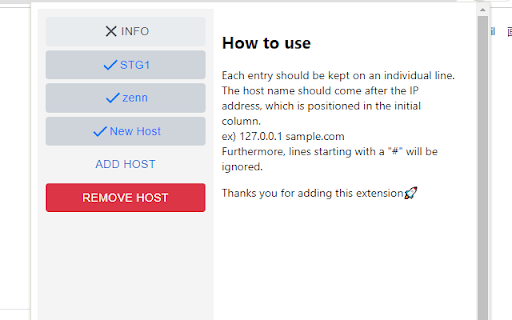

Hosts Modifier allows you to effortlessly redirect domain requests without the need to modify your hosts file. Hosts Modifier allows you to effortlessly redirect domain requests without the need to modify your hosts file. Achieve seamless domain redirection with just a few clicks, bypassing the hassle of manually editing system files. Ideal for developers and users who require flexible and quick domain switching.

Hosts Manager
轻松管理本地Hosts映射,支持分组切换和Socket代理,让开发测试更高效。 Hosts Manager 是一款专为开发人员和网络管理员设计的 Hosts 配置管理工具,帮助您在不同开发环境间快速切换。 🚀 核心功能 - 分组管理 - 创建多个 Hosts 分组,一键切换开发、测试、生产环境 - 实时生效 - 配置修改立即生效,无需重启浏览器 - 端口支持 - 完整支持带端口的域名映射(如 example.com:8080) - Socket 代理 - 内置 SOCKS 代理配置,灵活管理网络流量 - 批量导入 - 支持批量导入现有 Hosts 规则,快速迁移配置 📋 使用场景 - 本地开发环境配置 - 测试服务器切换 - 多项目并行开发 - API 接口调试 - 临时网络重定向 💡 操作简单 - 直观的分组管理界面 - 拖拽排序,快速整理规则 - 一键启用/禁用分组或单条规则 - 支持搜索和过滤功能 🔒 隐私保护 所有配置数据均存储在本地浏览器中,不会上传到任何服务器,保护您的隐私安全。 📝 更新日志 v1.0.8 - 添加ipv6支持 v1.0.7 - 添加代理白名单 v1.0.6 - 修复在没有文件规则时启用socket代理不生效的问题 - 修复页面大小变化时加载错误的问题 v1.0.4 - 新增规则导出导入功能 v1.0.3 - 新增hosts规则搜索功能 - 优化hosts规则列表的性能 v1.0.2 - 新增弹窗快捷开关,便捷管理分组和代理 - 修复删除分组的显示问题 v1.0.1 - 优化配置界面,新开页面设置提升体验 v1.0.0 - 初始版本发布

Requestly: Intercept & Modify HTTP Requests
Intercept & modify HTTP(S) traffic: redirect URLs, modify headers, inject scripts, mock REST & GraphQL APIs, and more. 🚀 Best Chrome extension to supercharge Web Development & QA. Trusted by 300,000+ developers. 👉 Requestly works directly in Chrome with beautiful, modern UI and team collaboration features. Popular features – Modify HTTP Headers, Override API Responses, API Mocking, Redirect URLs, Insert Scripts & HTTP Interceptor. 🌟 Top Use Cases → Mock API Responses to build frontend when backend isn't ready → Modify HTTP Request & Response Headers → Test local JavaScript changes directly on production sites → Use HTTP Redirect Rule to load scripts from local or staging environments on production sites → Modify and Mock API Request payload, Response body, & Status Code → Override GraphQL Requests 📌 https://requestly.com/blog/what-is-requestly Requestly (now a part of BrowserStack) doesn't set up a proxy in your browser, and hence, developers don't face VPN issues or lags while using it. Requestly leverages Chrome Extension APIs under the hood to intercept & modify requests. 👉 Redirect URLs, Change Host, Modify Query Params (Map Remote or Map Local) → Use dev/staging APIs in production sites & test local changes without code changes → Debug remote Javascript by loading locally running JS in production sites → Switch Hosts (e.g. abc.com/* to xyz.com/*) using Replace Rule → Debug Ad Tracking Pixels, Debug A/B Test Campaigns, etc → Remote Debugging with Requestly on Production sites → Swap Adobe Launch (Adobe DTM) scripts in production with staging script 📌 Demo Video – https://www.youtube.com/watch?v=85GVaOWTnlE 👉 Insert Scripts to any Webpage → UserScripts are simple JavaScript/CSS code that can change the layout of a page, add or remove new functionality and content, or automate actions. → Use File Server to upload long scripts and Inject them using Script Rule → Inject your JS tags on potential customers' sites and test your features → The sales/product team can use this to demo the product directly on the prospect's website (10x engaging demo) 📌 Demo – https://www.youtube.com/watch?v=4dvucRjLwGY 👉 Requestly supports the following imports → All HTTP header profiles from ModHeader → JSON configuration for Redirects & Scripts from Resource Override → XML configuration from Charles Proxy (Map local isn't supported in chrome extension yet due to technical limitations in browser) 👉 Additional Features → Enable/Disable rules with a single click → Export and import the rules and maintain a backup for your rules → Easy collaboration with others. Share Rules with other Users in one click 📌 Demo – https://www.youtube.com/watch?v=BM7kTFy-vdc

Website IP
Simple script which places the IP of the current website in the bottom right. This extension simply adds the IP of the current website you are viewing to the bottom right corner of the page. FEATURES: * Simple solution to always show the current website's IP address instead of clicking through an extension. * Moves left or right on mouse over, it won't get in your way. * Both IPv4 and IPv6 are supported. * Clean, attractive and does the job. * Minimal + efficient.

Awesome Host Manager
本地 hosts 管理插件 ## 概述 Yet another Host tools. —— 又一个 host 管理工具 * 秒切 host 无延迟 😎 * 基于 chrome 代理 ❤️ * 兼容 socket 代理 🤔 * 简洁好用,无多余功能 👏 ## 变更记录: ### 1.2.1 1. 移除 bulma 依赖 2. 修复空行引起的 IP 地址检测空的异常 ### 1.2.0 1. 升级 manifest V3 2. 迁移使用 preact,取消 react/redux/bulma 的依赖包 3. UI使用原生 CSS 4. 使用 TypeScript 重构,esbuild 构建最终插件的产物 5. 尝试使用 cursor 重构,发现有用,但是代替不了手写代码
