
cmcenleaacinkdafiffkbgekcnfpaajc

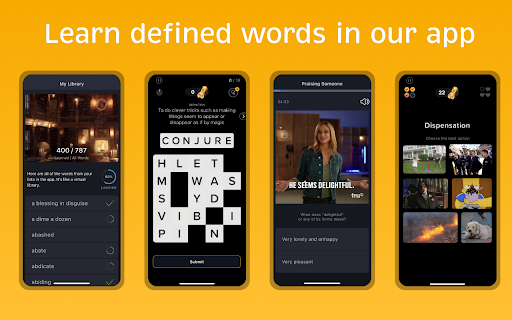
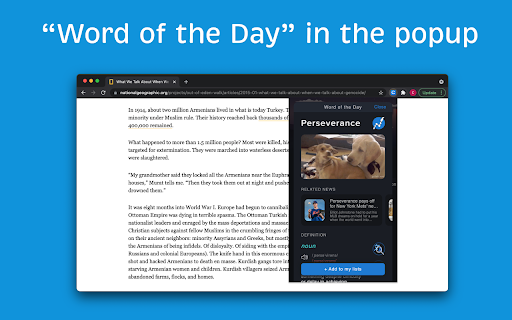
Look up the definition for any word on the page. Save it to your library to memorize it later. 💻 Define in Climb 💻 While reading in your browser, select any word or phrase unfamiliar to you and choose “Define in Climb” from the context menu. 📚A Modern Dictionary 📚 Each word comes with a funny GIF animation, Urban Dictionary link, Google Translate integration, Climb Word Analyzer™, and Oxford dictionary with idioms, extra examples, thesaurus, and more. 📱Practice to Learn 📱 The defined words are automatically added to a “To Do” list, which you can later learn using our mobile application: https://climbtest.com/chrome Climb improves your vocabulary by helping you to discover and memorize new words.

Vocab Tracker
VocabTracker is inspired by LingQ, Readlang and LWT: it helps you track your vocabulary on any web page. VocabTracker is a vocabulary tracking tool which can let you track your vocabulary on any page so that you can use any website as a language learning resource. It supports the following features: - Support English, French, Spanish, German, Italian, Russian, Ukrainian, Japanese, Chinese, Korean, Dutch, Arabic, Latin, Polish and more languages are being added now. - Analyze words on any web page and highlight the words with different colors based on your familiarity with the words. - Support adding user's own dictionaries to the tool, for example: NCIKU, Glosbe, merriam-webster and so on. - Support flash card and SRS system to help you memorize your vocabulary. - Support two modes -- "Lemma" and "Variant": in "Lemma" mode, the tool can find the lemma for word variants such as "were", "was", "is", "are", "am" and treat those variants as the same word ("be"). - Support adding phrases to your vocabulary. - Support segmenting Chinese (both Mandarin and Traditional Chinese) and Japanese with a very high accuracy. - Support exporting vocabulary to CSV file so that you can add your vocabulary to Anki or other tools. Note: This extension doesn't save your vocabulary data locally -- it saves them on a remote server. So in order to use this tool, you will need to register a user for this extension first.

word.ly - Dictionary, Thesaurus, & Rhymes
Have the ability to search for definitions, synonyms, and rhymes! The word.ly extension is a multi-purposed dictionary extension… Have the ability to search for definitions, synonyms, and rhymes! The word.ly extension is a multi-purposed dictionary extension that allows user to search up any given word at the click of a button. It's the fastest way to get the most versatile information on any given word. Currently, the functions that this extensions is able to search for in a given word are: Definitions, Synonyms, and Rhymes. With definitions, you receive a definition and a corresponding example of the given word in a sentence. Additionally, every definition will be under a "part of speech" category (noun, verb, adjective etc.) helping you better understand how a word is used. There will also be synonyms for the given word. Regarding rhymes, you receive a huge list of rhymes that are organized by the number of syllables the given rhyme word has. Please give the extension a couple of minutes to set up before using. This extension was coded utilizing the non-official Google API and the Datamuse API.

Dictionary - Oxford, Webster and Wikipedia
Dictionary for multiple languages. This Extension have offline support for Webster's Unabridged English Dictionary + Oxford UK Dictionary (from the Gutenberg Project, compiled August 22, 2009). For other languages it fallbacks to wikipedia definitions. You can support this project by becoming my Patreon member here: https://www.patreon.com/fxnoob

English Picture Dictionary | PicVoca.com
Make the English Dictionary visual through pictures, by PicVoca.com. Memorizing words from plain text can be frustrating. That’s why we created PicVoca—your ultimate English Picture Dictionary, a smarter alternative to the Oxford Picture Dictionary extension. Why Visual Learning? Studies show that visual vocabulary learning can boost retention by up to 65%. The Picture Superiority Effect explains why images stick in our memory better than words alone. Think in English, Don’t Translate! Stop relying on translations—immerse yourself in a monolingual dictionary to accelerate learning. The first rule to fluency? Think in English! Think through Pictures! With PicVoca, reading articles, understanding podcast subtitles, and even feeling the lyrics in songs becomes easier. Make it a habit, and let PicVoca simplify your learning journey! 🚀 PicVoca Features 📌 Instant Visual Popup Highlight any word to instantly see an image and its definition. ✔ Privacy First – PicVoca only activates when you click the extension icon. ✔ Smart Redirection – On a blank Chrome page, PicVoca redirects you to Oxford Learner’s Dictionaries. ✔ Adaptive Mode – On an Oxford Learner’s Dictionaries page, Instant Visual Popup is disabled, and the Resizable Picture Box is enabled instead. ⌨️ Shortcut Guide ✔ Highlight or double-click a word to open the Visual Meaning Popup. ✔ Click the speaker icon or press ‘R’ to hear the pronunciation. ✔ Press Esc to close the popup. 🖼 Resizable Picture Box ✔ Fully integrated with Oxford Learner’s Dictionaries for deeper learning. ✔ Try it out! Go to: 🔗 Oxford Learner’s Dictionary Example ✅ Install PicVoca → Refresh the page → Watch the magic happen! 📢 What’s New? (Changelog) Version 1.0.0 ✔ Resizable Picture Box for Oxford Learner’s Dictionaries Version 2.0.1 (2025-03-12) ✔ New Feature: On a blank Chrome page, PicVoca redirects to Oxford Learner’s Dictionaries. ✔ Improved UI: Styled credit text in the Instant Visual Popup. ✔ Bug Fix: Removed unintended pronunciation trigger on Oxford Learner’s Dictionaries when pressing ‘R’. Version 2.0.2 (2025-07-15) ✔ Bug Fix: Change URL query data ✔ Improved UI: Change credit text in the Instant Visual Popup.
