
clpoibdlcdgfeijkmpdnhgiclloeeagb
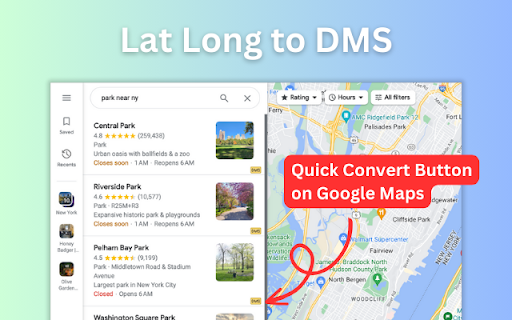
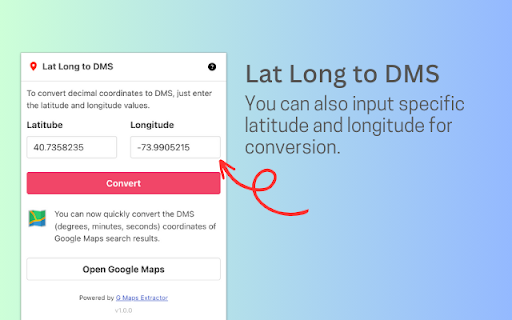
A convenient tool for converting coordinates into degrees, minutes, and seconds (DMS) format for Google Maps. Introducing the Ultimate Coordinate Converter for Google Maps Are you tired of manually converting geographic coordinates into Degrees, Minutes, and Seconds (DMS) format to use them effectively on Google Maps? Look no further! Our cutting-edge browser extension is here to simplify the process for you. Key Features: - Effortless Conversion: One-click conversion of coordinates to DMS format. - Search and Convert: Input specific latitude and longitude for quick conversions. - Time-Saving: Save time and eliminate manual conversions. - Precision: Ensure accuracy in your location data on Google Maps. Simplicity and efficiency for DMS conversions on Google Maps. Try it now!

Donoclip Modtools
Plus, clicking it will take you straight to the streamer's inbox.

Coordinate Converter
Convert coordinates between different coordinate systems with single and batch modes Conversion coordinates between WGS84, MGRS, USK-2000, DMS, DD etc formats in two modes: single mode for one coordinate and batch for many points

Lat Long to Address Bulk Converter
This tool converts latitude-longitude coordinates to physical addresses in bulk and provides the output in a downloadable CSV file. In today's digital era, location data plays a vital role in numerous applications and services. Whether you're a data analyst, a logistics professional, or a researcher, the ability to convert latitude-longitude coordinates to physical addresses is essential. However, manually converting a large batch of coordinates can be time-consuming and cumbersome. That's where the "Lat Long to Address Converter" Chrome extension comes in, offering a seamless solution for reverse geocoding. This powerful tool allows you to effortlessly convert coordinates to addresses in bulk and conveniently export the results in a downloadable CSV file. Read on to explore the features and benefits of this extension, and witness how it can enhance your workflow. Bulk Conversion Capability: With the "Lat Long to Address Converter" Chrome extension, you can convert hundreds or even thousands of latitude-longitude coordinates simultaneously. Instead of inputting each coordinate individually, the extension enables you to import a CSV file containing your coordinate data. This efficient bulk conversion feature saves you valuable time and effort, allowing you to process large datasets with ease. Accurate Reverse Geocoding: The extension employs advanced geocoding algorithms to ensure accurate and precise conversion results. It leverages trusted geolocation services, such as Google Maps API, to retrieve detailed and up-to-date address information based on the provided coordinates. You can rely on the extension's accuracy to obtain reliable addresses for your data analysis, mapping, or research purposes. User-Friendly Interface: Designed with simplicity in mind, the "Lat Long to Address Converter" extension boasts an intuitive and user-friendly interface. The straightforward layout allows users, regardless of technical expertise, to navigate the tool effortlessly. Whether you're a seasoned professional or a novice user, you can quickly grasp the conversion process and get the desired results within minutes. Downloadable CSV Output: Once the conversion process is complete, the extension generates a comprehensive CSV file that contains the converted addresses corresponding to the given latitude-longitude coordinates. This downloadable file offers a convenient way to store and organize your geocoded data for further analysis, integration into existing systems, or sharing with colleagues. The CSV format ensures compatibility with various software applications, making it easy to incorporate the data into your preferred tools or platforms. Time and Resource Savings: By automating the reverse geocoding process, the "Lat Long to Address Converter" extension frees you from the burden of manual conversion. It eliminates the need to spend countless hours manually inputting coordinates and researching addresses, allowing you to allocate your time and resources to other critical tasks. With this efficient tool, you can boost productivity, accelerate workflows, and achieve more in less time. Increased Efficiency: The extension's bulk conversion feature and automated geocoding process enable you to process large batches of coordinates swiftly, enhancing your productivity and efficiency. Data Accuracy: By leveraging trusted geolocation services, the extension ensures accurate and reliable address results, providing you with high-quality data for analysis and decision-making. Seamless Integration: The downloadable CSV output file is compatible with various software applications, allowing you to seamlessly integrate the converted address data into your existing workflows and systems. User-Friendly Experience: The extension's intuitive interface and simple operation make it accessible to users of all skill levels, eliminating the need for extensive training or technical expertise. Cost-Effective Solution: By eliminating the need for manual conversion and research, the extension saves you valuable time and resources, enabling you to accomplish more without investing in additional manpower or tools. The "Lat Long to Address Converter" Chrome extension offers a powerful solution for efficiently converting latitude-longitude coordinates to physical addresses. With its bulk conversion capability, accurate

Coordinates Helper
This extension will help you build a route in Google Maps by highlighting the required area with coordinates. This extension will help you build a route in Google Maps by highlighting the required area with coordinates. Now there is no need to manually insert each coordinate.
