
clolencblkcmgcalmcpfebbcgecddapn
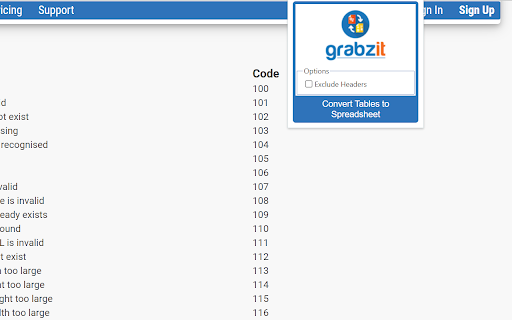
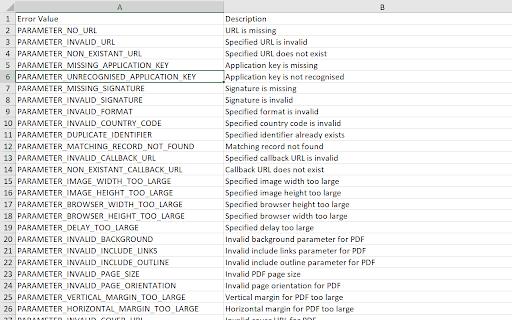
Convert all HTML tables in a web page or local HTML file to a XLSX spreadsheet, with each table placed on a seperate tab. Stop manually copy-pasting data! Automatically extract HTML tables from any web page and turn them into clean spreadsheets. Whether you are looking at a local HTML file or a live web page, this extension intelligently finds the tables and perfectly converts them into an XLSX spreadsheet, keeping all your rows and columns neatly intact. Perfect for: - Extracting financial data, pricing tables, or sports stats for analysis. - Pulling research data from sites like Wikipedia into Excel. - Capturing web directories, contact lists, and product inventories. - Saving hours of tedious manual data entry and formatting. How It Works: Simply navigate to a webpage containing the table you want, click the extension, and let GrabzIt do the heavy lifting! The tool securely sends the page data to GrabzIt's API, accurately extracts the table structure, and automatically downloads a ready-to-use XLSX spreadsheet straight to your computer. Getting Started & Pricing: Once installed, follow the instructions in the extension popup to create your free GrabzIt account and start extracting data. - Premium Trial: You will automatically start with a 7-day free trial of our Premium tier, giving you full, unrestricted table extractions. - Free Tier: After your 7-day trial expires, you can continue using the tool for free! (Note: On the free tier, some cell values in your downloaded spreadsheets will be replaced with an upgrade watermark). Backed by GrabzIt Limited's enterprise-grade infrastructure. Fast, secure, and reliable.

HTML to PDF
Convert webpage to pdf file online easily. Save and transform any links and sites with just one click using our HTML to PDF app. ✨ Transform your HTML to PDF with ease without any help or unnecessary steps. 🔄 Need to html convert to pdf quickly and efficiently? Our Chrome extension is perfect for you! Whether you’re - saving a webpage for offline reading, - sharing a document, - or archiving important content, this tool makes it easy to convert html to pdf with just a few clicks. 🌐 You can easily internet page to pdf and save important documents in a professional, easy-to-share format. ⏱️ In today's digital world, having the ability to quickly and efficiently convert html documents into pdfs is essential. Our extension is not only user-friendly but also packed with features that enhance your productivity. 🏆 Why choose our html to pdf converter? 1️⃣ Versatile: works with files, webpages, even entire websites. 2️⃣ Fast and Reliable: You can convert a link to pdf in seconds without compromising quality. 3️⃣ Easy to Use: No technical skills required—just install and start converting. 4️⃣ High-Quality Output: Preserve the layout, formatting, and images of your documents. 5️⃣ Browser-Based: Convert directly in your Chrome browser—no additional software needed. 💻 With just a few clicks, you can transform site to pdf professional-looking that are perfect for - sharing, - printing, - or archiving. 🛠️ How to convert html using pdf generator online effortlessly? It’s simpler than you think. ➤ Install our extension for transform chrome html document to pdf. ➤ Open the webpage you want to convert. ➤ Click the convert button and let the tool work its magic. ➤ Download your newly created file instantly. 🔑 Key features of our html to pdf file converter ▸ Batch Conversion: Convert multiple html file to pdf or webpages at once. ▸ Customizable Settings: Adjust margins, orientation, and page size. ▸ Secure Processing: Your files are processed locally, ensuring complete privacy. ▸ Lightweight Design: Doesn’t slow down your browser or device. ▸ User-Friendly Interface: Designed for both beginners and professionals. 🌟 Benefits of converting html documents • Save webpages for offline reading or archiving. • Share documents in a universally accepted format. • Preserve the original layout and formatting of your HTML files. • Print web content easily without losing quality. • Simplify your workflow with a single-click conversion tool. 🤔 Who can benefit from this html en pdf converter? 1. Students. 2. Professionals. 3. Web developers. 4. Bloggers and content creators. 5. Anyone. 🛠️ How to change html to pdf? The process is straightforward. 📌 Upload your html file or enter the URL of the webpage you want to convert. 📌 The tool html in pdf format automatically processes and converts the content. 📌 Download your newly created file to your device. 📌 Enjoy your hassle-free, high-quality document! 🤷♂️ Why convert html file to pdf? They are great for web content, but they’re not always ideal for sharing or printing. By using our app, you can: ✔ Ensure your documents are accessible on all devices. ✔ Avoid compatibility issues with different browsers or software. ✔ Create professional-looking PDFs for presentations or reports. ✔ Save time by simplifying the conversion process. 💬 Frequently Asked Questions (FAQ) ❓ How to transformar html a pdf? 💡 Simply install our Chrome extension, upload your file or enter a URL, and let the tool do the rest. ❓ Can I convert multiple files or webpages at once? 💡 Yes, our extension supports batch conversion for your convenience. ❓ Is the conversion process secure? 💡 Absolutely! Your files are processed locally, and no data is stored on our servers. Don’t miss out on the opportunity to simplify your conversion process. You can convert a webpage to pdf and another. With our generator online, you can easily convert and save page as pdf, and more. 🎉 Conclusion Say goodbye to the hassle of sharing or archiving html files and hello to seamless document conversion with our Chrome extension. Whether for personal, academic, or professional use, html to pdf delivers high-quality results every time. 📝 Whether you need a quick way to save an article or want to compile multiple pages into a single PDF document, this is your excellent solution. 🚀 Our powerful pages to pdf converter is specifically designed for users who need a straightforward solution for converting web content. Install it today and experience the convenience of translate html to pdf in just a few clicks! This extension contains ads for our other products. They do not interfere with your experience or limit any features — you can continue using all the functionality in full.

HTML Table to Markdown
Convert an HTML Table to Markdown for easy export. This extension provides a simple way to export an HTML table in Markdown format. Simply select the table you'd like to export by right-clicking and choosing Inspect, then open the Table to Markdown tab and hit Convert! This extension can handle a wide variety of HTML tables, including tables with missing cells, tables without headers, and tables with cells that span multiple rows and columns. Read the full README and see examples on the GitHub page at https://github.com/kbravh/table-to-markdown.

Table Exporter - Scrape & Extract Data to Excel, Sheet, CSV & JSON
Automatically detect and extract tables data from any website. Export HTML tables to Excel, CSV, JSON, or Clipboard in one click. Table Exporter is a fast and easy browser extension that lets you extract and export any HTML table from any webpage in just one click. Perfect for anyone working with data from dashboards, reports, analytics tools, research pages, admin systems, or business reports. No manual copying, no formatting issues, and no extra tools required. The extension automatically detects all tables on the page and allows you to export them as CSV, XLS, or Copy. If a webpage has multiple tables, you can choose which one you want. For users working with complete datasets, Table Exporter can also **extract and keep hyperlinks inside table cells**, ensuring you don’t lose important reference URLs such as product pages, document links, resource pages, or tracking information. 📍Export Any Webpage Table ✅ Automatically detects and extracts data from HTML tables. 📍 Export to CSV, XLS, JSON or Copy & Past ✅Compatible with Excel, Google Sheets, BI tools, and reporting systems. 🧩 Works with Multiple Tables on a Page ✅Export one table or all tables with a single click. 🔗 Extract Hyperlinks from Table Cells ✅Preserve important URLs and references in your exported data. ⚡ No Copy-Paste Needed ✅Clean and structured data without manual work or formatting. 👨🎓 Ideal for All Types of Users Great for students, researchers, data analysts, SEO specialists, developers, testers, and business professionals. 🧠 Simple and Easy to Use Lightweight interface with instant one-click exporting. 🎯 Who Is Table Exporter For? Students gathering research data Data analysts extracting online reports SEO professionals collecting SERP or competitor tables Developers testing content or UI output Business users preparing spreadsheets or presentations Content creators organizing online information Anyone who needs fast and accurate data extraction 🚀 So what are you waiting for? Install it now and start exporting tables in seconds!

HTML to Markdown
HTML to Markdown – a straightforward Chrome extension designed to convert most web pages into markdown format effortlessly. As a developer, I often found myself needing to pull high-quality documentation from websites and reformat it for use with AI chat tools. That's why I created the "HTML to Markdown" Chrome extension. This free tool quickly converts web page content into clean Markdown, making it perfect for feeding into large language models or any other AI powered chats. Bloggers & Content Creators: Easily grab content from articles or research pages for your own posts. Developers: Copy code snippets and documentation into README files, project notes, or for use with large language models. Students & Researchers: Quickly extract information from online resources for papers and reports. Technical Writers: Convert website content to create guides and documentation. AI Integration: Extract and convert relevant website information into markdown for input into AI powered chat tools.
