
clknajphkicnepcpecgjghccmmkhcagc

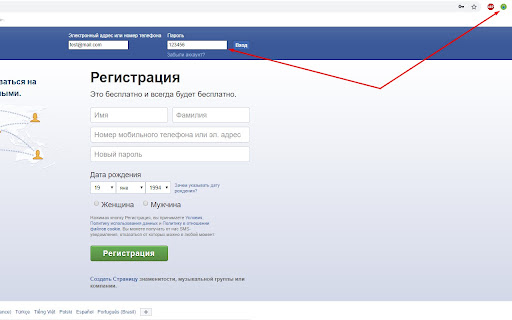

Viewing hidden passwords on page With this extension, you can see your password in the password field, it is very convenient to use it on sites where this option is not available.

Show Password - Most Secure Password Viewer
Your privacy matters. We respect your own data and never ask for unnecessary permissions. No tracking code or no 3rd-party script injected. How to use: In most cases ( ~98% ), just right click on password box and choose "Show / Hide Password", the password will be revealed in plain text mode. Choose again it will be switched back to password mode. In rare cases ( ~2% ), after clicking "Show / Hide Password" menu item, the login iframe will be opened in a new tab. Then right click on password box again to view password. That's because there is an embedded and its origin differs than its parent document. In order to get permission we need to open iframe in new tab. Still have concern about its security? Feel free to review the source code after installation: chrome-extension://agkfchaoihjmeleppjalfedmnjpefjma/background.js

ShowPassword
You can easily view the filled password, and support custom trigger settings, such as: - Double tap - click - Custom key + click If you encounter problems during use, please don't worry, bad reviews can't solve the problem. You can give feedback on the link below, and I will follow up in time. 👉 https://logspot.hocgin.top/addone-show-password?active=feedback 👈 If it helps you, can you give me a good review🌹

Password Viewer
Ever struggled to see a saved password hidden behind dots? Password Viewer allows you to quickly reveal and copy passwords in form fields. It adds a "Show" button next to password fields, letting you toggle visibility with a click. ✅ Features: ✔ Show/Hide password fields instantly. ✔ Auto-Reveal on Hover – View the password by simply hovering over the field (optional). ✔ Easily copy passwords with one click. ✔ Works on most websites and login forms. ✔ Lightweight and secure – no data is stored or sent anywhere. The extension does not store or transmit any password data. Works locally on your browser without any tracking. Open a website with a password field. Click the "Show" button to reveal the password. (Optional) Hover over the password field to reveal it temporarily. Click "Copy" to copy the password if needed.

Password Reveal
One click password reveal. Just click the icon and any password that is hidden will become legible text.
